

An SFTechScene original research report | Updated October 2026
San Francisco businesses have spent years using software to manage their money. They use accounting platforms to record sales, payroll systems to pay employees, spreadsheets to plan budgets, and banking apps to track cash. Yet many business owners still spend hours every week chasing invoices, checking transactions, collecting receipts, and trying to understand where their money went.
Artificial intelligence is starting to change that work in a much bigger way than traditional accounting automation ever did.
The latest AI agents can do more than recognize a receipt or suggest an expense category. They can review transactions, gather missing information, prepare accounting entries, identify unusual payments, follow up on overdue invoices, and help finance teams investigate problems before they become expensive mistakes.
For a small business in San Francisco, this could mean spending less time keeping the books up to date. For a growing startup, it could mean building better financial controls without adding a large finance department. For an established company, it could mean giving accountants more time to understand the numbers instead of preparing them.
But there is an important difference between software that helps people manage money and software that can be trusted to make financial decisions.
An AI agent might correctly classify hundreds of transactions and still make a costly mistake on one unusual payment. It might prepare financial reports quickly but misunderstand how a contract should be recorded. It might identify an overdue invoice without knowing that the customer has already disputed the charge.
That is why the biggest opportunity is not simply replacing accountants with software. It is building finance systems where AI handles routine work, people review important decisions, and the business has a clearer view of its money.
For this SFTechScene report, we examined publicly available federal labor statistics, small-business financial surveys, accounting software announcements, and recordkeeping guidance. We also developed an original financial model to estimate how different levels of accounting automation could affect monthly operating costs for a San Francisco business.
The findings suggest that AI accounting agents could create meaningful value. However, the financial results depend heavily on transaction volume, labor costs, the quality of existing records, and how much human review remains necessary.
The Short Version: AI Agents Are Turning Accounting Software Into an Active Financial Assistant
Traditional accounting software mostly waited for people to use it. A business owner entered an invoice, an accountant reviewed transactions, and a manager opened a report when they wanted to understand spending.
AI agents change that relationship because the software can identify work that needs attention and begin completing it.
Imagine a San Francisco marketing agency receiving 80 supplier invoices in one month. Instead of an employee opening every document, entering the details, checking the supplier, and sending it to the right manager, an AI agent could prepare much of that work automatically.
The employee would spend more time investigating exceptions and approving payments. The repetitive steps could happen in the background, while the final decision stays with an authorized person.
The same idea applies to businesses with hundreds or thousands of monthly transactions. AI agents can help accountants match payments against invoices, request missing receipts, identify unusual expenses, and prepare reports.
This shift matters because financial work often involves a surprising amount of communication. The problem is not always a difficult accounting rule. Sometimes the accountant simply needs to find out what a payment was for, locate a missing document, or remind someone to approve an expense.
Modern AI agents are being designed to handle these conversations as part of the accounting process.
In 2025, Intuit introduced a virtual team of AI agents for its financial platform. The announced capabilities included transaction categorization, bookkeeping assistance, reconciliation, invoice management, payment tracking, and financial insights. Its August 2026 support documentation also describes agents that ask for missing transaction details and help coordinate work between business owners and accountants.
Intuit Inc.
+1
These developments do not mean finance can run safely without supervision. They show that accounting software is moving from a place where employees store financial information toward a system that actively helps keep financial operations moving.
For San Francisco companies dealing with expensive labor, fast growth, and unpredictable cash flow, that is a significant change.
Why San Francisco Is an Important Market for AI Accounting Agents
High Labor Costs Make Repetitive Finance Work Expensive
San Francisco has an economic reason to pay close attention to finance automation: skilled business labor is expensive.
The U.S. Bureau of Labor Statistics reported that the San Francisco–Oakland–Fremont metropolitan area had an average hourly wage of $48.19 in May 2025, compared with $33.54 nationally. The figures were published in July 2026.
Workers in business and financial operations earned an average of $60.95 per hour locally, compared with $45.78 nationwide. Those figures cover a broad group of occupations, not just bookkeepers or accountants.
Bureau of Labor Statistics
Average hourly wages, May 2025
■ SF metro
■ United States
Source: U.S. Bureau of Labor Statistics, July 2026 release. Broad occupational groups; not the price of outsourced accounting services.
The local wage premium is substantial. Based on these published averages, overall hourly wages in the San Francisco metro area were about 43.7% higher than the national figure, while business and financial operations wages were about 33.1% higher.
These are SFTechScene calculations from BLS data, not estimates of AI-related savings.
The difference creates a strong reason for local companies to examine how employees spend their working hours. If a skilled finance employee spends a large share of the week collecting receipts, copying invoice details, or asking coworkers to explain charges, the business may not be getting the best value from that employee’s time.
However, saving an hour of work does not automatically mean saving an hour of payroll expense.
A salaried accountant may simply use that time for more useful work. The financial benefit becomes a direct cost saving only when the company can reduce overtime, avoid outside fees, postpone hiring, or eliminate another expense it would otherwise incur.
Small Businesses Have More Financial Problems Than Late Bookkeeping
The Federal Reserve’s 2025 Report on Employer Firms provides another reason to take accounting automation seriously.
Among surveyed small employer firms, 75% reported rising costs of goods, services, or wages as a financial challenge. Another 56% reported difficulty paying operating expenses, while 51% cited uneven cash flow.
Fed Small Business
Financial challenges reported by small employer firms
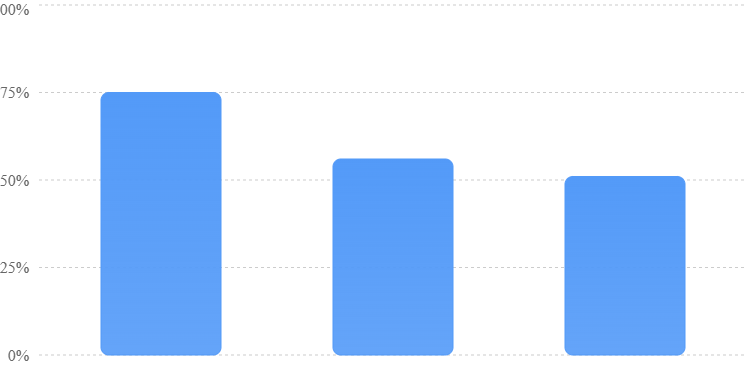
Source: Federal Reserve 2025 Report on Employer Firms, based on the 2024 Small Business Credit Survey. National survey; categories overlap and percentages do not sum to 100%.
This is national evidence rather than a San Francisco-specific survey. It cannot tell us exactly how many local businesses experience each problem, but it does show that finance teams face challenges beyond recording transactions.
When a company does not know which customers are likely to pay late, cash planning becomes harder. When expenses are recorded weeks after they occur, managers may make spending decisions using outdated information.
AI agents could help by keeping records closer to current and making exceptions easier to find. But the benefit depends on whether the software can access reliable information and whether employees act on the warnings it produces.
San Francisco Has Many Different Types of Finance Work
San Francisco is not one single business market. Its economy includes software startups, professional services, restaurants, retailers, healthcare providers, construction firms, creative agencies, and many other companies with different accounting needs.
A subscription software company may need help matching contracts, invoices, and customer payments. A restaurant may care more about daily sales, payroll, tips, supplier costs, and card-processing fees.
A consulting agency may struggle with unbilled project work and overdue client payments. A venture-backed startup may need to understand spending plans and cash runway before making its next hiring decision.
The city’s public Registered Business Locations dataset provides a way to research the local business landscape. It contains business location records maintained by the Office of the Treasurer & Tax Collector, with an important July 2026 update to industry-code fields. A single business can have multiple locations, so location records should not be treated as a count of unique companies.
DataSF
This distinction matters when estimating the local opportunity for AI accounting. There is no reliable basis for assuming that every registered business location represents an independent company ready to purchase finance automation.
The more useful question is which types of local businesses have frequent, repeatable financial tasks and enough transaction volume to justify automation.
What Is an AI Accounting Agent, and How Is It Different From Ordinary Accounting Software?
Traditional Software Records Information
Traditional accounting software makes it easier to store and organize financial records. It can connect bank feeds, generate invoices, create reports, and apply rules to transactions.
For example, a business might create a rule that marks monthly payments to a known software provider as a software expense. That rule can save time when the same payment appears every month.
But the system may not know what to do when the provider’s name changes, the payment includes a refund, or an invoice covers a service that belongs to a different accounting period.
The user still needs to investigate the problem.
AI Agents Can Work Through Multiple Steps
An AI accounting agent can potentially take a broader approach.
It might identify an unfamiliar transaction, search for a related invoice, check previous payments to the same vendor, ask the employee who made the purchase for more information, and prepare a suggested accounting entry.
That process involves several connected actions rather than one fixed rule.
The agent may also recognize that it cannot complete the task confidently. A properly designed system should then route the transaction to a human reviewer instead of guessing.
This is where the difference between useful automation and dangerous automation becomes clear.
A system that confidently enters incorrect information can create more work than one that asks for help. In accounting, knowing when to stop is often as valuable as knowing what to do next.
The Best Finance Agents Work Inside Existing Controls
Businesses should not think of AI agents as unrestricted digital employees with access to every financial system.
A safer design gives each agent a narrow role.
An expense agent may read receipts and prepare entries without being allowed to send payments. A collections agent may draft reminder emails but require approval before contacting important customers. A reporting agent may analyze financial records without being allowed to change them.
The strongest systems combine automation with clear approval rules, access limits, and a record of every action.
That structure becomes especially important as agents move from analyzing information to changing it.
How AI Agents Are Changing Bookkeeping
Transaction Categorization Is Becoming More Context-Aware
One of the most common bookkeeping tasks is deciding where each transaction belongs in the accounts.
An employee buys office equipment, and the payment appears in the company’s bank feed. Someone must decide whether the purchase is an ordinary expense or an asset that should be recorded and handled differently.
Simple software rules can help, but they often depend on a vendor name or a known payment pattern.
An AI agent can consider additional information, such as the receipt, description, purchase history, amount, and the company’s accounting rules.
For a San Francisco startup using many online services, this can be useful because charges may come from unfamiliar providers or appear under payment-processing names that do not clearly describe what was purchased.
Still, expense categories require judgment.
A large purchase of computer equipment should not automatically be treated like a small monthly software subscription. The correct treatment may depend on the company’s accounting policies and relevant tax requirements.
The practical goal should be to automate straightforward entries while routing unclear transactions for review.
Bank Reconciliation Can Become a Continuous Process
Bank reconciliation means checking whether the transactions recorded in the accounting system match the actual activity shown by the bank.
Traditionally, accountants complete much of this work at month-end. They compare balances, investigate unmatched transactions, and correct errors.
AI agents can help make reconciliation more continuous.
Rather than discovering 40 unresolved transactions after the month finishes, a business might receive daily alerts about payments that have no matching records.
The agent could prepare suggested matches, identify duplicate entries, and collect information needed to resolve exceptions.
This can reduce the amount of work waiting for the accountant at month-end.
However, a transaction that appears to match is not always a correct match. Payments may be grouped together, arrive net of fees, or relate to several invoices. Those cases still require careful handling.
Receipt Collection Can Happen Before Month-End
Missing receipts create a surprisingly large amount of bookkeeping work.
An employee makes a business purchase but forgets to upload the document. Weeks later, the finance team must identify the transaction and ask the employee what it was for.
An AI agent could send a targeted request shortly after the transaction appears. It could explain the amount, date, and merchant, then ask the employee to submit the missing receipt.
If the employee responds, the system could attach the document to the transaction and prepare it for review.
This is an example of AI improving the entire workflow rather than simply entering data faster.
The business benefits because the information is collected while the purchase is still easy to remember.
Month-End Close Could Become Less Disruptive
Month-end close is the process of checking and finalizing financial records for a completed month.
It includes tasks such as reconciling accounts, reviewing expenses, preparing entries, checking unpaid bills, and producing financial statements.
Many companies treat month-end close as a rush because problems accumulate during the month.
AI agents could reduce that problem by identifying missing information earlier and monitoring outstanding work.
But a faster close is only useful when the resulting numbers are trustworthy. Businesses should measure both completion time and the number of corrections required after close.
A report prepared in two days but corrected repeatedly during the following week is not necessarily better than a reliable report prepared in four days.
How AI Agents Are Transforming Accounts Payable and Business Payments
Invoice Processing Can Move From Data Entry to Exception Review
Accounts payable is the process of managing money a business owes to suppliers and service providers.
Consider a San Francisco design agency that receives invoices from contractors, software providers, photographers, and advertising platforms.
Without a well-connected system, employees may need to open the invoices, enter payment details, check the amounts, find the right approvers, and schedule payments.
An AI agent could extract the invoice information, compare it with an existing purchase record, check for possible duplicates, and prepare it for approval.
The important word is prepare.

Businesses should be especially careful about allowing AI systems to independently change bank details or release payments. A useful finance agent should remove repetitive work without weakening the controls that prevent fraud.
Duplicate Invoices Are a Practical Automation Opportunity
Duplicate payments can happen when the same invoice arrives through several channels.
A supplier might send a document by email and later upload it to a payment portal. Someone may enter both copies without realizing they describe the same obligation.
An AI agent can compare invoice numbers, supplier identities, amounts, dates, and supporting documents to identify possible duplication.
The system should then flag suspected duplicates for review rather than automatically deleting records.
This matters because two invoices can sometimes share the same amount while representing legitimate separate purchases.
Vendor Changes Need Stronger Controls Than Ordinary Transactions
A finance system might receive a message claiming that a supplier has changed its bank account.
An AI agent may be able to read the message and prepare an update. But allowing it to complete that update without independent verification creates a serious risk.
Businesses should require vendor bank changes to be confirmed through an established contact method, not through contact details supplied in the change request itself.
Payment creation and payment approval should also be separate permissions whenever possible.
The broader lesson is simple: the more directly an AI agent can move money, the stronger its controls must be.
How AI Agents Are Improving Accounts Receivable and Cash Flow
Invoice Follow-Ups Can Become Timely and Personal
Accounts receivable is money customers owe a business.
For many growing companies, the problem is not that customers refuse to pay. It is that invoices get buried, payment details are missing, or nobody follows up quickly.
AI agents can help by tracking invoice due dates and preparing reminders based on the customer’s payment history.
For example, a San Francisco consulting company might have 40 unpaid invoices. Instead of sending the same reminder to every customer, an agent could identify which invoices are newly overdue, which have payment promises, and which need a personal conversation.
This approach can reduce the time employees spend organizing collections work.
Still, reminder volume is not the right measure of success. What matters is whether customers actually pay sooner without damaging important relationships.
Better Collections Can Improve Cash Without Increasing Sales
Consider a hypothetical agency that bills customers $200,000 each month.
If its average collection time improves by five days and sales remain steady, the approximate amount of cash released from unpaid invoices is:
\[ \$200,000 \div 30 \times 5 = \$33,333 \]
That is approximately $33,333 in working capital made available sooner.
It is not $33,333 in new revenue, profit, or permanent cost savings. It is a timing benefit that can reduce the amount of cash tied up in unpaid invoices.
This distinction is important because claims about faster payments can make financial benefits appear larger than they actually are.
Intuit has reported that its Payments Agent helps businesses get paid an average of five days faster, based on its own stated methodology. That is a vendor-reported result, not proof that every business adopting an AI collections system will achieve the same improvement.
Intuit Inc.
Cash Forecasting Becomes More Useful When Data Is Current
A cash forecast estimates how much money a business expects to have available over the coming weeks or months.
Traditional forecasts often depend on spreadsheets that someone updates manually. Problems arise when payment dates change, new expenses appear, or expected revenue does not arrive.
An AI agent can help collect current information from accounting records, bank activity, unpaid invoices, and approved spending commitments.
The finance team can then review different scenarios.
For example, an agent might prepare one cash forecast assuming customers pay on time and another assuming several large invoices arrive two weeks late.
The business owner can compare those outcomes before deciding whether to hire, increase advertising spending, or purchase equipment.
However, AI cannot know with certainty when a customer will pay. Forecasts must show their assumptions, and unusual predictions should be reviewed rather than treated as facts.
How AI Agents Are Changing Financial Planning for San Francisco Startups
Cash Runway Becomes Easier to Monitor
For a venture-backed startup, runway means how long the business can continue operating with its available cash at its current rate of spending.
Suppose a startup has $1.8 million in available cash and is using $150,000 more cash than it receives each month.
Its simplified runway is:
\[ \$1,800,000 \div \$150,000 = 12\text{ months} \]
But that estimate may change quickly if the company adds employees, experiences delayed customer payments, or makes a large technology purchase.
An AI finance agent could monitor these changes and update forecasts more often.
It might also identify which spending categories have grown faster than expected and prepare explanations for the founders.
This can give startup leaders more time to make difficult decisions.
AI Can Make Budget Reviews More Frequent
Many smaller companies review budgets only when preparing monthly financial reports.
By then, a spending problem may already have continued for several weeks.
AI agents can help identify unusual changes earlier.
A company might have planned to spend $12,000 per month on software services. If the latest spending pace suggests a monthly total of $16,000, an agent could flag the difference.
But it should also investigate whether the change came from a planned annual renewal, new employees, or duplicate charges.
The most valuable warning is not simply that spending increased. It is an explanation of why it increased and whether management needs to do something.
Revenue Forecasts Still Need Human Judgment
For software startups, revenue forecasts can depend on renewals, customer growth, contract terms, discounts, and payment delays.
AI can analyze historical results and prepare scenarios, but it should not invent confidence where the underlying data is weak.
A startup with ten large customers may face greater uncertainty than a company with thousands of smaller customers.
A single delayed contract could materially change expected revenue.
The finance team should therefore treat AI forecasts as decision support. Founders and finance leaders still need to understand customer relationships, product risks, and upcoming business changes.
Original Research #1: A San Francisco Accounting Automation Opportunity Model
To understand the economics of finance automation, SFTechScene developed a transparent model for a hypothetical small San Francisco business.
The purpose is to estimate where time savings might come from and identify the conditions under which automation could be worth paying for.
This is original scenario analysis, not a survey or an observed AI deployment. We did not collect private accounting records from local businesses, and the assumed automation percentages should not be interpreted as measured performance.
Research Methodology
We began with public data showing that business and financial work is relatively expensive in the San Francisco metropolitan area. The BLS figures provide market context, although they do not establish how much any particular company pays its accountant.
We then constructed six recurring finance workflows that commonly appear in small businesses.
For each workflow, we assigned a hypothetical monthly time requirement and a possible percentage reduction in hands-on work. These assumptions were chosen to test the economics of partial automation, not to claim that current products achieve those results.
Our base case uses a $45 hourly value for the finance work being redirected. This is an assumed economic value, not a published San Francisco bookkeeping wage. The model also includes separate monthly costs for software and ongoing human oversight.
We deliberately avoid treating the full salary of an accountant as recoverable savings. Only the time that becomes genuinely available for other work is counted as a potential benefit.
The Six Workflows in Our Model
| Finance workflow | Baseline hours/month | Assumed reduction | Hours freed |
|---|---|---|---|
| Invoice processing | 18 | 50% | 9.0 |
| Transaction categorization | 12 | 40% | 4.8 |
| Bank reconciliation | 10 | 35% | 3.5 |
| Receipt collection | 8 | 30% | 2.4 |
| Payment follow-ups | 6 | 25% | 1.5 |
| Routine reporting | 6 | 20% | 1.2 |
| Total | 60 | 37.3% overall | 22.4 |
The percentages are not universal efficiency benchmarks. Actual results could be much lower when transactions are unusual, records are incomplete, or approval processes involve several people.
They could also be higher for well-organized companies with large amounts of repeatable work.
Original Finding #1: The Largest Savings Come From Concentrated, Repetitive Work
In the model, invoice processing creates the largest individual opportunity, releasing nine hours per month.
Transaction categorization contributes another 4.8 hours.
Together, these two activities account for 13.8 of the 22.4 hours potentially freed, or about 61.6% of the modeled total.
This is an important finding because it suggests that businesses should not try to automate every finance activity at once.
They may achieve better results by focusing on the two or three workflows responsible for most manual work.
A business that processes hundreds of similar invoices is likely to have a different opportunity from a company that receives ten complicated invoices each month.
The number and consistency of transactions can matter more than the number of finance employees.
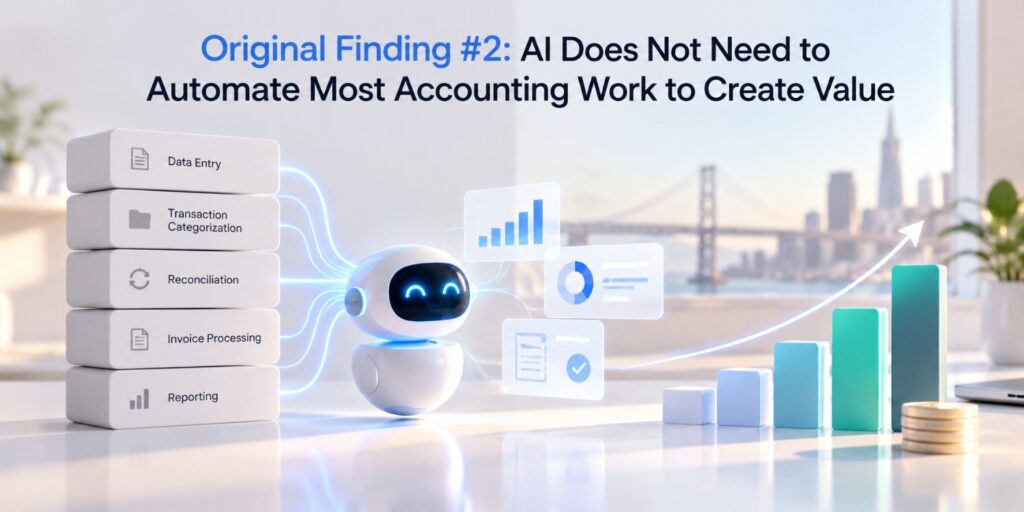
Original Finding #2: AI Does Not Need to Automate Most Accounting Work to Create Value
Our base model assumes a 37.3% reduction in hands-on time across the selected workflows.
That means most of the original finance workload remains.
The company still has 37.6 hours of monthly hands-on work across those activities, before accounting for the separately modeled AI oversight requirement.
Yet the freed time can still be valuable because it may remove the most frustrating parts of the process.
This supports a practical implementation strategy: automate predictable tasks first, improve data quality, and expand only after the team can show that the results are accurate.
Original Research #2: What Could AI Accounting Actually Save a San Francisco Business?
Time savings do not tell the full financial story.
Businesses pay for the software, spend time reviewing its work, and sometimes need to correct errors. Those expenses must be deducted before claiming an economic return.
We therefore developed a second calculation using the same base-case workflow model.
Base-Case Monthly Economics
Modeled time freed
22.4 hrs
Per month
Gross capacity value
$1,008
22.4 × $45
Net monthly value
$558
After modeled costs
Annualized net value
$6,696
Steady-state projection
SFTechScene illustrative base case. All dollar values are modeled and exclude implementation costs and any additional error-remediation expenses.
The calculation is straightforward.
The estimated 22.4 monthly hours freed are multiplied by the assumed $45 hourly value. That produces $1,008 in gross monthly capacity value.
We then subtract $300 per month for incremental AI software costs and $150 for ongoing review and administration.
The estimated net economic value becomes $558 per month, or $6,696 over 12 months.
It is important to interpret this correctly. This represents the possible value of usable capacity, not guaranteed cash savings.
If the freed hours do not reduce spending or support more valuable work, the business may not realize the modeled benefit.
Three Possible Financial Outcomes
To test how sensitive the economics are, we constructed three independent scenarios.
| Variable | Cautious case | Base case | High-volume case |
|---|---|---|---|
| Monthly hours freed | 10 | 22.4 | 40 |
| Value per hour | $35 | $45 | $55 |
| Gross monthly value | $350 | $1,008 | $2,200 |
| Software and oversight | $450 | $450 | $700 |
| Net monthly value | −$100 | $558 | $1,500 |
| Annualized net value | −$1,200 | $6,696 | $18,000 |
All three are illustrative scenarios. They are not forecasts for the average San Francisco business.
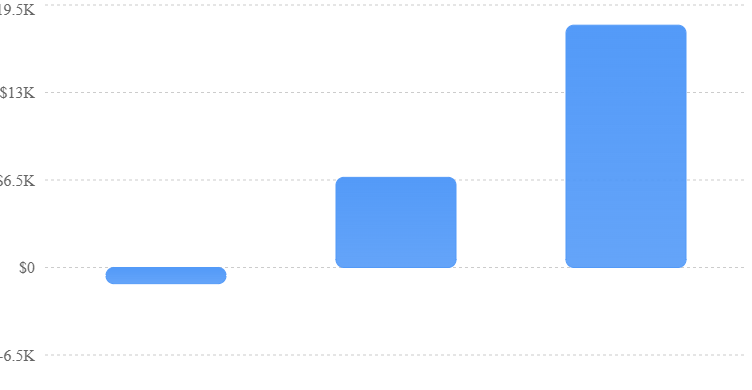
Source: SFTechScene modeled scenarios. Figures are potential annualized economic value, not verified customer savings. Negative values indicate costs exceeding modeled benefits.
Original Finding #3: AI Accounting Can Have Negative Returns for Small, Simple Businesses
In the cautious case, automation frees ten hours per month at an assumed value of $35 per hour.
That creates only $350 of monthly capacity value, while the model assigns $450 to software and oversight.
The result is a negative monthly value of $100.
This matters because businesses are often encouraged to adopt AI without examining whether they have enough repetitive work to justify the expense.
A small consulting practice with relatively few transactions may not benefit from a complex accounting agent.
Its existing accounting software, combined with a bookkeeper who knows the business, may already be efficient.
The economic case becomes stronger when the company has enough transaction volume, repeated exceptions, and manual coordination to produce meaningful time savings.
Original Finding #4: The Break-Even Point Depends on Hours Saved, Not the Number of AI Features
A finance tool may advertise dozens of capabilities. But the business still needs enough useful savings to cover its recurring cost.
In the base model, monthly software and oversight total $450, while each hour freed is valued at $45.
That produces a break-even point of:
\[ \$450 \div \$45 = 10\text{ hours per month} \]
If the company can genuinely redirect more than ten hours of work each month, the model starts to show a positive economic return.
If it frees fewer than ten hours, the modeled cost exceeds the value created.
This leads to a useful buying rule: before purchasing an AI accounting product, estimate how many hours of measurable work it must eliminate to pay for itself.
Interactive AI Accounting Savings Calculator
Use this calculator to explore the same economic relationship with your own assumptions.
Monthly hours freed
22.4 hrs
Hourly value ($)Software ($/mo)Review ($/mo)
Net monthly value
$558
Net annualized value
$6,696
Hours needed to break even
10.0 hrs/mo
Reset to base caseAssumes each freed hour has real economic value. Excludes setup costs, taxes, financing costs, and unexpected errors. Reusing salaried staff time may not reduce cash expenses.
Original Research #3: How Much Does Accuracy Matter in AI Bookkeeping?
One of the biggest risks in accounting automation is confusing an impressive accuracy percentage with a reliable finance system.
A product that correctly processes 95% of transactions sounds extremely accurate.
But what happens when the company processes thousands of transactions each month?
Testing Three Hypothetical Transaction Volumes
We modeled three transaction volumes and assumed that an AI system correctly handles 95% of transactions.
For this exercise, each incorrect or unresolved transaction is assumed to require review. In real systems, not every flagged item is wrong, and some errors may escape detection.
| Transactions per month | At 95% correct | Items needing investigation |
|---|---|---|
| 200 | 190 | 10 |
| 1,000 | 950 | 50 |
| 5,000 | 4,750 | 250 |
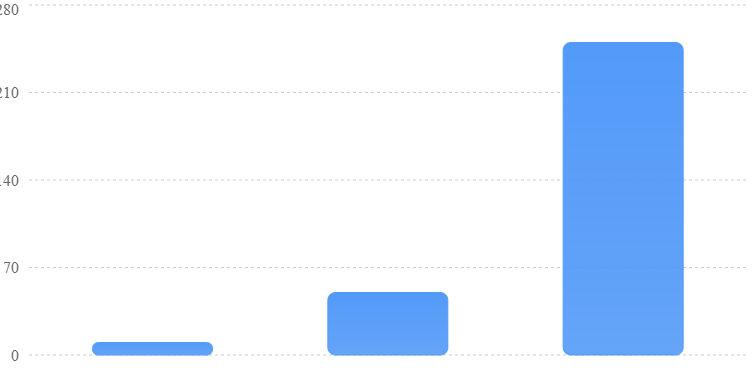
SFTechScene illustrative calculation: 5% of each transaction count. This does not describe any specific vendor’s measured error rate or review workload.
Original Finding #5: High Accuracy Can Still Produce a Large Review Queue
For a small company with 200 monthly transactions, a 5% problem rate means ten items need investigation.
For a larger company processing 5,000 transactions, the same rate creates 250 potential problems.
That difference changes the economics of automation.
If each problem takes six minutes to review, a queue of 250 items requires 25 hours of human work.
This is why businesses should ask vendors for more than a headline accuracy percentage.
They should want to know how often the system requests help, how frequently it makes errors, how long those errors take to fix, and whether important mistakes are caught before they affect financial records.
Financial Risk Is Not Equal Across Transactions
An error on a $20 office purchase is not the same as an error on a $200,000 supplier payment.
A system could process 999 small transactions correctly and make one serious mistake on a large transaction. Its overall transaction accuracy would still be 99.9%.
But the financial impact of that single error could be significant.
Businesses should therefore evaluate accuracy according to transaction value, accounting importance, and the potential impact of failure.
A good policy might allow automatic posting of routine, verified expenses while requiring manual review for unusual or material transactions.
For payment releases, new vendor bank accounts, tax-sensitive entries, and major accounting judgments, human approval should remain mandatory.
Which AI Finance Companies Are Leading the Shift?
The market now includes established accounting platforms, newer AI-focused companies, and financial software providers adding automation to their existing products.
Not every company offers a fully autonomous accounting agent. Some products provide advanced workflow automation, while others support AI-assisted review or broader finance analysis.
That difference should shape how buyers compare them.
Intuit QuickBooks: AI Built Into Familiar Accounting Software
QuickBooks is already a familiar name for many small businesses.
Its AI strategy focuses on bringing more active assistance into tasks such as bookkeeping, invoicing, payments, and financial reporting.
This approach can be attractive to businesses that do not want to replace their accounting platform.
The key advantage is that the agent can work closer to existing financial records and accounting workflows.
The key question is whether the available functions match the company’s actual work, including which actions require approval and how corrections are handled.
Ramp: AI Across Spending, Reconciliation, and Finance Operations
Ramp has expanded its accounting automation capabilities across card spending, invoices, reconciliation, and month-end workflows.
In February 2026, Ramp described Accounting Agents that could code transactions, handle recurring approved spending, prepare accrual entries, and reconcile records with connected accounting systems. The company reported accuracy figures above 90% for some coding tasks and 98% for certain recurring in-policy spending workflows. Those are vendor-reported figures, not independent benchmark results.
Ramp
Ramp has also published customer examples describing substantial time savings.
One case study involving Perplexity describes approximately 7,000 to 9,000 monthly card transactions and a 97% automatic coding rate, alongside a claimed 163 hours of monthly finance work automated.
This is useful as an example of what a high-volume, well-integrated workflow might achieve. It should not be used as a prediction for a small San Francisco business with very different accounting needs.
Ramp
Specialized Tools Are Focusing on the Month-End Close
Products such as Numeric and Double focus on making accounting processes more automated and easier to review.
Numeric’s approach includes close management, financial data, and related accounting workflows, while Double emphasizes accounting work connected to existing ledger platforms.
The central buying question is whether the product creates a clear, reviewable path from underlying records to completed accounting work. A tool that produces attractive reports but cannot explain its entries is not enough for a reliable close.
The market also contains tools for invoice capture, accounts payable, corporate cards, collections, and financial planning.
A company does not necessarily need one platform to do everything.
Comparing Finance AI Tools by Business Need
| Business need | Product category to assess | Most important test |
|---|---|---|
| Small-business bookkeeping | QuickBooks-style AI accounting | Correct entries and clear exceptions |
| High-volume employee spending | Ramp-style spend automation | Coding accuracy and approval controls |
| Complex month-end close | Dedicated close automation | Reviewable workpapers and reconciliations |
| Many supplier invoices | Accounts payable automation | Duplicate detection and payment controls |
| Slow customer payments | Receivables automation | Faster collections without customer complaints |
| Startup cash planning | Forecasting and finance analysis tools | Traceable assumptions and current data |
This is a functional comparison, not a ranking based on independent performance testing. Buyers should confirm current pricing, integrations, limits, and feature availability directly with providers.
Original Research #4: Which San Francisco Businesses Have the Strongest Case for AI Finance Agents?
Our financial model suggests that the value of AI accounting depends on how much repetitive work a business performs. To make that insight useful locally, we developed a qualitative opportunity framework for different business models found in San Francisco.
We assessed each type of business against four criteria: transaction volume, repetition, financial complexity, and the need for human judgment.
The following scores are editorial assessments based on typical workflows. They are not measured adoption rates, survey findings, or estimates of actual savings.
| Business type | Automation opportunity | Main use case | Main obstacle |
|---|---|---|---|
| SaaS startup | High | Billing, expenses, close | Revenue recognition |
| Marketing agency | High | Contractor invoices, collections | Project billing |
| Restaurant | Medium–high | Daily sales, suppliers, payroll checks | Tips and sales adjustments |
| E-commerce business | High | Payment matching, refunds | Fees and returns |
| Consulting practice | Medium | Expenses, invoicing | Lower transaction volume |
| Construction company | Medium | Bills, project costs | Change orders |
| Accounting firm | High | Multi-client bookkeeping | Quality and client rules |
Original Finding #6: Businesses With Repeatable Financial Work Have the Strongest Starting Point
The most promising candidates are not necessarily the largest businesses.
A small e-commerce company processing thousands of payments may have more automation potential than a consulting company with far higher annual revenue but only a few monthly invoices.
Similarly, an accounting firm managing 40 clients may find that automating document collection and transaction preparation is more useful than introducing an AI financial planning assistant.
The practical conclusion is that companies should prioritize workflows based on volume, repeatability, and financial risk rather than buying AI because competitors appear to be using it.
Why Restaurants Need a Different Approach From Software Startups
A restaurant may need to match card deposits with sales records, handle tips, identify supplier price changes, and account for delivery-platform deductions.
Those tasks differ from the accounting needs of a software company managing annual subscriptions and deferred revenue.
An agent trained mainly on straightforward subscription billing may be poorly suited to restaurant accounting without additional rules and integrations.
San Francisco businesses should therefore request demonstrations using their own transaction patterns.
A realistic test should include refunds, credits, unusual supplier invoices, payment fees, and missing documents.
How San Francisco Accounting Firms Can Use AI Without Losing Client Trust
Accounting firms have an especially strong reason to examine automation because much of their work is repeated across multiple clients.
They collect documents, categorize expenses, reconcile accounts, prepare reports, and answer similar questions for different businesses.
AI agents can help standardize parts of that work.
However, each client may have different accounting policies, approval requirements, and reporting needs.
The Opportunity Is More Clients per Team, Not Less Responsibility
An accounting firm might use AI to prepare transactions across several clients while accountants focus on exceptions, unusual entries, and advisory work.
This could increase the number of clients a team can support without adding staff at the same rate.
But that outcome requires strong separation between client data and clear records showing who reviewed each action.
An agent must never confuse records belonging to different clients or apply one client’s accounting rules to another.
The Advisory Relationship Could Become More Valuable
A business owner rarely hires an accountant simply because they enjoy receiving financial statements.
They want to understand whether the company is profitable, why costs increased, how much cash is available, and whether an important decision is financially sensible.
When routine bookkeeping takes less time, accountants can potentially spend more time answering those questions.
That may become one of the most valuable changes in the profession.
The accounting firm that combines efficient automation with clear human advice could become more useful to clients than a firm that competes mainly on data-entry speed.
The Biggest Risks of AI Accounting Agents
AI Can Produce Financial Information That Looks Correct but Is Wrong
AI-generated reports can appear polished even when the underlying figures contain errors.
A system might summarize expenses accurately but misunderstand which month a cost belongs to.
It could mistake a customer deposit for revenue, overlook a refund, or classify a long-term asset as an ordinary expense.
These mistakes can affect management decisions and financial reporting.
Businesses should require agents to provide links to the source transactions behind important numbers.
For material accounting entries, reviewers should be able to inspect the original documents and understand the rule used.
Automation Can Increase Fraud Exposure
Connecting an AI agent to banking, payments, email, and accounting platforms creates new paths through which an attacker might try to influence financial activity.
For example, a malicious invoice or email could contain instructions intended to make an AI system change a payment destination.
Financial agents should treat supplier documents and external messages as untrusted information, not as instructions that override company policies.
A sensible setup separates reading information, preparing a payment, approving it, and releasing funds.
No single AI agent should have unrestricted control over the full process.
Data Privacy Must Be Considered Before Connecting Tools
Financial records can contain bank details, employee compensation, customer information, and sensitive business contracts.
Before connecting an AI tool, companies should examine how data is stored, who can access it, whether it is used for model training, and how long it is retained.
They should also confirm that employees can access only the records appropriate to their roles.
For San Francisco businesses dealing with sensitive customer information, healthcare records, or regulated financial activity, additional legal and security review may be required.
Tax Records Still Need Supporting Evidence
AI bookkeeping does not remove the business’s responsibility to maintain accurate financial records.
The IRS explains that electronic records are subject to the same basic recordkeeping requirements as paper records. Businesses must maintain records supporting income, expenses, and other tax return items.
Internal Revenue Service
+1
This means an automatically generated expense category is not enough by itself to prove that an expense is deductible.
The underlying receipt, invoice, business purpose, and other required evidence still matter.
Employment tax records generally need to be retained for at least four years, while other retention periods depend on the type of record and the relevant limitation period.
Internal Revenue Service
Businesses should have a CPA or qualified tax adviser review tax-sensitive workflows, particularly when local, California, and federal requirements interact.
How San Francisco Businesses Can Introduce AI Accounting Agents in 90 Days
The most effective implementation starts with a narrow problem that can be measured.
Trying to automate every finance process immediately creates too many opportunities for errors and makes it difficult to determine whether the investment worked.
A 90-day rollout provides enough structure to test the system before giving it broader responsibility.
Days 1–15: Map the Work and Establish a Baseline
Start by examining how the finance team spends its time.
Choose a recent, representative month and measure the time needed to process invoices, categorize transactions, reconcile accounts, collect receipts, and prepare reports.
Record transaction volumes and error rates as well.
If a company does not know how many hours a process currently takes, it will struggle to prove that automation improved anything.
The goal during this phase is not to buy software. It is to understand which manual activities are expensive enough to justify attention.
Days 16–30: Choose One Low-Risk Workflow
Select a process that is repetitive, measurable, and unlikely to create serious harm if an AI suggestion is wrong.
Receipt collection or transaction categorization may be appropriate starting points.
Avoid making autonomous payment approvals or complex tax entries the first experiment.
The chosen tool should integrate with the existing accounting system and provide a clear record of the actions it performs.
Days 31–45: Test AI in Review-Only Mode
Run the AI alongside the existing process without allowing it to make irreversible changes.
For example, ask the system to categorize transactions but require an accountant to approve every suggestion.
Compare the results against the entries created through the normal process.
Measure how often the AI is correct, how long employees spend reviewing its suggestions, and how frequently they need to correct errors.
This stage reveals whether the system works on the company’s actual data rather than on a polished vendor demonstration.
Days 46–60: Introduce Limited Automation
Once the system has shown reliable performance, allow it to complete a narrow group of low-risk actions.
A business might permit automatic categorization of recurring, well-documented expenses while continuing to require approval for unfamiliar transactions.
Every action should remain visible in an audit log.
The team should also test what happens when the system receives an incomplete invoice, encounters conflicting records, or cannot reach an integrated service.
Reliable failure handling is part of successful automation.
Days 61–75: Measure Financial Results
Compare the new process with the baseline.
A useful evaluation should answer whether employees spend fewer hours on the workflow, whether errors have increased or decreased, and whether the business has gained any financial benefit.
Count review time, correction time, software fees, and integration costs.
Do not ignore the time required to maintain rules or monitor the system.
If an agent saves four hours of data entry but creates three hours of additional review, its actual benefit may be limited.
Days 76–90: Expand Carefully or Stop
Use the results to decide whether to extend automation to another workflow.
A company that succeeds with expense categorization might next test invoice processing or reconciliation.
A company seeing frequent errors should improve its data or reconsider the product before expanding access.
The decision should be based on measured results, not the number of features available.
A Practical 90-Day Performance Scorecard
| Metric | What to measure | Why it matters |
|---|---|---|
| Hands-on processing time | Hours per month | Shows capacity released |
| First-pass accuracy | Correct AI suggestions / all suggestions | Measures output quality |
| Exception rate | Items requiring investigation / total items | Shows review burden |
| Correction time | Minutes spent fixing errors | Captures hidden costs |
| Close duration | Business days to complete month-end | Measures process speed |
| Cost per transaction | Fully loaded process cost / transactions | Allows fair comparisons |
| Financial control failures | Unauthorized or material errors | Protects the business |
Businesses should establish their own acceptable thresholds based on the financial risk of each activity. A 95% accuracy rate may be adequate for suggesting low-value expense categories but unacceptable for releasing supplier payments.
What Business Owners Should Ask Before Buying AI Accounting Software
An AI accounting product should be evaluated like a financial control system, not merely a productivity app.
The company should ask the provider to demonstrate how its product handles real transactions, missing information, errors, and approval requests.
A strong evaluation should also cover what happens when the AI is uncertain.
The system should be able to explain which records support an action and what employees must review before the process continues.
Pricing deserves equally close attention.
Some tools may be included within existing subscriptions, while others charge by user, transaction volume, connected account, or usage. The lowest advertised price may not include implementation, support, and additional integrations.
Businesses should calculate the total cost of running the workflow before comparing vendors.
Five Questions That Reveal Whether a Finance Agent Is Ready
A useful vendor demonstration should answer five core questions.
First, can the agent explain every important accounting entry and show the underlying source documents?
Second, can the business restrict which actions the agent is allowed to perform without approval?
Third, what happens when the agent makes a mistake, and can the company reverse the action safely?
Fourth, how is sensitive financial data protected across the agent and its connected systems?
Finally, what independent evidence supports the company’s accuracy and time-saving claims?
A provider that cannot explain these basic points may not be ready to handle sensitive financial operations.
What AI Accounting Could Mean for Finance Jobs in San Francisco
AI accounting agents are likely to change how finance work is organized, but that does not mean accountants will disappear.
Routine data entry, transaction matching, and document collection are natural candidates for greater automation.
Work involving judgment, accountability, tax interpretation, unusual transactions, and financial advice remains more difficult to delegate safely.
A finance employee may spend less time preparing spreadsheets and more time investigating discrepancies, improving controls, and helping managers make decisions.
This could increase the value of employees who understand both accounting principles and modern software.
Entry-Level Roles May Change the Most
Many entry-level accounting jobs have traditionally involved repetitive work that helps employees learn financial systems.
If AI handles more of those tasks, firms may need new training methods.
Junior employees still need to learn how accounts fit together, why entries are correct, and how financial statements are prepared.
A company that automates the learning process without replacing it could weaken its future finance team.
The stronger approach is to use AI-generated work as material for review and teaching, while giving junior employees opportunities to solve increasingly complex problems.
Finance Leaders Will Need New Skills
Finance managers will increasingly need to understand how automated systems make decisions.
They do not all need to become software engineers.
They do need to know how to define clear accounting policies, test automated outputs, set approval limits, and detect when software behaves unexpectedly.
The ability to manage both financial risk and automation quality may become a particularly valuable skill in San Francisco’s technology-heavy business environment.
What the Next Few Years Could Look Like
The direction of travel is becoming clearer.
Accounting software is moving toward systems that complete more of the work needed to keep financial records accurate and current.
The next stage will likely involve better connections between accounting, payments, payroll, purchasing, and financial planning.
Instead of employees manually moving information between systems, AI agents may coordinate more of those steps.
A business might receive a supplier invoice, verify it against an approved purchase, identify a potential budget problem, and prepare the accounting records through one connected process.
That would be more useful than adding a chatbot to an accounting dashboard.
But adoption will not be equally fast across all businesses.
Companies with standardized transactions and reliable digital records may find it easier to automate. Businesses with complex contracts, incomplete records, and unusual accounting requirements will need more careful implementation.
The most important competitive advantage may not be access to the newest AI model. It may be having clean financial data, clear procedures, and employees who know how to review automated decisions.
Final Takeaway: The Future of AI Accounting Is Better Financial Control, Not Just Faster Bookkeeping
AI agents have the potential to change accounting, bookkeeping, and finance for San Francisco businesses in meaningful ways.
They can help employees collect documents, prepare entries, identify unusual transactions, reconcile accounts, follow up on unpaid invoices, and produce more timely financial information.
For companies with enough repeated finance work, these improvements could create significant value.
Our original scenario analysis found that a hypothetical San Francisco business handling 60 hours of selected monthly finance tasks could free 22.4 hours through partial automation. Under the model’s assumed hourly value and operating costs, that represents approximately $6,696 in annualized net economic value.
But the same analysis also showed that an expensive system can produce a negative return when a business has little work to automate.
That finding may be more useful than any sweeping claim about AI replacing accountants.
The best outcome is not necessarily a finance department with fewer people. It is a business where records are accurate, bills are handled on time, cash problems are identified early, and skilled employees spend more time helping the company make better decisions.
For San Francisco business owners, the practical starting point is straightforward.
Find the financial work that repeats every week. Measure what it costs. Test whether an AI agent can handle part of it accurately. Keep strong approval controls. Then expand only when the results justify the investment.
The companies that follow that approach will be better positioned to benefit from AI without putting their financial records, customer relationships, or business cash at unnecessary risk.
Research Methodology and Source Notes
This article combines publicly available evidence with original SFTechScene calculations and scenario analysis, prepared in October 2026.
The principal public sources include the U.S. Bureau of Labor Statistics’ May 2025 San Francisco metropolitan wage estimates, the Federal Reserve’s 2025 Report on Employer Firms, the San Francisco registered business locations dataset, and the IRS small-business recordkeeping guidance.
Product capability examples were checked against public announcements and documentation from Intuit and Ramp. Reported vendor results are attributed to their publishers and are not treated as independently verified measurements.
The original research in this article uses three kinds of analysis: calculations from published statistics, arithmetic models based on explicitly stated assumptions, and a qualitative classification of accounting automation opportunities by business type.
No proprietary San Francisco transaction dataset, representative local business survey, controlled AI benchmark, or direct customer experiment was conducted for this report. Therefore, the savings scenarios establish how the economics work under different conditions; they do not establish the average savings realized by San Francisco businesses.
For a more rigorous company-specific decision, the next research step is to measure real transaction volumes, processing times, errors, review costs, and software expenses before and after a controlled deployment. Those observations can then be compared with the model presented here to determine whether automation produces a measurable return.