

San Francisco businesses have spent years buying software to make work faster. Yet inside many companies, employees still spend large parts of their day copying information between applications, checking spreadsheets, following up on approvals, updating customer records, and answering questions that have already been answered somewhere else.
The software is faster than ever. The work moving between those systems often isn’t.
That gap is creating one of the biggest opportunities in enterprise technology. A growing group of San Francisco AI startups is building software that can do more than organize tasks or send automatic alerts. These systems can read information, understand requests, choose the next step, complete approved actions, and involve employees when something needs judgment.
This is the shift from traditional workflow automation to AI agents and intelligent enterprise automation.
Companies such as Glean, WRITER, Decagon, Sierra, and Asana are approaching different parts of the same problem. They want to reduce the manual steps that slow down work between teams, business applications, and customers.
But there is a bigger question behind the excitement. Can these new systems reliably replace manual workflows, or will businesses simply end up paying for another layer of software that employees must manage?
To answer that, SFTechScene examined public industry research, company product documentation, and real-world automation examples. We also developed an original financial model covering four common enterprise workflows to estimate where automation could deliver measurable value, how much manual work might remain, and what businesses should measure before making major investments.
The findings point to an important conclusion: the biggest opportunity is not removing humans from every business process. It is removing unnecessary steps while giving people better control over the work that matters.
The Short Version: Enterprise Automation Is Moving From Following Rules to Completing Work
Traditional business automation is built around instructions. When a customer fills out a form, create a record. When an invoice arrives, send it to accounting. When a sale closes, notify the onboarding team.
These systems work well when information is clean and every step is predictable. Problems begin when the software encounters something different.
A customer may describe a billing problem using unexpected words. An invoice might contain missing information. A sales request may require details stored across three applications. A support ticket might need several checks before anyone knows what should happen next.
Traditional automation often sends these situations to a human.
AI agents offer a different approach. Instead of relying only on fixed instructions, an agent can interpret a request, find relevant information, use approved tools, and decide which permitted step to take next.
That does not make the agent automatically reliable or safe. It does create a way to automate work that previously required someone to read, interpret, and coordinate information.
WHAT PUBLIC RESEARCH SHOWS
88%
of respondents reported regular AI use in at least one business function.
62%
reported scaling or experimenting with AI agents.
23%
reported scaling agentic AI in at least one business function.
39%
reported an enterprise-level earnings impact from AI.
Source: McKinsey’s November 2025 State of AI survey. These are survey responses, not measured adoption rates for San Francisco businesses.
McKinsey
The numbers explain why enterprise automation has become such an important market. AI adoption is widespread, but converting experiments into measurable business results remains difficult.
For San Francisco startups, this creates an opportunity to build the systems that help companies move from asking AI questions to letting AI complete useful work.
For business leaders, it changes the buying decision. The question is no longer simply whether a product uses AI. It is whether that product can reduce delays, prevent mistakes, improve service, and lower the total cost of completing a business process.
Why Manual Workflows Are Still Everywhere in Modern Companies
Businesses Have Automated Tasks Without Fixing Entire Processes
A modern company might use Salesforce for sales, Slack for communication, Google Workspace for documents, an accounting application for finance, and a separate platform for customer service.
Each tool can be effective on its own. Yet completing a single customer request may require information from several of them.
Consider a software company handling a customer who wants to change a subscription. The support team receives the request, checks the customer’s account, confirms billing terms, asks another team about contract limits, updates the subscription, and sends confirmation.
Parts of this process may already be automated. The initial ticket could be created automatically, and an email might be sent when it closes.
But someone still has to connect the middle steps.
This is where manual workflows survive. Businesses have automated individual actions without fully joining the decisions and handoffs between them.
The Cost of Manual Work Is Larger Than Employee Time
Most companies measure manual work by counting hours. That is useful, but it misses several expensive problems.
When an employee waits for approval, the entire process slows down. When information is copied incorrectly, another employee must investigate the mistake. When a request reaches the wrong team, the customer waits longer for an answer.
These delays affect sales, customer satisfaction, cash flow, and employee focus.
A business might save five minutes of administrative work while also reducing a two-day approval delay. In that situation, the faster decision could be more valuable than the saved labor.
This matters particularly for San Francisco companies operating in competitive software, financial technology, healthcare technology, and professional services markets. Customers often expect quick answers, while businesses must maintain strict control over information, payments, and important decisions.
Why Adding More Software Does Not Always Help
Businesses often respond to an inefficient process by buying another application. Eventually, employees are responsible for managing the connections between too many systems.
A new platform may provide useful reports or automation features, but it can also create more places to check information.
The strongest AI automation products try to solve this by working across existing applications rather than requiring a business to move every process into another system.
That is an important distinction. Companies usually want less work, not a larger collection of dashboards.
How Traditional Automation Differs From AI Agent Automation
Traditional automation remains valuable. Businesses should not replace a reliable rule with an AI system simply because AI is newer.
The difference becomes clearer when comparing how the two approaches handle real business situations.
| Business activity | Traditional automation | AI agent automation |
|---|---|---|
| Customer email | Moves it based on a rule or keyword | Interprets the request and suggests or performs permitted actions |
| Invoice processing | Extracts fixed fields and follows a set path | Checks unusual details against approved policies and records |
| IT support | Follows a prepared decision tree | Finds relevant information and selects approved troubleshooting steps |
| Sales research | Moves data between systems | Combines information and prepares a qualified recommendation |
| Project updates | Changes status after a fixed trigger | Reads project context and identifies missing information |
| Exceptions | Often sends work to an employee | May investigate the issue before escalating it |
Fixed Rules Are Still Better for Predictable Work
If an employee submits a properly formatted expense and the amount is below an approved limit, there may be no reason for AI to decide what happens next.
A simple automation rule can process the request consistently, quickly, and cheaply.
Adding AI to this type of task introduces cost and a new source of possible error without necessarily improving the result.
A sensible automation strategy uses ordinary software rules wherever the process is predictable. AI becomes useful when the system must understand varied language, examine documents, compare information, or handle situations that do not follow an exact template.
AI Agents Are Most Useful in the Middle of a Workflow
Many enterprise processes contain three stages. Someone makes a request, the company investigates what needs to happen, and a final action completes the task.
The investigation stage is often the hardest to automate.
An AI agent might determine what a customer wants, find the right account details, check applicable policies, and prepare an appropriate action. A normal software rule can then carry out the approved transaction.
This combination is often safer and more economical than expecting AI to control every stage.
Automation Becomes More Valuable When Systems Work Together
An AI agent that can write a useful reply but cannot access the relevant account has limited value.
An agent connected to customer records, billing systems, support tools, and approved company policies can potentially resolve a much larger part of the request.
However, every connection creates responsibilities around access permissions, privacy, security, and error handling.
The goal is not to give AI unrestricted control over company applications. It is to provide the minimum access needed to complete clearly defined tasks.
The San Francisco Startups Reinventing Enterprise Automation
San Francisco’s automation market includes several types of companies. Some focus on customers, others on internal employee work, and others on connecting applications or managing complex processes.
These companies should not be treated as identical competitors. Their products address different parts of enterprise automation.
Glean: Connecting Company Knowledge to Business Actions
Glean addresses a problem that almost every growing business encounters: information becomes difficult to find.
Employees may have useful documents in Google Drive, customer information in Salesforce, engineering discussions in Slack, and project details in other applications. Finding a complete answer can require checking several places.
Glean’s platform connects enterprise information, respects access permissions, and supports agents that can use company context to complete work. Its May 2025 announcement expanded the availability of Glean Agents for building and governing enterprise workflows.
Agents, Assistant & Search
+1
The business opportunity is bigger than search.
Imagine an account manager preparing for a customer renewal. Instead of collecting notes from multiple systems, the employee could use an agent to retrieve the contract history, summarize previous support issues, and prepare a review.
The employee would still own the negotiation and final commercial decision, but the preparation work could become considerably faster.
For companies considering Glean, a useful pilot would measure how much time employees spend finding information, how often the answers contain correct source material, and whether the system reduces repeated questions to internal teams.
WRITER: Turning Enterprise Knowledge Work Into Repeatable Processes
WRITER is another San Francisco company moving beyond simple AI-assisted writing.
Its enterprise platform supports AI agents that perform business tasks using company information and defined processes.
In March 2026, WRITER introduced agent skills and playbooks designed to let business teams describe specialized work and create repeatable agent capabilities. The company also announced further platform updates in August 2026 focused on efficiency, reliability, and governance.
WRITER
+1
This approach could be useful for businesses producing large volumes of reports, customer documents, marketing materials, and internal research.
For example, a marketing operations team could build a workflow that gathers campaign information, prepares a report, checks it against company standards, and sends a draft for review.
The important distinction is that the workflow can include more than writing text. It can potentially organize the research, use enterprise context, and move the work through several connected stages.
Companies evaluating this type of platform should measure the accuracy of the finished deliverable, the amount of human correction required, and whether repeatable work becomes easier to manage.
Decagon: Automating Customer Service Outcomes
San Francisco-based Decagon focuses on AI agents for customer support.
The company emerged publicly in June 2024 after announcing $35 million across seed and Series A funding, followed by a $65 million Series B later that year. These historical funding figures help illustrate investor interest, but they are not evidence of current operating performance.
Decagon
+1
The larger opportunity is to move beyond answering customer questions.
Consider a customer asking why an order has not arrived. A basic chatbot might explain the company’s delivery policy.
A more capable support agent could check an order, retrieve a shipment update, determine whether an approved refund or replacement process applies, and complete authorized steps.
This is where customer support becomes operational automation.
For a business using Decagon or a similar platform, the most useful measurement is not the number of conversations answered by AI. It is the number of customer problems correctly resolved without unnecessary follow-up.
Sierra: Connecting Customer Conversations With Revenue and Retention
Sierra is also building AI agents for customer-facing work, but its stated vision extends beyond basic support.
The company has described opportunities involving product discovery, customer recommendations, subscription management, sales, and retention. Its San Francisco events have focused on how businesses can use agents to improve customer relationships and business outcomes.
Sierra
+1
This is a meaningful expansion of enterprise automation.
Customer service has traditionally been treated as a cost center. Businesses want requests answered efficiently while limiting the amount of employee time required.
AI agents may allow companies to connect customer service with other goals. An agent might help someone understand a subscription, choose a suitable product, change an account, or solve an issue that would otherwise lead to cancellation.
The result should be judged by customer satisfaction, accurate resolution, retention, and responsible revenue growth rather than conversation volume alone.
Asana: Bringing AI Into Existing Work Management
Asana, headquartered in San Francisco, takes a different approach.
Rather than starting with a separate AI assistant, Asana’s AI Studio places automation inside the project and work management processes that teams already use.
Its tools support tasks such as request intake, routing, approvals, document analysis, and project updates. The platform combines natural-language instructions with rules that define how work should move.
Help Center
+1
This approach matters because many businesses already manage their daily work inside project software.
A marketing team could receive a new campaign request, check whether the brief includes the necessary information, classify the project, assign it to a team, and request approval when needed.
Employees still manage the project, but they spend less time sorting requests and chasing missing information.
The key opportunity is to improve a workflow employees already understand instead of asking them to learn an entirely new process.
Retool: Building Custom Internal Tools That Fit the Business
Some companies have workflows too unusual for standard software.
A logistics company might require its own order review system. A financial technology startup may need internal dashboards connected to several databases. An operations team may want a custom approval process with detailed controls.
Retool helps companies build internal applications and automated workflows around these requirements.
Its enterprise application generation work allows developers and teams to create applications using natural-language instructions, while keeping the tools connected to business systems.
Retool Blog
A useful example comes from San Francisco-based Descript, which described using Retool to build more than 50 internal applications and support sales, customer information, and other business functions. Retool’s published account reports substantial time savings, although those claims should be treated as vendor-provided customer evidence rather than independently verified results.
Retool
Retool’s approach is especially relevant when a company’s biggest problem is not the absence of automation but the absence of software designed for its exact process.
Zapier: Making Automation Accessible Across Applications
Zapier has helped make software automation available to businesses without large engineering teams.
The company says its platform connects more than 9,000 applications and supports AI-enabled workflows alongside traditional automation. It also lists a San Francisco business address while describing its workforce as remote and globally distributed.
Zapier
+1
For smaller businesses, that broad application connectivity can be especially useful.
A company might connect incoming sales forms to a customer database, automatically create follow-up tasks, summarize new requests, and notify the right employee.
The strategic question is how to combine simple rules with AI rather than replacing every existing automation.
For many businesses, a reliable collection of small automations can deliver better results than a single complicated agent.
What These Companies Reveal About the Market
| Company | Main automation focus | Business problem to test |
|---|---|---|
| Glean | Enterprise knowledge and agents | Time spent finding information and taking related actions |
| WRITER | Knowledge-work agents | Repeated document and research processes |
| Decagon | Customer support agents | Unresolved customer service requests |
| Sierra | Customer experience agents | Customer support, account management, and retention |
| Asana | AI work management | Intake, routing, project coordination, and approvals |
| Retool | Custom apps and workflows | Internal processes not served by standard software |
| Zapier | Cross-application automation | Repeated steps between existing tools |
These are selected examples, not a ranking of the best products. Buyers should compare vendors based on their own systems, security needs, required approvals, and measured pilot results.
The broader pattern is clear. Enterprise automation is no longer limited to connecting applications. Vendors are increasingly trying to help software understand business information and carry work across multiple stages.
Original Research: How Much Manual Work Could AI Agents Actually Remove?
The biggest weakness in discussions about enterprise automation is the lack of clear financial analysis.
Software companies regularly describe faster workflows, better productivity, and lower operating costs. But these claims do not automatically tell a business how much value it can expect from its own operations.
SFTechScene developed an original scenario model to examine this question using transparent assumptions and reproducible calculations.
The analysis focuses on four common workflows found in San Francisco technology and service businesses: customer support, finance operations, internal IT requests, and sales administration.
Research Methodology: What We Measured and What We Did Not
This research has two separate components.
The first is a review of publicly available research and product information. McKinsey’s 2025 State of AI survey provides evidence about enterprise adoption and scaling. Public documentation from automation vendors shows what types of workflows their products are designed to support.
The second is an original financial scenario model developed for this article. Because reliable transaction-level performance data from San Francisco companies is not publicly available for all four workflows, we do not pretend that the model’s inputs are observed results.
Instead, we construct an illustrative company operating across four functions and test how different levels of automation would affect its workload and costs.
The model uses these definitions:
- Monthly volume: the number of requests or records processed.
- Manual handling time: the minutes employees currently spend handling each item.
- Automation coverage: the share of items suitable for the modeled automation.
- Minutes saved: the reduction in manual handling time for each covered item, before additional review costs.
- Labor cost: a fully loaded illustrative cost of $45 per employee hour.
These assumptions are not citywide averages, vendor performance claims, or forecasts of what any specific company will achieve. They are published so readers can replace them with their own measured data.
The calculations were checked using the formulas shown below, with all intermediate values retained before rounding.
Original Finding #1: A Company Does Not Need to Automate Most of Its Work to Save Hundreds of Hours
Our model starts with four departments handling a combined 5,200 monthly items.
| Workflow | Monthly items | Current minutes per item | Automation coverage | Minutes saved per covered item |
|---|---|---|---|---|
| Customer support | 2,400 | 8 | 45% | 5 |
| Finance administration | 900 | 12 | 35% | 7 |
| Internal IT requests | 1,200 | 10 | 50% | 6 |
| Sales administration | 700 | 9 | 40% | 5 |
| Total | 5,200 | — | — | — |
We calculate the monthly savings for each workflow by multiplying the number of items by automation coverage and minutes saved, then dividing by 60.
For example, the customer support calculation is:
\[ \frac{2,400\times0.45\times5}{60}=90\text{ hours} \]
Applying that calculation across the four departments produces the following results.
Modeled Monthly Labor Hours Saved by Workflow
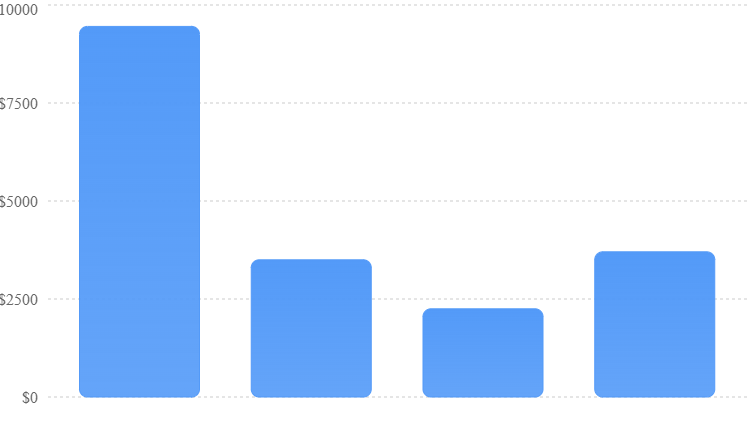
SFTechScene original scenario model; illustrative inputs, not observed company performance.
Calculated savings before additional review, implementation, software, and ongoing management costs.
Monthly time saved
210.1 hours
Across four workflows
Original handling time
805 hours
Before automation
Gross time reduction
26.1%
Of modeled baseline hours
Gross annual hours
2,521
If volumes remain constant
The modeled company would save roughly 210 hours of routine handling time each month.
That is equivalent to about 1.3 full-time monthly workloads, assuming 160 working hours per month. It does not mean the company could or should remove 1.3 employees, because saved time may be scattered across teams and cannot always be converted into a staffing reduction.
The important finding is that meaningful time savings can arise from automating only selected parts of existing work.
Even with coverage rates between 35% and 50%, the organization reduces its original handling time by approximately 26%.
Why Customer Support Produces the Largest Modeled Savings
Customer support contributes 90 hours because it handles the greatest number of requests.
That does not mean customer support is always the best first automation project.
A company with fewer but more time-consuming finance requests might find greater value in accounting. Another business might benefit more from automating IT access requests or sales administration.
The model demonstrates why companies must examine both task volume and the number of minutes realistically saved.
A task repeated thousands of times can create substantial value even when each individual improvement looks small.
Original Finding #2: The Real Financial Return Is Much Smaller Than the Gross Time Savings
One of the most common mistakes in enterprise automation planning is to count every saved hour as profit.
That approach ignores software fees, human review, testing, maintenance, and the cost of dealing with mistakes.
We added two illustrative monthly cost assumptions to the model.
The company pays $3,500 for automation software and supporting services. It also spends 50 employee hours reviewing AI work, checking exceptions, and maintaining the system, valued at $45 per hour.
The financial results change substantially.
| Financial component | Monthly value |
|---|---|
| Gross labor time saved | 210.08 hours |
| Value of saved time at $45/hour | $9,453.75 |
| Software and operating services | −$3,500.00 |
| Additional review and management | −$2,250.00 |
| Net modeled monthly value | $3,703.75 |
| Net modeled annual value | $44,445.00 |
Where the Gross Financial Benefit Goes
SFTechScene original financial scenario. Costs are shown as positive amounts for comparison and subtracted when calculating net benefit.
Gross time savings look impressive, but more than 60% of their modeled financial value is consumed by the assumed operating and oversight costs.
The net benefit is still positive. Yet it is far smaller than the headline labor savings might suggest.
There is another important distinction. The $3,703.75 represents the economic value of released employee capacity after modeled recurring costs. It becomes a cash saving only if the company can reduce spending, avoid planned hiring, reduce overtime, or use the available capacity in a way that produces measurable additional value.
For many growing San Francisco startups, avoiding the need to hire another employee may be more realistic than cutting an existing position.
That is why automation planning should connect the saved time to an actual business decision.
Original Finding #3: Automation Economics Are Extremely Sensitive to Coverage
Our base model assumes the company can automate selected tasks at different rates.
But what happens if the software works well on fewer requests than expected?
To investigate, we kept the original monthly volume and time-saving assumptions, then increased or decreased every department’s automation coverage by the same multiplier.
A coverage multiplier of 0.5 means the system achieves half the base coverage in every department. A multiplier of 1.5 means 50% more coverage, with the highest modeled coverage reaching 75%, so none exceeds 100%.
Software and review costs remain fixed in this sensitivity test.
| Coverage scenario | Gross monthly hours saved | Net monthly value |
|---|---|---|
| Half base coverage | 105.0 | −$1,023 |
| 75% of base coverage | 157.6 | $1,340 |
| Base coverage | 210.1 | $3,704 |
| 125% of base coverage | 262.6 | $6,067 |
| 150% of base coverage | 315.1 | $8,431 |
Modeled Net Monthly Value at Different Coverage Levels
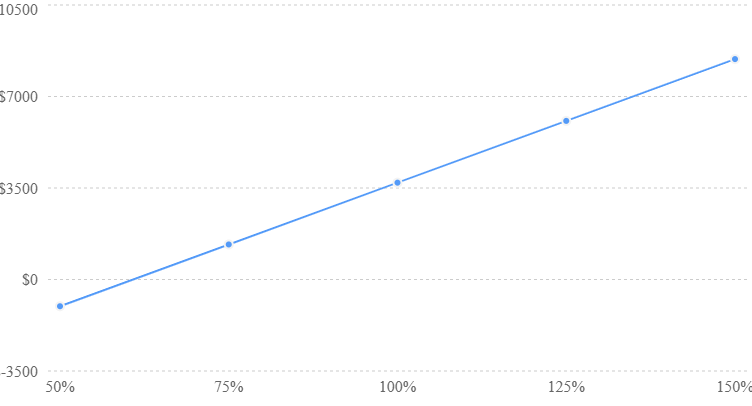
Assumes a $45 hourly value, $3,500 monthly software cost, and 50 review hours.
Percentages refer to multipliers of the modeled base coverage, not the percentage of all requests automated.
This analysis provides a practical lesson: the most important automation question may be how many real requests the system can successfully handle.
If automation coverage falls to half the modeled level, the program produces a monthly loss under these assumptions.
At higher coverage, the same software and oversight costs are spread across more completed work, improving financial performance.
The approximate break-even point occurs when the company captures 60.8% of the base model’s expected gross savings.
That is about 127.8 saved hours each month before the separate review time is deducted.
What This Means for Vendor Evaluation
A software demonstration typically shows a carefully prepared example. It rarely reveals how the tool behaves when requests contain missing details, conflicting information, unexpected language, or unusual customer circumstances.
Businesses should therefore test agents against real historical cases, with sensitive information handled appropriately.
A company might start by selecting 100 representative requests. It should include ordinary cases, difficult cases, incomplete records, and situations where human approval is required.
The objective is to measure successful end-to-end handling, not just impressive answers.
If an AI system produces a useful response but still requires an employee to do nearly every remaining step, the financial value will be much lower than a demonstration suggests.
Original Finding #4: The Break-Even Point Changes With Labor Cost and Software Spending
San Francisco businesses operate with very different staffing costs.
A professional services firm might have expensive senior employees handling routine processes. A small online retailer might have lower average operating costs.
That difference changes automation economics.
To examine it, we kept the model’s 210.08 gross saved hours, 50 additional review hours, and $3,500 monthly software cost. We then changed the assumed fully loaded hourly value of employee time.
| Hourly labor value | Gross monthly value | Net monthly value |
|---|---|---|
| $25 | $5,252 | −$248 |
| $35 | $7,353 | $2,103 |
| $45 | $9,454 | $3,704 |
| $60 | $12,605 | $6,105 |
| $80 | $16,807 | $9,307 |
The calculation is straightforward:
\[ \text{Net value}=(210.0833-50)\times r-3500 \]
Here, \(r\) is the hourly value of employee time.
Because review work uses the same hourly cost assumption, higher labor rates increase both the value of time saved and the cost of oversight.
The financial break-even hourly value under this scenario is approximately $21.86.
This does not mean automation is automatically profitable whenever employees cost more than that amount. It means the modeled time savings exceed recurring costs at that value, before one-time implementation spending and other omitted costs.
Why This Finding Is Relevant to San Francisco
San Francisco businesses frequently compete for specialized employees, including engineers, finance professionals, account managers, and operations specialists.
When these workers spend time on routine administration, the opportunity cost can be considerable.
An automation that saves an expensive specialist several hours per week may have stronger economics than a system that automates a larger quantity of lower-cost tasks.
However, companies should not automatically use senior employee billing rates as the value of saved time. The relevant number is the economic value the business can realistically recover.
If a senior engineer saves five hours but has no other valuable work to complete, the financial benefit may be limited.
If those five hours allow the engineer to finish a product release sooner, the value could be much greater than the salary calculation suggests.
Original Finding #5: Real Automation Performance Needs More Than One Metric
Our model is deliberately simple enough to reproduce, but real systems require a broader measurement framework.
A company may report a high automation rate while still experiencing poor customer outcomes.
For example, an agent might automatically close many customer tickets. If customers return because their problems remain unresolved, the apparent success disappears.
A similar issue arises when AI generates reports that employees must rewrite extensively.
The system technically produces output, but it has not eliminated much work.
Businesses should track several linked measurements.
| Metric | What it reveals | How to measure it |
|---|---|---|
| Eligible request rate | How much work is suitable for automation | Eligible requests ÷ total requests |
| Correct completion rate | How often the agent finishes accurately | Correct completed requests ÷ attempted requests |
| Human review time | How much oversight automation creates | Review minutes per request |
| Repeat work rate | How often completed work must be reopened | Reopened cases ÷ closed cases |
| End-to-end cycle time | Whether the full process is faster | Time from request to final resolution |
| Cost per correct outcome | Whether automation creates financial value | Total operating cost ÷ correct outcomes |
| Customer or employee satisfaction | Whether the experience improves | Consistent before-and-after survey |
These measurements should be compared with a baseline collected before the AI system is deployed.
Without that comparison, the company cannot reliably tell whether the new system made work better or simply changed how employees perform it.
Research Limitations and Reproducibility
The original calculations are scenario analysis, not a randomized experiment, a survey of San Francisco companies, or a performance benchmark for the vendors named in this article.
The workflow volumes, coverage rates, time savings, labor values, software costs, and review hours were constructed for analysis. They are not derived from a disclosed San Francisco transaction dataset.
The model assumes a constant monthly workload, an unchanged value per saved hour, and stable recurring costs. It excludes one-time implementation costs, taxes, financing effects, potential revenue gains, losses from mistakes, and changing demand.
Readers can reproduce every monetary result using:
\[ H=\sum_i\frac{N_i\times C_i\times S_i}{60} \]
\[ V=H\times R-(K+Q\times R) \]
Where \(N\) is monthly volume, \(C\) is automation coverage, \(S\) is saved minutes, \(H\) is gross hours saved, \(R\) is hourly labor value, \(K\) is recurring software cost, and \(Q\) is additional review hours.
Our strongest conclusion is therefore conditional: partial automation can be economically valuable, but the result depends heavily on actual coverage, time saved, review costs, and how the company uses released capacity.
The model does not establish how frequently San Francisco startups achieve these outcomes in production.
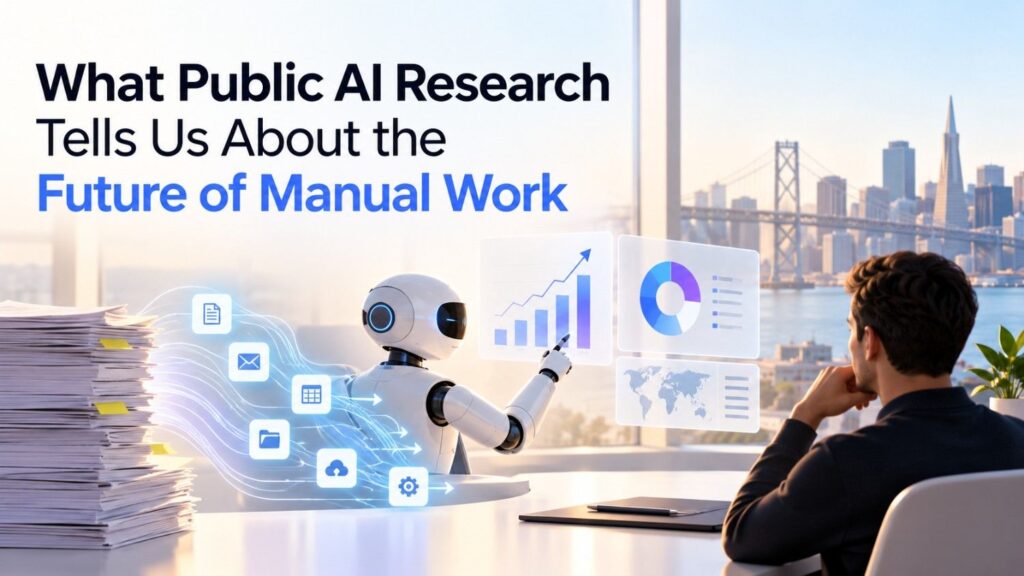
What Public AI Research Tells Us About the Future of Manual Work
The scenario model explains how automation economics can work. Broader research helps explain how quickly companies are moving toward these systems.
Most Businesses Are Still Learning How to Scale AI Agents
McKinsey’s November 2025 survey found that 62% of respondents reported either experimenting with or scaling AI agents.
But only 23% reported scaling agentic AI in at least one business function. An additional 39% were experimenting.
AI Agent Adoption in McKinsey’s 2025 Survey
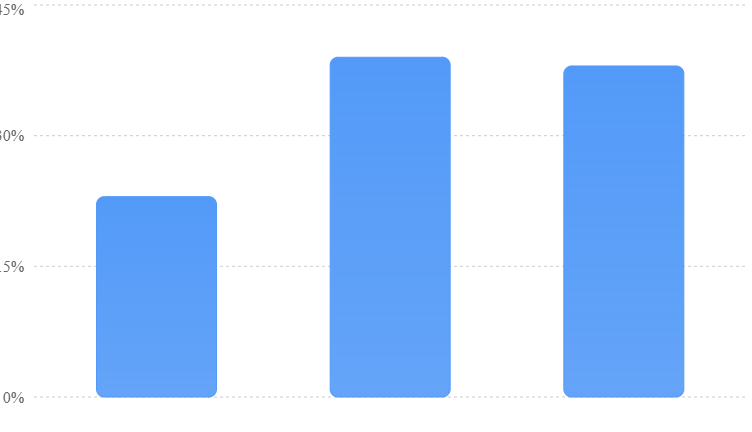
The final category is calculated as 100 − 23 − 39. Values are reported percentages and may be affected by rounding. The survey is not limited to San Francisco.
McKinsey
These findings matter because experimentation is not the same as dependable business automation.
A company might have hundreds of employees using AI assistants while only a handful of production processes rely on autonomous agents.
Another business might have several successful pilots that have not been approved for wider use.
The challenge is often less about generating useful text and more about controlling actions, connecting business data, managing risks, and proving that the system works consistently.
The Companies Seeing the Most Value Are Redesigning Work
The same McKinsey research found that high-performing AI organizations were much more likely to redesign individual workflows.
That finding is especially relevant to enterprise automation.
A company that adds an AI tool to an inefficient process may make the existing process slightly faster.
A company that studies the entire process may discover that several steps are unnecessary.
For example, a customer refund process might include multiple internal messages simply because employees cannot access the same information.
If the company centralizes the required policy and account information, some approvals may no longer be necessary for low-risk requests.
AI can then help with the remaining interpretation and decision-support work.
The greatest value can come from changing the process rather than automating each old step.
McKinsey
AI Is Still Used for Collaboration, Not Only Complete Automation
Anthropic’s research provides another important perspective.
Its Economic Index research using Claude interactions found that AI use remained concentrated in certain categories of work. In its analysis covering January through November 2025, Anthropic reported that collaborative AI use accounted for 52% of Claude.ai conversations, compared with 45% classified as automation.
The company also observed much stronger automation patterns in API-based usage, where AI is embedded into other software. These measures describe activity on Anthropic’s systems, not the whole economy or the share of jobs being automated.
Anthropic
+1
This difference is useful for understanding what businesses are buying.
Employees often use conversational AI to think through problems, draft work, or check information.
Enterprise automation systems increasingly use AI behind the scenes to perform parts of a larger workflow.
The two approaches serve different purposes. In many companies, both will remain important.
Where Enterprise Automation Will Have the Biggest Impact
Customer Support: From Answering Questions to Solving Problems
Customer support is one of the clearest places to start because businesses often have large volumes of similar requests.
A customer may want to reset an account, update contact information, understand a charge, check an order, or change a subscription.
The first version of an AI support system might answer questions using a knowledge base.
A more advanced workflow can connect to account systems and perform carefully controlled actions.
What a Well-Designed Support Workflow Looks Like
The AI receives a customer request and identifies the issue. It retrieves the relevant information using approved access and determines which actions are permitted.
If the request is ordinary and falls within policy, the system completes it and records the result.
If the account details conflict, the customer asks for an unusual exception, or the action exceeds a financial limit, the system sends the case to an employee with a summary of what it found.
The objective is to reduce both the time required to handle the request and the effort needed to investigate difficult cases.
The Metric That Matters Most
Customer support leaders should track correct resolution without repeated contact.
An agent that answers quickly but gives incorrect information can damage trust.
A slower agent that resolves an issue correctly may create better long-term value.
Companies should also compare satisfaction, escalation rates, and complaint volumes before and after deployment.
Finance Operations: Reducing Repeated Checks Without Giving Up Control
Finance teams perform many tasks that appear simple but require careful attention.
Employees review invoices, match payment details, investigate missing receipts, update records, and prepare recurring reports.
AI can help interpret the documents and identify information requiring further review.
An invoice-processing agent might extract supplier details, check the purchase order, compare amounts, and prepare an entry for approval.
However, payment release, bank detail changes, and unusual transactions should remain subject to appropriate controls.
Why Finance Automation Needs Clear Boundaries
A mistake in a marketing report can be corrected. A mistaken payment may be difficult to recover.
That difference changes how finance automation should be designed.
Businesses should establish approval thresholds, restricted actions, audit records, and clear responsibility for exceptions.
They should also make sure the agent cannot both create and approve the same sensitive transaction without the required independent checks.
The goal is to reduce administrative effort while maintaining strong financial controls.
IT Support: Handling Routine Requests Faster
Employees frequently contact IT departments about passwords, application access, device problems, and software configuration.
Many of these requests follow recognizable patterns.
An AI agent can help identify the issue, retrieve approved guidance, and perform permitted troubleshooting.
For example, an employee asking for access to a project application could trigger a workflow that checks eligibility, requests approval from the correct manager, and initiates access after authorization.
This can reduce waiting time and repetitive work for IT staff.
Why Permissions Matter More Than Speed
IT support agents may interact with sensitive systems.
A poorly controlled agent could grant inappropriate access or expose information to the wrong employee.
Businesses should use access controls that follow the employee’s existing permissions, require independent approval for privileged access, and record every sensitive action.
For high-risk changes, the agent should prepare the work rather than complete it independently.
Sales Operations: Giving Salespeople More Time With Customers
Sales teams spend considerable time maintaining customer databases, preparing meeting notes, updating forecasts, and finding information about prospective customers.
Some of this work is necessary. Much of it does not require a salesperson’s full attention.
AI agents can help gather approved information, prepare account summaries, update records, and draft follow-up messages.
A sales representative could finish a customer meeting and find a suggested account update, identified next steps, and a prepared email waiting for review.
The potential benefit is not only saving administrative time.
It may also help salespeople follow up consistently and spend more time understanding customer needs.
The Danger of Automating Poor Sales Behavior
An agent that sends large quantities of irrelevant messages does not create a better sales process.
It may damage the company’s reputation and create compliance problems.
Sales automation should prioritize useful research, accurate records, and thoughtful communication rather than simply increasing the number of emails sent.
The strongest sales workflows improve the quality of customer interactions, not just their volume.
Marketing Operations: Making Campaign Work More Consistent
Marketing teams move work across writers, designers, advertising platforms, managers, and clients.
Campaign requests often arrive without complete information. Employees spend time asking for missing details, checking brand requirements, arranging approvals, and preparing reports.
AI can help manage these steps.
A campaign intake agent could review a brief, identify missing information, check the requested deadline, and send it to the correct team.
Another workflow could gather advertising performance data and prepare an initial weekly report for review.
The most useful result is often fewer handoffs and less time spent coordinating work.
Where Human Judgment Remains Essential
AI can help prepare campaign materials, but it does not automatically understand a company’s deeper market position or customer relationships.
A human should remain responsible for major creative decisions, sensitive claims, brand positioning, and final campaign approval.
A good marketing automation system makes that judgment easier by handling preparation and routine coordination.
Human Resources: Faster Employee Support With Stronger Privacy
Employee onboarding is often a collection of small tasks.
A new employee needs accounts created, equipment prepared, documents collected, training assigned, and questions answered.
An AI agent can coordinate many of these activities through existing business systems.
For example, an approved new-hire record could trigger a workflow that prepares a checklist, requests equipment, and schedules onboarding tasks.
The agent can also help employees find accurate answers about company policies.
However, decisions about hiring, compensation, performance, and disciplinary action require especially careful human oversight.
Businesses must account for privacy, fairness, employment rules, and the risk of incorrect or biased recommendations.
Why San Francisco Is an Important Market for Enterprise Automation
Startups Build Products They Need Themselves
San Francisco has a deep concentration of software companies, AI developers, investors, and business customers.
Many local startups face the same workflow problems that enterprise customers encounter, although often at a smaller scale.
A young company may have a small operations team responsible for finance, support, recruiting, sales, and administration.
As the business grows, these tasks can become difficult to manage without hiring more people.
Automation can help founders maintain operational quality while managing growth.
That creates a practical testing environment for workflow software.
A startup can identify a problem inside its own business, build a solution, measure the result, and then determine whether other companies face the same challenge.
The Opportunity Extends Beyond AI-Native Startups
The potential customer base includes businesses that are not building AI products.
A San Francisco accounting firm may want to reduce document collection and reconciliation work.
A property management company may need faster maintenance request handling.
A legal services business might want to organize case documents and administrative steps.
A healthcare organization may have repeated scheduling and information-handling tasks, although patient information and clinical decisions require additional safeguards.
These businesses may benefit from automation without needing to develop their own AI models.
In many cases, their advantage comes from understanding the workflow and applying existing technology effectively.
Enterprise Customers Want Reliability, Not Another Experiment
Large organizations are usually less interested in impressive demonstrations than in dependable operations.
They need software that follows access rules, records what happened, recovers from failures, and can be monitored by responsible employees.
This creates opportunities for startups specializing in governance, testing, integrations, and workflow management.
It also makes enterprise sales more difficult.
A product that performs well in a small demonstration may still need extensive testing before it can handle customer information or important transactions.
Successful vendors must bridge that gap between technical capability and operational trust.
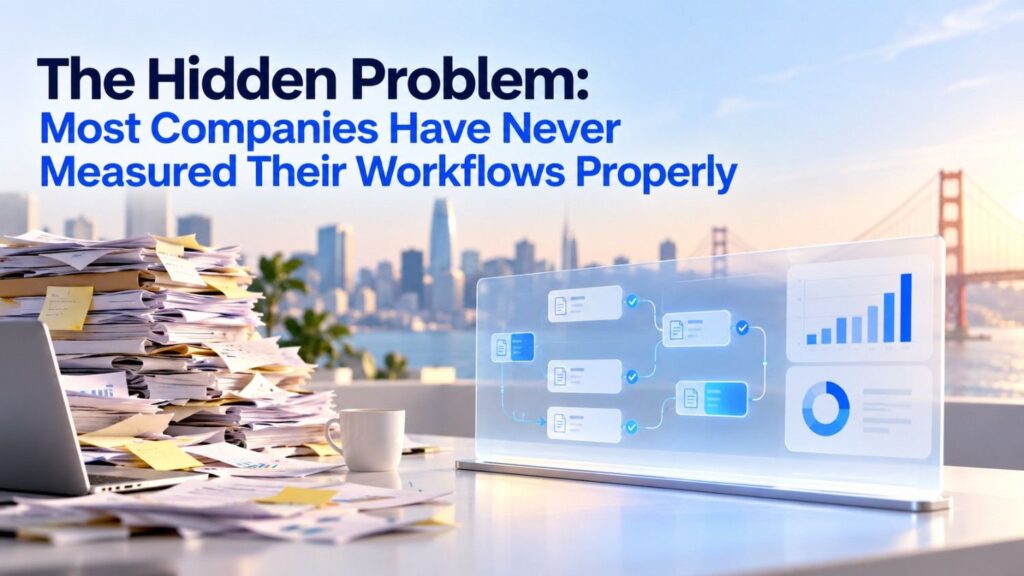
The Hidden Problem: Most Companies Have Never Measured Their Workflows Properly
Businesses often begin automation projects by asking which software they should buy.
A better starting point is understanding what employees actually do.
The company should examine a complete process from the first request to its final outcome.
For example, a customer onboarding process may include gathering documents, checking information, creating accounts, assigning responsibilities, sending updates, and confirming completion.
Employees may know their individual responsibilities without understanding why the whole process takes so long.
Why Workflow Mapping Comes Before Buying AI
A workflow map makes hidden delays visible.
It should show where information enters, which systems are used, where human decisions occur, and what causes requests to become stuck.
It should also identify steps that exist because of outdated processes or unclear ownership.
Sometimes the best improvement is removing a redundant approval or fixing a broken connection between two applications.
AI is not required for every problem.
A company that uses AI to automate unnecessary steps may make the wrong process faster instead of designing a better one.
The Importance of Measuring Waiting Time
Employee handling time is only one part of a workflow.
A request may require 15 minutes of work but take three days to complete because it waits in multiple queues.
Automation could reduce the handling time by five minutes while leaving the three-day delay unchanged.
Alternatively, a system might remove a slow handoff and reduce the total process from three days to several hours.
The second improvement could create much more business value.
Companies should therefore measure both labor time and total time to completion.
Why Exception Rates Can Make or Break a Project
An exception occurs when a request cannot follow the standard path.
It may contain missing information, require an unusual decision, or involve a situation the system was not designed to handle.
Exception rates matter because they determine how much human work remains.
An agent that handles 80% of standard cases but struggles with the remaining 20% may still be valuable.
However, the company must understand whether difficult cases are significantly more expensive to review.
A small number of complicated exceptions can consume a large share of the expected savings.
This is why automation performance should be measured across different request types rather than summarized with one broad success percentage.
How San Francisco Businesses Can Build Their First Enterprise AI Workflow in 90 Days
The best way to start enterprise automation is not to launch agents across every department at once.
A company should select one process, establish a clear baseline, test the technology, and expand only after proving that it improves results.
A 90-day plan offers a practical structure for doing this without making the project unnecessarily complicated.
Days 1–15: Find the Right Workflow
Begin by identifying tasks that employees repeat frequently.
Review support requests, operational records, project updates, and administrative processes to determine where employees spend time.
A strong first candidate usually has a clear starting point, a measurable outcome, enough monthly volume to justify the work, and limited risk when something goes wrong.
Avoid starting with decisions involving large payments, sensitive employment matters, or actions that cannot easily be reversed.
Establish the Current Baseline
Before introducing any automation, collect information about the existing process.
Measure monthly volume, average handling time, waiting time, error rates, rework, and total cost where possible.
If the company cannot measure these values precisely, start with a representative sample of historical requests.
The baseline will provide the evidence needed to determine whether the new system improves performance.
Days 16–30: Design the Workflow and Its Safety Rules
Once the company understands the process, identify which parts should use standard software rules, which parts may benefit from AI, and which decisions need human approval.
Do not give an AI agent more responsibility than necessary.
For example, a customer service agent might be permitted to retrieve account information, check a refund policy, and prepare a response.
A separate system could handle the approved refund after the necessary checks.
This design is often easier to test and control than allowing one agent to perform every action.
Define What Happens When AI Is Uncertain
Every production workflow needs a clear failure path.
If information is missing, the system should ask for clarification or escalate the request.
If an external application is unavailable, the workflow should pause safely or retry within established limits.
If an agent produces an action that violates policy, the system should block it.
Employees must also know who is responsible for reviewing unusual outcomes.
Days 31–45: Test the Agent Against Historical Cases
Build the first version using the selected platform and approved business connections.
Begin with historical examples rather than giving the agent immediate access to live customer transactions.
Include straightforward cases, unusual cases, missing information, and requests that require approval.
Record whether the agent chooses the correct action, retrieves accurate information, and follows the company’s policies.
Test cases should also include misleading instructions inside documents or customer messages to ensure the agent does not treat untrusted material as permission to take sensitive actions.
Compare the AI Output With Real Business Outcomes
A useful evaluation should distinguish between generating a plausible answer and completing a task correctly.
For every case, compare the agent’s result against the known correct outcome.
Measure the time employees need to review or correct its work.
This provides a more reliable foundation for estimating the financial benefit than simply counting automated responses.
Days 46–60: Run a Limited Live Pilot
After the system passes the initial tests, introduce it to a small group of employees or a limited set of low-risk requests.
Keep the original process available in case the AI workflow fails.
During this stage, examine how the system performs with real information, changing conditions, and unexpected requests.
Employees should be able to report incorrect behavior and explain why the workflow created or removed work.
A successful pilot is not one in which the AI handles every request. It is one in which the company understands what the system can reliably do.
Days 61–75: Calculate the Real Return
Use the pilot results to update the original business case.
Replace estimated request volumes, coverage rates, and time savings with measured values.
Include software costs, review time, implementation work, and any additional support requirements.
Calculate the value of correct outcomes rather than treating all AI activity as productive.
If the system has improved the process but not created a positive financial return, investigate why.
It may be handling too few cases, using an expensive model for simple tasks, requiring too much review, or operating inside a workflow that still contains unnecessary steps.
Days 76–90: Expand Carefully or Redesign
If the pilot delivers reliable results, the company can consider expanding it to additional requests.
The next stage should include ongoing performance checks and clear ownership.
As new cases are introduced, automation quality may change. A system that succeeds with a narrow set of requests may struggle when given broader responsibilities.
If the pilot does not meet its targets, the company should not automatically abandon AI.
It may need to narrow the task, improve its data, use a different combination of rules and AI, or redesign the workflow.
The objective is to create a dependable operating process rather than reach an arbitrary automation percentage.
How to Choose the Right Enterprise Automation Platform
Businesses should resist the temptation to select a vendor solely because it offers the most advanced AI model.
Model capability matters, but it is only one part of a working automation system.
The best platform is the one that supports the company’s required processes, existing applications, security needs, and operating budget.
Start With the Business Systems You Already Use
An organization that relies heavily on project management software may benefit from automation built directly into that environment.
Another company may need a platform designed to connect many different applications.
A business with unusual internal processes might prefer a customizable application and workflow builder.
The correct choice depends on where the work happens and how much flexibility the process requires.
Compare Total Costs, Not Just Subscription Prices
Vendor pricing may involve subscriptions, usage fees, model costs, additional connections, implementation services, and support.
A low starting price does not always produce a low operating cost.
Businesses should estimate what happens when request volume increases, workflows become more complex, or agents need to retry failed tasks.
They should also consider the time employees spend monitoring and improving the system.
A more expensive product can be the better choice if it reliably completes more work with less supervision.
Ask Vendors for Evidence That Matches Your Workflow
Generic productivity claims are not enough.
A vendor should be able to explain how its system handles missing information, conflicting records, failed actions, and human approvals.
It should also support meaningful performance reporting.
The strongest evidence comes from testing the platform using the buyer’s own representative cases under agreed conditions.
Comparing vendors on the same cases makes the decision more useful than comparing unrelated customer success stories.
Why Security and Governance Will Become Central to AI Automation
The more actions an AI agent can perform, the more important its operating limits become.
A tool that summarizes public information carries different risks from one that can change bank account details, delete customer records, or grant access to confidential systems.
In October 2026, enterprise AI leaders were still publicly discussing the gap between agent capabilities and clear accountability for their actions.
Axios
This is not a small technical issue. It affects whether organizations can trust agents with meaningful business work.
Give Every Agent Only the Access It Needs
A customer support agent should not automatically receive finance administrator permissions.
An internal research agent should not be able to modify employee records simply because it can retrieve information from another application.
Businesses should provide limited, task-specific access and review permissions regularly.
When possible, sensitive actions should require approval from an authorized employee or a separate control system.
Keep a Record of Important Actions
Companies need to understand what an agent did and why an action occurred.
Useful records include the request received, information consulted, tools used, approvals obtained, and final outcome.
The records should be designed with privacy and security requirements in mind.
This information helps employees investigate mistakes, improve workflows, and demonstrate that important controls were followed.
Test for Errors Before They Reach Customers
AI agents can misunderstand instructions, rely on incomplete information, or respond incorrectly to misleading content.
Businesses should test for these situations before permitting agents to perform sensitive actions.
The US National Institute of Standards and Technology provides an AI Risk Management Framework and a generative AI profile that organizations can use when designing their risk controls.
NIST
+1
The practical lesson is that dependable automation requires continuous testing and oversight.
Security should be part of the workflow design from the beginning, not a feature added after deployment.
Will AI Agents Replace Employees or Change Their Jobs?
The phrase death of manual workflows suggests that large parts of business operations could disappear.
Some repetitive tasks are likely to require much less human effort as automation improves.
But replacing a task is not the same as replacing an entire job.
A finance employee may spend less time collecting documents and more time investigating unusual transactions.
A customer support worker may handle fewer basic questions while becoming responsible for complicated customer issues.
A project manager may spend less time gathering status updates and more time resolving delays.
These changes can improve productivity, but they can also create difficult workforce decisions.
Companies may use automation to avoid additional hiring, reorganize responsibilities, or change the skills they expect employees to develop.
The outcomes will differ across businesses and industries.
Why Human Judgment Could Become More Valuable
As software takes on routine work, employees may become more responsible for unusual decisions.
They will need to understand when AI recommendations make sense and when they should be challenged.
A business that removes administrative work but fails to train employees for more complex responsibilities may not realize the full benefit.
Automation therefore requires a workforce plan as well as a technology plan.
Employees should understand which activities are changing, what the systems can and cannot do, and how their responsibilities will develop.
The Best Outcome Is Not Always a Smaller Team
For a growing startup, automation may allow an existing team to serve more customers without immediately hiring additional people.
For a mature organization, it may reduce costs in some operations.
For a service business, it could improve response times and allow employees to focus on higher-value customer work.
These are different outcomes, and each requires different measurements.
The goal should be to improve the economics and quality of the business rather than assume every automation project must reduce headcount.
The Next Competitive Advantage: Companies That Design Better Workflows
As AI models become more widely available, access to advanced language technology alone may become a weaker advantage.
Two companies can use similar models and achieve very different results.
One may have accurate internal information, clear operating rules, useful software connections, and well-tested processes.
The other may have fragmented records, unclear responsibilities, and workflows that nobody has properly documented.
Even if both use the same AI model, their automation systems are unlikely to perform equally well.
Better Data Makes Agents More Useful
An agent cannot reliably update a customer account when the company has several conflicting versions of that customer’s information.
It cannot follow a policy consistently when the policy is missing or out of date.
It cannot coordinate a process effectively when responsibilities are unclear.
For many businesses, improving the quality and organization of internal information will be a necessary part of automation.
That work may be less exciting than launching a new AI agent, but it can have a larger effect on practical performance.
Reliable Integrations Become a Business Asset
A useful agent must often communicate with several applications.
Those connections need to work when information changes, a service becomes temporarily unavailable, or a transaction fails.
Businesses should pay attention to whether their automation platforms can detect failures, avoid duplicate actions, and recover safely.
The ability to complete work reliably across existing systems can be more valuable than a highly capable agent operating in isolation.
Companies Need to Own Their Workflows, Not Just Their Software Contracts
A company should understand the logic behind its important processes even when a vendor provides the technology.
That includes knowing where information comes from, who approves decisions, and how work can continue when the platform is unavailable.
Clear documentation reduces dependence on individual employees and makes it easier to compare or replace technology later.
It also helps businesses improve processes as their requirements change.
What San Francisco Founders Should Build Next
For founders entering enterprise automation, the market contains major opportunities alongside increasingly strong competition.
General-purpose AI assistants are becoming widespread, making it harder to stand out with a product that simply answers questions or executes basic commands.
More promising opportunities may exist in solving difficult problems for specific industries and workflows.
Build Around a Painful Process, Not a General AI Promise
A startup promising to automate everything may struggle to explain its value.
A product designed to reduce a specific type of insurance processing delay, finance review task, or enterprise support issue can offer a clearer business case.
Founders should identify a process with measurable cost, meaningful volume, and an outcome customers already care about.
That makes it easier to define success, design the product, and justify spending.
Design Human Approval as a Strength
Founders sometimes treat human involvement as evidence that automation is incomplete.
In enterprise environments, that can be the wrong assumption.
A product that prepares work accurately, identifies exceptions, and requests approval at the right time may be more attractive than one that attempts unrestricted autonomy.
Businesses want useful automation they can control.
Making human oversight simple and efficient can therefore be a product advantage.
Create Evidence Competitors Cannot Easily Copy
A good product demonstration can attract attention, but repeatable customer results are more valuable.
Founders should build systems that help customers measure correct completion, time saved, cost, and operational reliability.
Over time, aggregated and properly protected performance evidence can help a startup understand which workflows its product handles best.
That knowledge can improve product design and make commercial claims more credible.
Avoid Building Another Layer of Unnecessary Software
Enterprise customers already have many applications.
A new automation startup should consider whether it can fit into existing processes rather than requiring large changes to how employees work.
Reducing setup effort, making integrations dependable, and providing clear controls can improve adoption.
The product should eliminate more complexity than it creates.
Final Takeaway: Manual Workflows Will Not Disappear Overnight, but Unnecessary Manual Work Is Becoming Harder to Defend
Enterprise automation is entering a different phase.
For years, businesses used software to record information, organize tasks, and connect applications. Employees still handled many of the decisions and handoffs between those systems.
AI agents are beginning to change that arrangement.
San Francisco companies such as Glean, WRITER, Decagon, Sierra, Asana, and Retool illustrate how enterprise software is moving toward systems that can interpret information and help complete work.
The opportunity is significant, but it should not be confused with proof that every business process can already run autonomously.
Public research shows that AI adoption is widespread while enterprise-scale agent deployment remains less common. Companies are still learning how to combine model capabilities with data access, security, oversight, and dependable business operations.
Our original financial scenario demonstrates why partial automation deserves serious attention. A modeled organization handling 5,200 monthly requests could save approximately 210 gross labor hours per month under the stated assumptions.
After recurring software and additional oversight costs, the modeled economic benefit falls to about $3,704 per month. That is meaningful, but it also shows why vendor promises must be tested against actual operating data.
The largest gains will not necessarily come from automating the greatest number of tasks.
They will come from identifying costly delays, removing unnecessary steps, connecting information, improving decisions, and giving employees better tools to handle the work that still needs human judgment.
For San Francisco startups, the opportunity is to build automation products that produce measurable results rather than impressive demonstrations.
For business leaders, the next step is more practical: choose one painful workflow, measure its current performance, test automation under real conditions, and expand only when the results justify it.
The death of manual workflows may be an exaggerated headline. The decline of repetitive, disconnected, and poorly designed manual work is a much more credible business opportunity.
And the companies that learn to redesign that work—not simply add AI to it—will be in the strongest position to benefit.
Research and editorial note: Prepared for SFTechScene using public information available through October 16, 2026. Reported survey findings and product announcements are attributed to their sources. All SFTechScene financial projections are original illustrative calculations, not verified financial outcomes from named San Francisco companies. The article does not claim a proprietary survey, unpublished transaction dataset, or independently audited vendor comparison.