
Workplace collaboration is going through its biggest change since companies started moving their conversations from email to Slack. The next shift is not simply about sending messages faster, holding fewer meetings, or summarizing long conversations. It is about giving teams AI coworkers that can understand what needs to happen, find the right information, coordinate tasks, and help complete work.
For San Francisco startups, this change could reshape how companies operate. A small team may soon have AI agents handling project updates, answering internal questions, preparing customer reports, routing requests, and following up on unfinished tasks. Instead of asking five people for an update, a manager could ask an AI coworker to check the work, identify problems, and prepare a report.
But there is an important difference between an AI assistant that writes a good summary and an AI coworker that actually helps a team finish a project. The second must understand business context, work across different tools, respect permissions, and know when a person needs to make a decision.
That is where San Francisco’s latest workplace AI companies are competing. Salesforce is turning Slack into a place where people and AI agents work together. Notion is building agents around shared company knowledge. Startups such as Lindy and Relevance AI are offering ways to create AI workers for repeatable business tasks.
The opportunity is large, but so are the questions. How much employee time can these systems really save? Which workplace tasks should companies automate first? And will AI coworkers make collaboration better, or simply create a new flood of automated messages?
To answer those questions, SFTechScene examined published workplace research, reviewed the capabilities of leading AI collaboration platforms, and developed original productivity and cost models. The goal is to separate what the evidence shows from what businesses can reasonably expect.
The Short Version: Workplace Software Is Moving From Helping People Communicate to Helping Them Complete Work
The first generation of workplace collaboration software helped employees communicate. Email made written communication possible across offices. Slack made discussions faster and easier to organize. Project management software helped teams track assignments, deadlines, and progress.
The problem is that employees still have to perform much of the work connecting those systems.
Someone reads a message, identifies a request, searches for supporting information, creates a task, updates a spreadsheet, asks for approval, and follows up when nothing happens. These activities may be necessary, but they consume time that could otherwise go toward serving customers, building products, or solving difficult problems.
AI coworkers are designed to reduce this coordination burden.
They can read approved information, answer questions, create drafts, update connected systems, and trigger workflows. More advanced agents can carry out several steps before asking a person to review the result.
The change matters because workplace communication has become extremely demanding. Microsoft’s 2025 Work Trend Index reported that employees were interrupted about 275 times during a working day by meetings, emails, or chats. Its research combined a survey of 31,000 workers across 31 countries with productivity signals and other evidence.

Microsoft
A separate Microsoft analysis reported daily averages of 117 emails and 153 Teams messages among the workers and activity measured. These are not San Francisco-specific figures, but they show the scale of the communication problem that workplace AI companies want to address.
Microsoft Switzerland News Center
275
Interruptions per dayMicrosoft 2025 research
60%
Time on work about workAsana Anatomy of Work
81%
Leaders expecting agent integrationMicrosoft 2025 survey
Asana’s Anatomy of Work research provides another useful measure. It found that knowledge workers spent about 60% of their time on activities surrounding their main work, including searching for information, managing changing priorities, attending meetings, and communicating about tasks.
Asana
These figures come from different studies and populations, so they should not be added together or treated as a single local measurement. They do, however, point toward the same problem: businesses have built powerful communication systems without removing the effort required to coordinate everything happening inside them.
The next generation of workplace collaboration tools is trying to solve that problem.
The companies that succeed may not be the ones creating the most impressive chatbots. They may be the ones that help employees spend less time managing work and more time completing it.
Why Slack Changed Workplace Collaboration but Did Not Solve the Coordination Problem
Slack Made Communication Faster, but Work Still Needs an Owner
Slack became popular because it offered a better way for teams to organize workplace conversations. Instead of digging through endless email chains, employees could create channels for projects, departments, customers, and important announcements.
That made it easier for teams to share information without being in the same office.
Yet communicating a decision is different from carrying it out.
Imagine a San Francisco software startup preparing to launch a new product. The engineering team confirms that a feature is ready. Marketing needs to update the website. Sales needs a new product description. Customer support needs training materials.
The decision may appear in a Slack channel, but someone still has to turn that decision into assigned work.
If nobody takes ownership, important actions can disappear inside the conversation. If several people think someone else is responsible, a simple launch can turn into a week of reminders and meetings.
AI coworkers are being built to recognize these gaps and help close them.
The Hidden Cost of Searching for Company Knowledge
Another problem is that employees often cannot find information that already exists.
A product decision might be discussed in Slack. The explanation may be in a Notion page. The approved requirements could be stored in Google Drive. The current status might live in a project tracker.
Employees spend time moving between these tools because no single application contains the full picture.
This creates a particularly difficult problem for fast-growing startups. As teams expand, new employees must learn where information lives, who understands each system, and which decisions remain current.
An AI coworker connected to approved company systems can reduce some of this searching.
Instead of asking a teammate where a document is stored, an employee could ask which pricing policy applies to a particular customer. The agent could retrieve the relevant policy, identify the latest approved version, and provide a link to the original source.
The benefit is not simply a faster search result. It is the ability to make a decision with less effort.
Why More Notifications Are Not the Answer
Businesses have often tried to solve missed work by adding reminders, alerts, dashboards, and reporting meetings.
Each new system promises better visibility. However, it can also create another place employees must check.
AI could make this problem worse if companies deploy agents without changing their communication rules.
Imagine five agents posting hourly updates into the same project channel. Employees might receive more information than ever, yet understand less about what actually needs attention.
The better approach is to design AI coworkers around exceptions and outcomes.
A useful agent should quietly handle routine steps, record what happened, and notify a person when a decision, approval, or unusual problem requires attention. It should not create another constant stream of messages.
What Is an AI Coworker, and How Is It Different From a Chatbot?
Chatbots Answer Questions. AI Coworkers Participate in Workflows.
A chatbot usually responds to a question. It may explain a policy, summarize a document, or suggest how to perform a task.
An AI coworker is a broader system that can work with information and take permitted actions.
For example, a chatbot might explain how a company processes customer refunds. An AI coworker could identify a refund request, retrieve the relevant order, check the policy, prepare the refund in the correct system, and ask an employee to approve it.
The distinction is important because the second system affects real business operations.
| Capability | Traditional chatbot | AI coworker |
|---|---|---|
| Answer questions | Yes | Yes |
| Search connected documents | Sometimes | Usually central to its work |
| Understand task context | Limited or session-based | Can draw on connected work records |
| Create or update tasks | Requires integration | Often part of the workflow |
| Coordinate several steps | Limited | A core goal |
| Request human approval | Possible | Important for sensitive actions |
| Work on recurring schedules | Not usually the main feature | Often supported |
| Report completed outcomes | Sometimes | Should be built into the design |
These differences describe common product patterns, not strict technical categories. A chatbot can gain agent capabilities through integrations, and an AI coworker may still need human instructions for many tasks.
The Most Useful AI Coworkers Need Four Things
First, they need access to relevant information. An agent cannot prepare a reliable customer update if it cannot see the correct customer record.
Second, they need clear instructions and boundaries. Employees should know what the agent is allowed to do, which systems it can change, and when it must ask for approval.
Third, they need tools for taking action. Reading a task is different from updating its status, assigning an owner, or preparing the next step.
Fourth, they need a reliable way to show their work. If an agent changes a record, people should be able to see what changed, why it happened, and how to correct a mistake.
These requirements explain why the workplace AI market is becoming more complicated than the early chatbot market.
The challenge is no longer only generating useful text. It is connecting information, decisions, actions, and accountability.
How San Francisco Is Becoming a Testing Ground for AI Coworkers
San Francisco has an unusual combination of companies working on this problem.
The area includes established workplace software businesses, AI model developers, new agent platforms, and startups experimenting with smaller teams supported by automation.
This creates opportunities for companies to develop tools that fit into the software businesses already use.
Salesforce and Slack Are Turning Conversations Into an AI Workspace
One of the most important developments is the transformation of Slack under Salesforce.
In October 2025, Slack announced a larger effort to bring AI agents, company information, and business applications into the same working environment. Its plans included a rebuilt Slackbot, employee-facing agents, and tools allowing outside AI systems to connect with Slack conversations.
Slack
During 2026, Slack expanded these capabilities.
Its January 2026 updates introduced the redesigned Slackbot as a workplace assistant. Later updates added connections to outside applications, interactive reports, agent skills, and additional controls over what agents could access.
Slack
In August 2026, Slack introduced features designed to make shared work with agents easier. Slack Code allows people and supported AI agents to collaborate in dedicated channels, review changes, discuss results, and work on more complex tasks together.
Slack Developer Docs
By September 2026, Slack was presenting its platform as a connected workspace where Slackbot, agents, Salesforce information, and employees could collaborate through conversations.
Slack


8
The strategic goal is clear. Slack does not want to remain only the place where employees talk about work. It wants to become one of the main places where people direct, review, and complete work with AI.
For businesses, the appeal is that employees may not need to learn an entirely new interface. They can interact with agents in familiar channels.
The risk is that a familiar interface can make automated actions feel safer than they really are. Companies still need strict controls before giving an agent permission to send information, change important records, or perform sensitive tasks.
Notion Is Bringing AI Workers Into Shared Company Knowledge
San Francisco-based Notion is approaching the opportunity through documents, databases, and internal knowledge.
In February 2026, Notion introduced Custom Agents that can run on schedules or respond to triggers. The company described uses such as answering repeated questions, routing incoming requests, creating project updates, and handling recurring work.
Notion 3.3: Custom Agents
This matters because many teams already use Notion as a shared source of company information.
For example, a startup might keep onboarding instructions, marketing plans, product requirements, and project trackers in Notion. An AI agent can use this information to answer approved questions or prepare updates using existing records.
Notion’s agent system also includes permissions for controlling which content and connected services an agent can access. Its product information describes connections with Slack, email, calendars, and other business tools.
Notion
This makes Notion especially relevant for tasks that depend on structured company knowledge.
Instead of asking employees to remember which pages need updating, a company could create an agent that reviews selected records and prepares a weekly summary.
The challenge is keeping that underlying information accurate. An AI agent built on outdated documentation may produce polished but misleading answers.
Lindy Is Working Toward the AI Teammate Model
represents another approach.
The San Francisco-founded company describes its product as an AI teammate that connects with workplace tools, including Slack, and helps complete work across applications. Its stated use cases include investigations, reports, dashboards, presentations, and customer relationship management updates.
This model focuses on reducing the number of manual steps between an employee’s request and a finished task.
Consider a sales manager who needs to prepare for an important customer meeting.
The usual process might involve reviewing CRM records, reading previous meeting notes, checking customer activity, identifying outstanding questions, and preparing a short briefing.
An AI coworker could gather much of that information and assemble a draft.
A manager would still need to check the facts and decide how to approach the customer. However, the time required to prepare could fall substantially if the integration is reliable.
The product’s value depends on how often it completes the work correctly, not simply on how many applications it connects.
Relevance AI Is Making Specialized AI Workers Easier to Build
has a San Francisco presence alongside operations in other cities. It focuses on helping businesses build teams of specialized AI agents without requiring every user to write code.
Relevance AI
The idea is that one general AI assistant may not be the best tool for every business task.
A customer support agent might need access to support tickets and help articles. A sales research agent may need customer records and public company information. An operations agent may need project trackers and approval workflows.
Each requires different instructions, information, and permissions.
A platform for coordinating these specialized agents can help businesses manage the work they perform.
However, multiple agents also create more handoffs. If one agent produces incorrect information, another may act on it. That makes testing, tracking, and approval rules especially important.
Glean Shows Why Company Knowledge Is Becoming Critical Infrastructure
Although headquartered in Palo Alto rather than San Francisco proper,
is an important Bay Area company in this market.
Glean began with a focus on helping employees search across company systems. Its search tools are designed to respect existing access permissions and retrieve information from connected applications.
Instantly Find Answers Across All Apps
In February 2025, Glean announced an agent platform for carrying out business tasks with company knowledge. It expanded those capabilities in May 2025, including options for coordinating workflows and managing agent access.
Glean Press
+1
Glean illustrates a major lesson for workplace AI.
A system that understands where information lives may be better positioned to help complete work than an agent with no access to company context.
But information access is only the foundation. Businesses must still measure whether the system produces correct answers, safe actions, and useful results.
Original SFTechScene Research #1: How Much Workplace Time Could AI Coworkers Actually Recover?
One of the biggest claims in workplace AI marketing is that agents will give employees hours of their week back.
That sounds attractive, especially for San Francisco startups trying to grow without increasing operating costs at the same pace.
But the claim needs closer examination. Time spent communicating is not automatically wasted, and a task completed faster does not always mean a company saves money.
For this analysis, SFTechScene built a workforce capacity model using published research on how employees spend their time.
Research Methodology: Measuring the Recoverable Coordination Opportunity
We used Asana’s reported finding that knowledge workers spend approximately 60% of their working time on work about work as a starting assumption.
The source study is not specific to San Francisco. We therefore use it as an external benchmark rather than claiming it describes the exact working habits of Bay Area companies.
Asana
Our model makes five assumptions:
- A company employs 100 knowledge workers.
- Each employee works 40 hours per week.
- Coordination activities represent 60% of working time, following the published benchmark.
- The company operates for 48 working weeks per year after allowing for time off.
- AI coworkers recover 5%, 10%, or 15% of that coordination time under three hypothetical scenarios.
The recovery rates are our scenario assumptions. They are not measured outcomes from an experiment, and there is no evidence that every company can achieve them.
We then calculate the hours that could become available for other work.
Finding #1: Small Improvements Can Create Large Capacity Gains
A 40-hour workweek contains 24 hours of coordination work under the 60% benchmark.
Recovering 5% of those 24 hours produces 1.2 hours per employee each week. Recovering 10% produces 2.4 hours. A 15% recovery produces 3.6 hours.
Modeled annual hours recovered for a 100-person company
Original SFTechScene scenario calculations, not observed productivity outcomes.
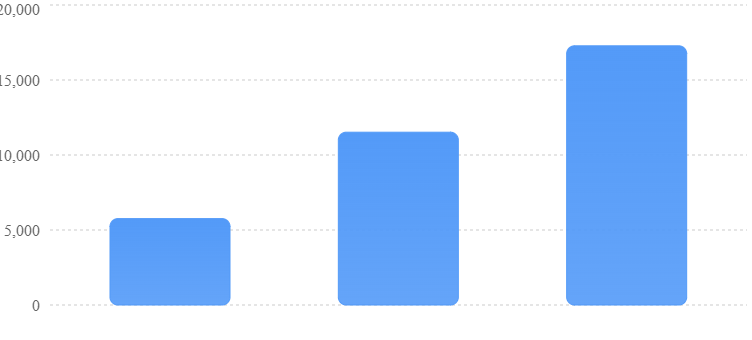
Source: SFTechScene calculations using Asana’s published coordination-time benchmark, a 40-hour week, 100 employees, and 48 working weeks.
| Recovery scenario | Hours recovered per worker/week | Company hours/year |
|---|---|---|
| Conservative: 5% | 1.2 | 5,760 |
| Moderate: 10% | 2.4 | 11,520 |
| Higher: 15% | 3.6 | 17,280 |
The calculation is:
\[ H=N\times W\times C\times R\times Y \]
Where \(N\) is employee count, \(W\) is weekly hours, \(C\) is the coordination-time share, \(R\) is the assumed recovery rate, and \(Y\) is annual working weeks.
The result shows why collaboration automation is worth investigating.
Even modest improvements could create meaningful working capacity across an organization.
However, these numbers do not establish that AI will produce the improvements. They show what the business impact would be if those improvements were achieved.
Finding #2: The Financial Opportunity Depends on What Employees Do With the Time
Recovered hours have economic value, but that value is not the same as actual cash savings.
For a second model, SFTechScene applies an illustrative fully loaded employment cost of $60 per hour. This is a modeling assumption rather than a measured San Francisco wage or a verified average compensation rate.
Fully loaded cost means the estimated employment expense associated with an hour of work, including pay and other employment costs.
Hypothetical capacity value, not realized savings or profit.
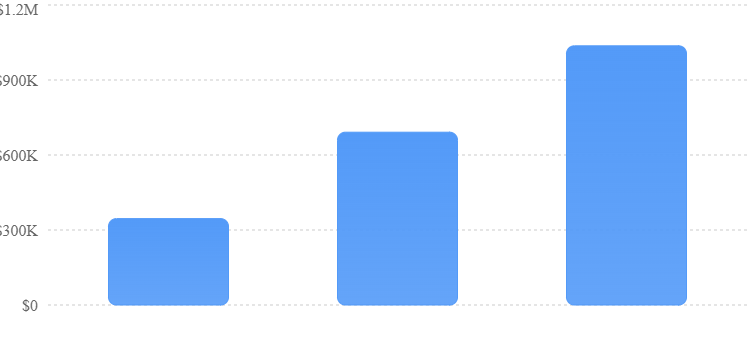
The moderate scenario produces 11,520 recovered hours and a gross capacity value of $691,200 a year.
That does not mean the company earns an extra $691,200 or reduces its payroll by that amount.
If employees use the time to improve products, shorten customer response times, or handle more business, the benefits may appear as additional output, faster growth, or better service.
If that time cannot be used productively, much of the financial value may never be realized.
The correct business question is therefore not how many hours an AI agent claims to save. It is what the company can achieve with those hours.
Finding #3: The Biggest Opportunity May Be Reducing Delays Between Teams
Most workplace AI products focus on making an individual employee faster.
That is useful, but collaboration creates another opportunity: reducing the time work spends waiting for people or information.
Consider a customer request that needs approval from sales, finance, and operations.
Each employee might spend only a few minutes on the task. Yet the request could remain unfinished for two days because information and approvals move between people at different times.
An AI coworker may be able to identify the required approvers, prepare the supporting information, and route the request to the next person without repeated reminders.
The benefit is not only labor time saved.
It may be a shorter customer wait, quicker billing, or faster delivery.
These benefits are difficult to estimate using general workforce surveys, because they depend on each company’s workflows. Businesses should measure them directly rather than treating employee time savings as a complete measure of value.
What This Research Does and Does Not Prove
The original contribution here is the transparent modeling of possible company-level outcomes under stated assumptions.
It is not a new employee survey or an experimental estimate of AI’s causal impact.
The 60% benchmark comes from existing research. The 5%, 10%, and 15% improvement rates are sensitivity scenarios chosen to show how results change. The annual hours and financial values are original calculations based on those inputs.
A stronger San Francisco-specific estimate would require observed workflow logs from local companies, measured task completion times, and a comparison between teams using and not using AI.
That distinction matters. A useful business model should make decisions easier without pretending that assumptions are proven facts.
Original SFTechScene Research #2: Which Workplace AI Tasks Have the Strongest Business Case?
Not every workplace task is equally suitable for an AI coworker.
Some tasks happen frequently, have clear rules, and produce results that are easy to check. Others involve sensitive judgment, incomplete information, or consequences that are difficult to reverse.
To identify promising opportunities, SFTechScene developed a practical workflow scoring framework.
Research Methodology: Five Factors That Determine Automation Readiness
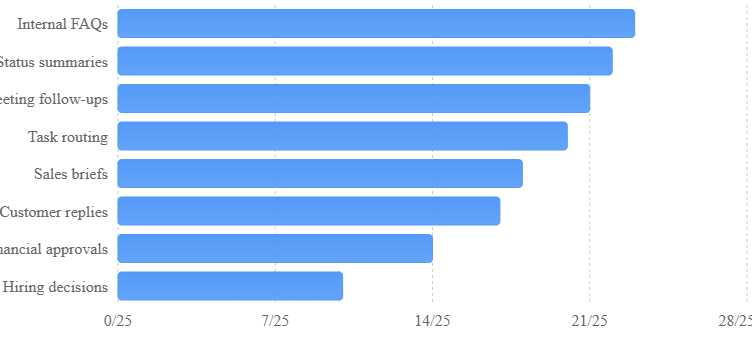
The framework evaluates tasks using five factors: how often the work occurs, how clearly the steps can be defined, how easily the result can be checked, how serious the consequences of an error would be, and how complicated the required system access is.
For each factor, we assign an editorial score from 1 to 5. A higher score represents greater suitability for a controlled AI pilot. For error risk and access complexity, a higher score means lower risk and simpler access.
These are explicit analyst judgments, not scores produced by a representative company dataset. They should be tested against actual workflow data before guiding a large deployment.
| Workplace task | Frequency | Clear rules | Easy to verify | Low error risk | Simple access | Total /25 |
|---|---|---|---|---|---|---|
| Internal FAQ answers | 5 | 5 | 5 | 4 | 4 | 23 |
| Weekly status summaries | 5 | 5 | 4 | 4 | 4 | 22 |
| Meeting follow-up drafts | 5 | 4 | 4 | 4 | 4 | 21 |
| Routine task routing | 5 | 4 | 4 | 4 | 3 | 20 |
| Sales research briefs | 4 | 4 | 4 | 3 | 3 | 18 |
| Customer-facing replies | 5 | 4 | 3 | 2 | 3 | 17 |
| Financial approvals | 4 | 3 | 4 | 1 | 2 | 14 |
| Hiring decisions | 3 | 2 | 2 | 1 | 2 | 10 |
SFTechScene editorial scoring model. Scores are illustrative and depend on the permissions, tools, policies, and workflow design used by a particular business.
Unweighted sum of five editorial criteria scored from 1 to 5, not empirical success rates.
Finding #4: Internal Knowledge Tasks Are Good Starting Points
Internal questions and status summaries score highly because they usually have clear source material and relatively low consequences when handled with proper review.
For example, an employee might ask where the latest onboarding checklist is stored.
An agent can search approved information and return the relevant document.
If the agent cannot find an answer, it can direct the employee to the appropriate person.
This is substantially safer than giving the same agent permission to approve a payment or make a hiring decision.
The lesson for San Francisco startups is straightforward. Begin with tasks where the AI can provide value while having limited authority to change anything.
Finding #5: High-Stakes Decisions Need a Different Operating Model
Financial approvals and hiring decisions score poorly in the framework because mistakes can have serious consequences.
AI may still be useful in these workflows.
For instance, an agent could gather documents, check whether required fields are complete, identify missing information, and prepare a recommendation.
But an authorized person should make the final decision.
The strongest early opportunity is often to automate preparation rather than judgment.
A well-designed AI coworker can make human decisions faster without taking control of decisions it should not make.
Original SFTechScene Research #3: The Real Economics of an AI Coworker
Businesses evaluating AI agents often compare software subscription costs.
That comparison is incomplete.
A low-cost agent may become expensive if employees must repeatedly correct its work. Another agent may cost more but deliver reliable results with little supervision.
To understand the difference, SFTechScene built a detailed workflow cost model.
Research Methodology: A 500-Task Weekly Pilot
Consider a hypothetical San Francisco company processing 500 routine internal requests each week.
Before using AI, each request takes an average of eight minutes of employee work.
The company tests an AI coworker that reduces routine human handling to three minutes per request. The agent can prepare information and handle standard steps, but certain cases still need additional attention.
Our central scenario assumes that 15% of requests require another eight minutes of human work. We also include two hours of weekly supervision and quality checks.
| Model input | Value |
|---|---|
| Requests per week | 500 |
| Human time before AI | 8 minutes per request |
| Human time after AI, base handling | 3 minutes per request |
| Cases needing extra review | 15% |
| Additional human time per reviewed case | 8 minutes |
| Weekly management and quality checks | 2 hours |
| Working weeks per year | 48 |
| Illustrative employment cost | $60/hour |
These values are illustrative assumptions, not measured outcomes at a named startup.
Finding #6: Review Time Can Change the Entire Business Case
Without AI, the weekly work is:
\[ 500\times8=4{,}000\text{ minutes} \]
That equals approximately 66.7 employee hours.
With AI, the central scenario includes 1,500 minutes of basic handling, 600 minutes of extra review, and 120 minutes of weekly oversight.
The total becomes 2,220 minutes, or 37 hours.
That leaves 29.7 hours of weekly capacity recovered.
At 48 working weeks, the annual result is 1,424 recovered hours.
Using the illustrative $60 hourly cost, the gross annual capacity value is $85,440.
However, a different review rate produces a different result.
Original deterministic sensitivity analysis; every scenario assumes 500 requests weekly, three minutes basic human handling, eight additional minutes per reviewed case, and two weekly oversight hours.
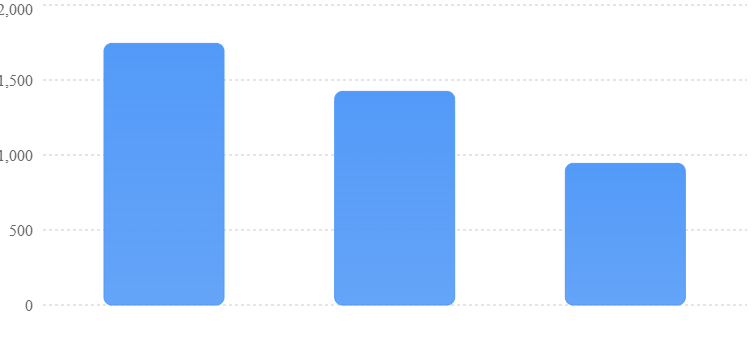
| Extra-review rate | Annual hours recovered | Gross capacity value at $60/hour |
|---|---|---|
| 5% | 1,744 | $104,640 |
| 15% | 1,424 | $85,440 |
| 30% | 944 | $56,640 |
The important finding is not that one of these outcomes is guaranteed.
It is that the amount of human correction required can greatly affect whether a workplace agent is worth using.
The model also explains why businesses should avoid evaluating AI coworkers only through successful demonstrations.
A system that completes an impressive task once may still create too much review work when processing hundreds of tasks every week.
The Cost Per Correctly Completed Task Matters More Than the Cost Per AI Request
A better measure is the total cost of completing an acceptable task.
That includes software usage, employee review, corrections, supervision, and other direct operating costs.
For this model, we can express the measure as:
\[ \text{Cost per accepted task}= \frac{\text{Total operating cost}}{\text{Accepted tasks}} \]
If an agent runs 500 times but only 400 tasks are accepted without further repair, its headline price per run does not tell the full story.
Businesses should also measure how often the agent changes the wrong record, misses required information, or creates a task that another employee must undo.
For financial analysis, compare the total cost of the AI-supported process against the cost of the existing process. Do not count the same employee time saving twice or ignore the cost of adding and maintaining the agent.
How to Turn the Research Into a Real Pilot
A startup can validate the assumptions by selecting a real workflow and recording at least two weeks of baseline activity.
Employees should record how many requests arrive, how much work each requires, and why certain cases take longer.
Then the team should run an AI-assisted pilot on comparable tasks. Ideally, some requests should remain in the existing process so managers can compare outcomes during the same period.
This gives the business actual evidence about completion times, errors, review effort, and employee experience.
The company can then replace our illustrative assumptions with its own measured numbers.
That is where the model becomes a practical decision tool rather than an estimate based on general industry research.
What Academic Research Reveals About AI and Real Workplace Productivity
Productivity studies offer an important warning: giving employees AI tools does not automatically change how teams work together.
A 2025 randomized field study examined generative AI access among roughly 6,000 workers across different industries. Workers using the tools spent less time on email, but the research did not find a significant reduction in meeting time.
arXiv
The study helps explain why individual AI assistants may not be enough.
An employee can write an email faster without changing how many approvals a project needs. A manager can produce a meeting summary without reducing the number of meetings the team schedules.
Some collaboration problems require changes to the way teams organize work.
That is also why companies should be cautious about broad claims that every AI tool improves productivity.
Another randomized study, involving 16 experienced open-source software developers completing 246 tasks, found that access to early-2025 AI coding tools increased task completion time by 19% in the tested setting. The researchers discussed several possible reasons, including the complexity of existing projects.
arXiv
These findings do not mean AI agents are ineffective. They mean the outcome depends on the task, the people using the system, and the time spent checking its work.
For workplace collaboration, the implication is especially important.
A tool should be judged by whether the entire team completes work better, not by how quickly one employee produces a draft.
How AI Coworkers Are Changing Everyday Work Inside San Francisco Startups
Product Teams: Turning Discussions Into Clear Action Items
Product development often requires engineers, designers, marketers, and managers to coordinate dozens of small decisions.
A new feature might be technically complete but still need documentation, testing, pricing updates, and customer communication.
An AI coworker can help track those dependencies.
For example, it could review an approved project discussion, identify agreed tasks, and prepare updates in the relevant tracking system.
If a release is approaching and an important requirement remains incomplete, the agent could notify the responsible person.
The team would still decide what to build and whether the product is ready. The AI would reduce the effort involved in keeping everyone informed and ensuring that agreed work is tracked.
What Product Managers Should Measure
The most useful measures include the time between a decision and task creation, the percentage of tasks with clear owners, the number of overdue dependencies, and how long a release waits for internal approval.
A product team should also measure incorrect tasks created by the agent.
Automating project coordination is not useful if managers must spend additional time cleaning up the tracking system.
Sales Teams: Building Better Customer Context
Sales teams frequently work across CRM systems, email, meeting records, and internal messages.
Before a customer call, an account manager may need to review recent conversations, check unresolved support issues, and understand changes in the customer’s account.
An AI coworker can help assemble that information.
For a San Francisco business selling software to enterprise customers, this can be useful because large accounts often involve several people and long sales cycles.
A well-designed agent could prepare an account briefing using approved sources, identify unanswered questions, and suggest follow-up actions for the account owner to review.
The manager should not assume that every recommendation is correct. Customer information may be outdated, and AI-generated notes can misinterpret what someone said.
The best system provides source links, makes uncertainty visible, and allows employees to correct the record.
Customer Support: Connecting Internal Knowledge to Faster Service
Customer support teams often lose time trying to find the right answer.
An issue may require checking product documentation, reviewing previous support cases, and asking an engineer whether a problem has been fixed.
AI coworkers can help gather the supporting information.
They may also route cases to the correct team and prepare summaries that reduce the need for customers to repeat their problem.
For example, an agent could detect that several customers have reported the same error and prepare an internal issue report with affected cases.
However, the agent should not invent a fix or promise that a problem has been resolved when the engineering team has not confirmed it.
Support workflows need reliable source information and clear escalation rules.
Human Resources: Making Onboarding Easier
Onboarding provides a useful example of collaboration work that can be automated without giving AI control over sensitive decisions.
A new employee needs access to tools, information about company policies, introductions to teammates, and a clear understanding of their responsibilities.
Much of this work involves repeated questions.
An AI coworker could guide employees through approved onboarding documents, help them locate training materials, and remind the relevant team when an access request is incomplete.
It could also gather feedback about confusing instructions so the company can improve its onboarding process.
Sensitive employee records, performance decisions, pay information, and private conversations require much stricter access controls.
A new employee asking about vacation rules should not give an AI agent access to the entire human resources database.
Marketing Teams: Coordinating Campaigns Across Departments
Marketing campaigns often require information from product, sales, design, and legal teams.
The creative work may be completed quickly, while the surrounding approvals take much longer.
An AI coworker could identify missing campaign assets, prepare status reports, track deadlines, and remind the right people when approvals are pending.
For a small San Francisco startup, this may reduce the need for one person to spend several hours each week checking project progress.
The AI should not publish unapproved marketing claims or change a campaign budget without the necessary authorization.
Its strongest early role is helping the team keep work moving while employees remain responsible for the message and final decisions.
The Biggest Change: AI Coworkers Could Make Collaboration Less Dependent on Meetings
Meetings exist for several different reasons.
Some help people make difficult decisions, resolve disagreements, or explore ideas together. Others are primarily used to report progress.
The second type creates a clear opportunity for AI.
From Status Meetings to Automated Progress Reports
Imagine a ten-person team holding a 30-minute weekly status meeting.
That meeting consumes five combined employee hours, excluding preparation and follow-up.
If an AI coworker prepares an accurate status report before the meeting, employees may be able to shorten the session or replace it with written updates.
However, the company should not assume every meeting can disappear.
A team discussing a serious customer problem may need a conversation involving several perspectives. An AI report cannot replace the trust, judgment, and shared understanding created through a useful discussion.
The goal is to remove meetings that exist only because information is difficult to collect.
From Asking for Updates to Reviewing Exceptions
A useful AI coworker should be able to distinguish between normal progress and a problem requiring attention.
For example, if a task is moving according to plan, the agent may simply update the project record.
If a deadline is approaching and a required approval is missing, it can raise the issue.
This creates a more focused communication model.
Instead of receiving updates about everything, managers can spend their attention on decisions, risks, and unresolved problems.
Why Companies Must Protect Quiet Working Time
AI agents can operate continuously, but employees should not be expected to respond continuously.
A system that sends requests at midnight because it can work around the clock may create more stress rather than less.
Companies should define when agents can notify employees, which events justify urgent interruptions, and what can wait until normal working hours.
Routine status updates should usually be collected into scheduled summaries.
Urgent alerts should be reserved for problems that genuinely require immediate human action.
Why the Future of Workplace Collaboration Is Not One Giant AI Agent
A common idea is that a company might eventually have one powerful AI system that understands everything and handles every request.
There are reasons to be cautious about that approach.
Different departments use different information, operate under different rules, and require different levels of authority.
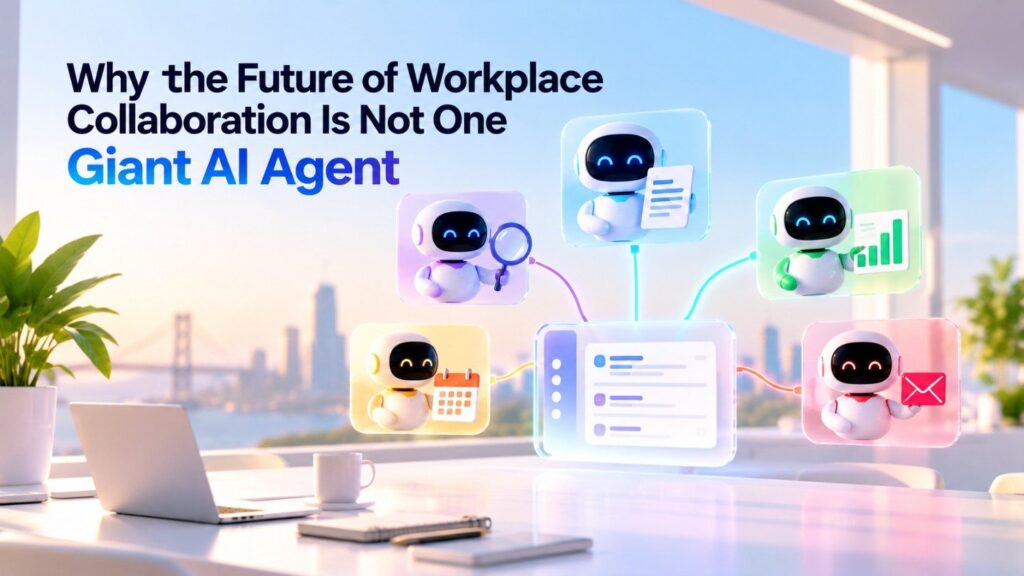
A marketing agent should not automatically have access to payroll records. A technical support agent should not have permission to approve company spending.
Specialized agents provide a way to separate responsibilities.
The Case for Smaller, Specialized AI Coworkers
Consider a startup using three agents.
One answers internal policy questions. Another prepares weekly project summaries. A third helps sales employees gather customer information.
Each agent has a clear purpose.
Employees can understand what the system does, which information it uses, and how to report a mistake.
The company can also measure each agent separately.
If the internal knowledge agent performs well but the sales agent repeatedly creates incorrect summaries, managers can improve or disable the second without disrupting the first.
Multi-Agent Systems Create Their Own Coordination Problems
Several agents can work together, but additional handoffs may introduce new errors.
An agent preparing a sales report might rely on another agent to retrieve customer information.
If the first system receives an outdated customer record, it may produce an inaccurate report even though its own instructions are correct.
Businesses need ways to track where information came from and which agent performed each action.
A handoff should preserve the original request, supporting sources, and any approval requirements.
Otherwise, companies may recreate the same coordination problems they hoped to remove, except this time the confusion occurs between software systems.
The Biggest Risks of Using AI Coworkers in Workplace Collaboration
Sensitive Company Information Can Spread Through Poor Access Controls
Workplace AI systems often need to search internal documents and messages.
That creates a serious security concern.
A business may have channels containing confidential customer contracts, employee discussions, financial plans, and unreleased product information.
Connecting an agent to these systems does not mean the agent should be able to share everything it can find.
Businesses should apply existing access permissions, limit agent access to necessary information, and test whether the system can reveal restricted content.
They should also review how providers handle data storage, model training, retention, and connected services.
AI Agents Can Misunderstand Instructions
An employee might write that a project is likely to launch next week.
An agent could incorrectly interpret that statement as approval to announce a launch date.
That mistake could become serious if the agent has permission to send customer messages or update external systems.
For this reason, companies should separate information gathering from actions that change business records.
Sensitive changes should require approval, and agents should present the proposed action clearly before it happens.
Incorrect Information Can Become Harder to Trace
When employees make a mistake, managers can often identify where it came from.
AI systems add another layer.
A wrong answer may come from an outdated source, a misunderstood instruction, a failed tool connection, or a problem in the model’s reasoning.
Businesses need records showing what the agent used and what it did.
For important workflows, those records should include the triggering request, accessed sources, actions taken, approvals received, and final outcome.
This is especially important when different agents can change the same systems.
Human Accountability Must Remain Clear
Who is responsible if an AI agent updates the wrong customer account or sends an inaccurate report?
That question becomes more important as agents gain authority.
Recent reporting in October 2026 has highlighted uncertainty inside companies about who should manage AI agents and who is accountable when they fail.
Axios
A practical approach is to assign every production agent a named business owner and a technical owner.
The business owner decides what outcomes the agent should deliver. The technical owner manages system access, reliability, monitoring, and security.
Neither role should disappear simply because an agent can operate with little daily supervision.
How San Francisco Startups Can Build Their First AI Coworker in 90 Days
The most effective way to begin is with one narrow workflow.
A company does not need to redesign every department to understand whether AI collaboration can deliver value.
It needs a measurable problem, clear permissions, and a way to compare results.
A practical 90-day rollout
- Days 1–15: Identify the coordination bottleneckReview recurring tasks such as status updates, document searches, meeting follow-ups, and internal requests. Measure task volumes, handling time, waiting time, and common errors before introducing AI.
- Days 16–30: Choose one workflow and define boundariesSelect a task that scores well for frequency, clear rules, and easy review. Write down what the agent can read, what it can prepare, and which actions require approval.
- Days 31–45: Connect approved information and testGive the agent access only to the sources it needs. Test ordinary requests, missing information, outdated documents, restricted data, and unusual cases.
- Days 46–60: Launch a limited pilotIntroduce the agent to a small team. Keep employees responsible for reviewing actions while recording completion times, corrections, and unsuccessful attempts.
- Days 61–75: Compare results with the baselineCalculate total handling time, review effort, operating cost, and accepted outcomes. Look for unwanted effects such as more notifications or errors spreading into connected systems.
- Days 76–90: Decide whether to scaleExpand only if the workflow shows useful results at an acceptable risk and cost. Document the agent’s owner, permissions, quality standards, and procedures for stopping or correcting it.
What a Successful Pilot Should Prove
A useful pilot should answer three questions.
First, does the agent make the complete workflow faster after including review and corrections?
Second, are the outputs reliable enough for the task?
Third, do employees find it easier to complete work, or have they simply inherited another system to manage?
A company might discover that the agent saves two hours per employee each week but produces so many unnecessary alerts that managers feel more overwhelmed.
That would be a mixed result, not an automatic success.
The goal is to improve the working process, not maximize the number of tasks performed by AI.
The New Metrics Every AI-Enabled Workplace Should Track
Traditional collaboration software often measures messages, meetings, and user activity.
Those figures provide some information about adoption but do not establish whether work is improving.
As AI coworkers become more common, businesses will need stronger measures.
| Metric | What it measures | Why it matters |
|---|---|---|
| End-to-end completion time | Time from request to accepted result | Shows whether work finishes faster |
| First-pass acceptance rate | Share of outputs accepted without correction | Indicates practical quality |
| Human review time | Minutes spent checking agent work | Reveals hidden labor costs |
| Rework rate | Share requiring fixes or repeated actions | Identifies unreliable processes |
| Cost per accepted task | Total cost divided by accepted tasks | Supports financial decisions |
| Approval delay | Time waiting for authorized decisions | Shows coordination bottlenecks |
| Unnecessary alerts | Notifications requiring no meaningful action | Helps protect employee focus |
| Permission violations | Unauthorized access or action attempts | Tracks security risks |
These metrics should be compared against the existing process.
For example, an agent might have a 95% successful run rate while leaving many tasks unfinished.
If the team measures only successful runs, the dashboard may look impressive.
If it measures accepted completed requests, the real picture may be less attractive.
Businesses should also track employee satisfaction and customer outcomes where relevant. The best automated workflow is not necessarily the one that removes the most human activity.
What the Next Generation of Workplace Collaboration Could Look Like
The long-term change may be less visible than people expect.
Employees may continue using Slack, Notion, email, and project management tools.
The difference is that more of the routine movement between these applications could happen automatically.
A manager might begin the morning with a short briefing showing completed work, important changes, and decisions requiring attention.
A project team might receive a prepared update instead of spending an hour collecting information.
A new employee might find company policies without interrupting a colleague.
A customer account manager might have the latest approved context available before a call.
None of these examples requires an AI system to replace the judgment of experienced employees.
They require systems that can find information, perform narrow tasks reliably, and help people make better use of their working time.
The Software Interface Could Become Less Important Than the Work It Completes
For years, workplace software companies competed through features and interfaces.
An application might offer a better dashboard, a cleaner message view, or more powerful reporting tools.
AI coworkers create another basis for competition.
Businesses may increasingly compare products based on how reliably they complete actual work across several applications.
This could favor companies with strong integrations, reliable permissions, and deep access to approved business information.
But smaller startups also have an opportunity.
An AI product designed around one frustrating workflow may deliver more immediate value than a broad platform that tries to automate everything.
For a San Francisco founder, that means the best opportunity may not be another general-purpose AI assistant. It may be a carefully designed system that removes a costly handoff from a specific kind of business.
The Best AI Coworkers May Be the Least Disruptive
The most successful workplace agents may not send many messages or demand constant attention.
They may work quietly, document their actions, and involve employees only when necessary.
That is a meaningful change from the last decade of collaboration software.
The goal shifts from keeping everyone constantly connected to making sure the right people receive the right information at the right time.
In that kind of workplace, a quiet channel may be a sign that work is moving smoothly rather than a sign that nobody is participating.
Final Takeaway: The Future of Workplace Collaboration Is About Completing Work, Not Creating More Conversations
San Francisco’s workplace AI movement is changing what collaboration software is expected to do.
Slack helped employees communicate across teams and offices. Notion helped companies organize shared knowledge. Project management tools helped businesses make work visible.
AI coworkers are attempting the next step: helping teams act on the information those systems contain.
The opportunity is real, but it needs to be measured carefully.
SFTechScene’s original scenario analysis shows that a 100-person company recovering just 10% of the coordination time described in published workplace research could free up 11,520 working hours annually. At an illustrative employment cost of $60 per hour, that represents $691,200 of potential annual working capacity.
Those results are not a forecast of guaranteed AI savings. They demonstrate why even modest improvements are worth testing and why actual financial returns depend on how recovered time is used.
Our workflow scoring analysis also suggests that internal questions, status reports, meeting follow-ups, and routine task routing are sensible starting points. They offer businesses a chance to learn how AI coworkers behave before allowing them to perform sensitive actions.
The deeper lesson is that better collaboration does not mean more communication.
A company with hundreds of AI-generated updates may be less effective than one where a few reliable agents help employees finish the right work.
That is why the winners in workplace AI will need more than powerful models, attractive interfaces, or impressive demonstrations.
They will need dependable connections to business systems, careful permission controls, measurable results, and clear human accountability.
For San Francisco founders and business leaders, the next step is not to replace employees with digital coworkers. It is to identify where valuable work slows down, test whether AI can remove that friction, and build systems that help people accomplish more without losing control.
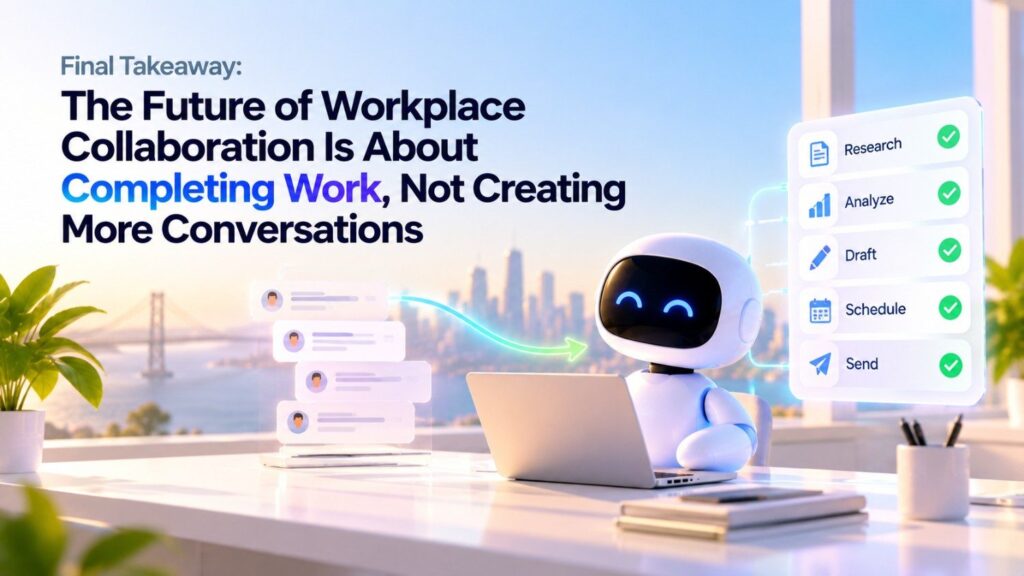
The future of workplace collaboration may not be a world where everyone talks to AI all day. It may be a world where employees spend far less time talking about unfinished work because more of that work is actually getting done.
Research Methodology, Limitations, and Source Notes
SFTechScene’s original research in this article consists of three secondary-data analyses: a workforce capacity sensitivity model, an analyst-scored workflow suitability framework, and a task-level economic sensitivity model.
The models are original calculations and scoring frameworks developed for this article. They should not be interpreted as newly collected San Francisco employee data, a statistically representative local survey, or a controlled experiment.
The workforce model uses Asana’s published estimate of time spent on work about work. The illustrative recovery rates, staffing levels, working hours, and hourly employment costs are declared assumptions. The workflow suitability scores are unweighted editorial assessments. The task-level cost model uses explicitly stated hypothetical handling times, review rates, and oversight requirements.
The calculations show how results would change under different conditions. They do not prove that an AI agent will deliver those results in production.
Key Public Research and Primary Sources
| Source | Evidence used in this article |
|---|---|
| Microsoft 2025 Work Trend Index | Workplace interruptions, AI adoption expectations, human-agent collaboration |
| Asana Anatomy of Work research | Coordination-time benchmark |
| Slack Workforce Index, June 2025 | Employee AI adoption and self-reported workplace outcomes |
| Shifting Work Patterns with Generative AI | Randomized study on email, meetings, and workplace AI |
| Measuring the Impact of Early-2025 AI on Experienced Open-Source Developer Productivity | Experimental evidence on AI productivity limitations |
| Slack’s September 2026 announcements | Recent workplace agent and collaboration capabilities |
| Notion Custom Agents launch | Shared agents and recurring workplace automation |
| Glean agent platform announcement | Enterprise agents, connected knowledge, and governance |
Future SFTechScene research could improve these estimates by collecting anonymized workflow records from consenting San Francisco companies, measuring before-and-after task performance, and comparing results across industries and company sizes.
That would allow local business leaders to distinguish broad workplace AI promises from independently measured improvements in how San Francisco teams collaborate.