

Software development is entering a new phase. Artificial intelligence is no longer limited to helping developers write code. AI coding agents can now run tests, investigate errors, suggest fixes, review software changes, and check whether an application works as expected.
For San Francisco startups, this could change how software gets built and maintained. A small engineering team can use AI agents to handle parts of the testing and debugging work that once required hours of manual effort. Developers can spend more time improving products instead of repeatedly checking the same problems.
But there is an important difference between software that passes an automated test and software that is truly reliable. AI agents can make mistakes, misunderstand requirements, and even change tests to hide problems. The real opportunity is not to remove human oversight. It is to make software testing faster, more thorough, and easier to repeat.
New research shows why this shift matters. According to the Stack Overflow 2026 Developer Survey, 63.8% of respondents already use AI for debugging, troubleshooting, or improving code, while 58.1% use it to write or improve tests. Yet only 19.9% use AI for deploying, operating, or troubleshooting production systems. Stack Overflow Developer Survey
That gap reveals something important about the future of software engineering. Developers are increasingly willing to let AI help find and fix problems, but they remain much more careful when real customers and live systems are involved.
For SFTechScene, we examined the latest developer survey data, independent research, coding-agent benchmarks, and published product documentation. We also developed original calculations that examine where AI testing adoption is strongest, when AI-assisted debugging might save money, and what level of reliability startups need before expanding automation.
The findings point toward a new model of software quality: AI agents do more of the checking, while engineers remain responsible for deciding whether the software is safe to release.
The Short Version: AI Coding Agents Are Changing How Software Quality Gets Managed
AI coding agents are becoming useful for three connected jobs: finding software problems, understanding why those problems happened, and checking whether proposed fixes actually work.
Traditional testing tools follow instructions written by developers. They run specific checks and report whether those checks pass or fail. AI agents can go further by reading the code, examining test results, suggesting new test cases, and making changes when they identify a likely problem.
This creates a more active testing process. Instead of simply reporting that a checkout feature failed, an AI agent may investigate the payment code, find a possible cause, write a test that reproduces the failure, and suggest a fix for an engineer to review.
The technology is already available in tools such as GitHub Copilot, OpenAI Codex, and Claude Code. Specialized platforms also connect error monitoring with automated bug investigations.
However, the strongest results are likely to come from teams that combine AI agents with reliable tests, clear requirements, human reviews, and controlled access to their systems. AI can speed up a strong testing process, but it cannot make an unreliable process trustworthy on its own.
Why Software Testing Is Becoming a Major Opportunity for AI Agents
Writing code faster creates a new testing problem
AI coding tools have made it easier for developers to produce working software. A founder can describe a feature, generate an initial version, and make changes without manually writing every line.
That speed creates a new challenge. More code can be produced in less time, but every new feature may introduce errors, security risks, or problems elsewhere in the application.
Imagine a San Francisco startup that once released five meaningful software changes every week. With AI coding agents, its engineers may now be able to prepare fifteen changes during the same period.
If the testing process stays unchanged, the team could face three times as many changes to review. The faster development process would simply move the workload from writing code to checking code.
This example is illustrative, but the underlying issue is real. Faster code creation does not automatically produce faster or safer software delivery.
Testing often involves work that AI can repeat
Many testing activities follow patterns that software agents can learn to handle.
An engineer checks whether a login system rejects the wrong password. Another test confirms that a customer cannot access someone else’s account. A third checks whether a payment failure produces the correct error message.
These checks are important, but building and maintaining them can be repetitive. AI agents can help create test cases, run them, explain failures, and update tests when legitimate product requirements change.
The advantage becomes especially valuable when a startup has hundreds or thousands of existing tests. Rather than asking engineers to inspect every routine failure manually, AI can help identify which failures deserve immediate attention.
Software quality is a business problem, not just a technical problem
A software error can create costs far beyond the engineering team. A broken signup page can reduce customer growth, while an incorrect billing calculation can damage customer trust.
For a young SaaS company, these problems can be especially painful. The business may have limited cash, a small customer support team, and very little room for repeated failures.
This is why AI testing deserves attention from founders and business leaders. It may reduce development costs, but its bigger long-term value could be helping teams find important problems before customers encounter them.
How AI Coding Agents Actually Automate Software Testing
From fixed test scripts to agents that investigate problems
Traditional automated testing normally begins with a test written by a developer. The software runs the test, compares the result with the expected outcome, and reports success or failure.
AI coding agents can work through a longer sequence. They can inspect the application, identify relevant files, run existing tests, examine the results, and decide what to investigate next.
For example, an agent testing a subscription application might discover that customers can change plans but that the billing total sometimes remains unchanged. It could trace the calculation, create a test for the problem, and propose a code change.
The final decision should still depend on independent checks and human review. An agent finding a possible solution does not prove that the solution is correct.
Unit testing: checking individual pieces of software
Unit tests check whether small parts of an application behave correctly. A test might examine a pricing calculation, a password validation rule, or a function that formats customer information.
AI agents are well suited to helping with these focused tasks because the expected results can often be described clearly.
A developer can give an agent a pricing function and ask it to generate tests covering normal prices, discounts, zero values, and unusual inputs. The agent can run those tests and identify cases where the current code produces unexpected results.
However, automatically generated tests can repeat incorrect assumptions. Developers should make sure important expected results come from product requirements rather than simply copying the behavior of the current code.
Integration testing: checking whether systems work together
Modern applications depend on many connected services. A SaaS product may use one service for payments, another for email, and a separate database for customer records.
Integration tests check whether these services work together correctly. They can catch problems that individual unit tests may miss.
An AI agent can help build tests that follow a complete business process. For example, it might check whether a new customer can register, choose a plan, complete payment, and receive access to the correct features.
The hardest part is often setting up realistic test data and understanding how outside services behave. AI can help, but a startup still needs safe test accounts, controlled environments, and reliable ways to simulate external failures.
Browser testing: checking what customers actually experience
Browser testing examines an application from the user’s perspective. It can verify whether buttons respond, forms submit correctly, pages load, and important customer journeys succeed.
Tools such as Playwright provide automated browser testing. AI agents can help generate and maintain the scripts used by these tools.
For a San Francisco e-commerce startup, an agent could examine the checkout flow and suggest tests covering missing addresses, expired payment methods, discount codes, and abandoned transactions.
This approach can reduce the amount of test code developers write manually. Yet visual appearance, customer expectations, and accessibility still require careful review.
Regression testing: preventing old problems from returning
A regression happens when a software change breaks something that previously worked. These errors are common in products that change frequently.
AI agents can help identify which existing tests are relevant to a code change and suggest additional checks for areas that might be affected.
Suppose a startup changes its discount system. An agent could test not only the new discount feature but also recurring subscriptions, refunds, invoices, and billing reports.
The goal is to check the wider effect of a change before the software reaches customers.
Original SFTechScene Research #1: Where Developers Are Already Using AI for Software Quality
Research question: Is AI adoption stronger in testing and debugging than in production operations?
To investigate this question, SFTechScene analyzed the published workflow data from the 2026 Stack Overflow Developer Survey.
The survey provides a useful view of where developers are already using AI tools and agents. Instead of relying on vendor marketing claims, we compared reported adoption across different parts of the development process.
Our analysis focuses on seven activities that are especially relevant to software quality.
Methodology
We extracted the reported percentages for current AI use from the survey’s workflow adoption table, which covers 12,547 respondents. We then calculated percentage-point differences between testing, debugging, code review, security work, and production operations.
The analysis uses publicly released survey figures and original SFTechScene calculations. It does not involve a new survey, and the results should not be interpreted as representative specifically of San Francisco developers.
Where AI is currently being used
| Software development activity | Currently using AI |
|---|---|
| Generating familiar code | 69.3% |
| Debugging and troubleshooting | 63.8% |
| Writing or improving tests | 58.1% |
| Reviewing code and pull requests | 40.5% |
| Analyzing logs and metrics | 41.9% |
| Finding or fixing security issues | 34.6% |
| Deploying and operating production systems | 19.9% |
Source: Stack Overflow Developer Survey 2026, workflow adoption data. Responses are not mutually exclusive. Stack Overflow Developer Survey
Original finding: Debugging adoption is more than three times production operations adoption
Our calculation shows that current AI use for debugging is approximately 3.21 times the rate of AI use in production operations.
Testing adoption is approximately 2.92 times the production operations rate. The gap between debugging and production operations is 43.9 percentage points.
These findings suggest that developers are more comfortable using AI in tasks where they can inspect results before making changes to live systems.
This comparison measures survey adoption rates, not the number of tasks completed, the quality of results, or the productivity of individual developers.
What this means for San Francisco startups
A startup does not need to give AI full control over production software to benefit from it. It can begin with code review, test generation, and debugging, where the work can be checked before release.
This approach makes it possible to gain experience while keeping the most important decisions under human control. It also allows engineering teams to measure whether AI is producing useful results before increasing the level of automation.
The next opportunity may not be fully autonomous software deployment. It may be improving the testing and verification systems that make greater automation safe.
Chart 1: AI adoption across software quality tasks in 2026
Share of respondents who currently use AI for each development workflow, from the 2026 Stack Overflow Developer Survey.
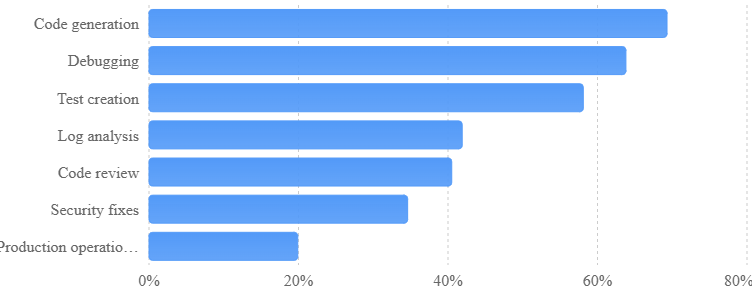
Source: Stack Overflow Developer Survey 2026; SFTechScene calculations.
Source: Stack Overflow Developer Survey 2026. Categories overlap; values describe survey respondents, not all developers or San Francisco developers.
How AI Coding Agents Are Automating Software Debugging
AI can investigate errors instead of only explaining them
Debugging is the process of finding and fixing the cause of a software problem. It can take a long time because the visible error is often not the real cause.
For example, a customer might report that a dashboard is loading slowly. The problem could come from the database, a recent code change, an outside service, or an unexpected increase in traffic.
A traditional developer investigates these possibilities by checking logs, reading code, running tests, and comparing recent changes.
An AI coding agent can help complete parts of that investigation. It can search relevant files, inspect error messages, compare recent code changes, and suggest possible causes.
The agent becomes most useful when it has enough information to test its ideas. Without logs, clear reproduction steps, or access to the relevant code, it may produce explanations that sound convincing but are wrong.
Reproducing bugs automatically
One of the hardest parts of debugging is making a reported problem happen again. A customer might describe an error that appears only under certain conditions.
An AI agent can help turn the report into a repeatable test. It might create a customer record with specific settings, simulate the failed request, and record the result.
This matters because a bug that cannot be reproduced is difficult to fix with confidence. Once a repeatable test exists, developers can check whether a proposed change actually solves the original problem.
For a startup, the best process is to keep that new test after the bug is fixed. It becomes part of the company’s long-term protection against similar failures.
Connecting error monitoring with code changes
A newer approach connects AI coding agents directly to software monitoring systems.
For example, Sentry offers Seer issue-fixing capabilities that can identify possible root causes, suggest solutions, generate code changes, and create pull requests. These actions help connect the discovery of a software error with a proposed fix. Sentry Docs
This is especially useful when a startup receives many reports about the same underlying problem. Instead of asking an engineer to examine every report independently, the system can group related information and support a focused investigation.
However, the agent should not automatically treat its first explanation as correct. Engineers still need to check whether the proposed fix addresses the actual cause and whether it creates new problems.
Why debugging requires more than passing tests
An AI agent can sometimes make a failing test pass without fixing the real issue.
Imagine that a test expects a refund calculation to return $50, but the application returns $45. A poorly guided agent might change the test to expect $45 rather than investigate why the amount is wrong.
The result would appear successful, even though the business error remained.
This is why important tests need independently defined expected outcomes. An agent should not be allowed to rewrite the rules of a test simply to make its work pass.
Original SFTechScene Research #2: AI Testing Has a Verification Advantage
Research question: Why is AI more widely used for testing than for production operations?
The adoption data gives one clue, but we also wanted to examine how developers verify the answers they receive from AI.
For this analysis, SFTechScene used a second section of the 2026 Stack Overflow Developer Survey. It reports which checks developers perform before using AI-generated answers.
What the data shows
| Action after receiving AI output | Respondents |
|---|---|
| Run the output locally | 76.5% |
| Compare with existing code | 63.9% |
| Inspect tests or security effects | 53.0% |
| Read official documentation | 38.0% |
| Use the answer without additional checks | 9.6% |
Source: Stack Overflow Developer Survey 2026, question on steps taken after receiving AI-generated answers. Multiple answers were allowed. Stack Overflow Developer Survey
Original finding: Verification is part of normal AI development
Our calculation shows that running AI output locally was reported almost eight times as often as using it without checks: 76.5% compared with 9.6%.
This is a comparison of response rates, not a claim that eight times as many distinct developers always verify their work. The survey allows respondents to select several actions.
Even with that limitation, the result supports an important business insight. Many developers are treating AI as a source of work that needs checking rather than as an authority that should be trusted automatically.
Chart 2: How developers check AI-generated output
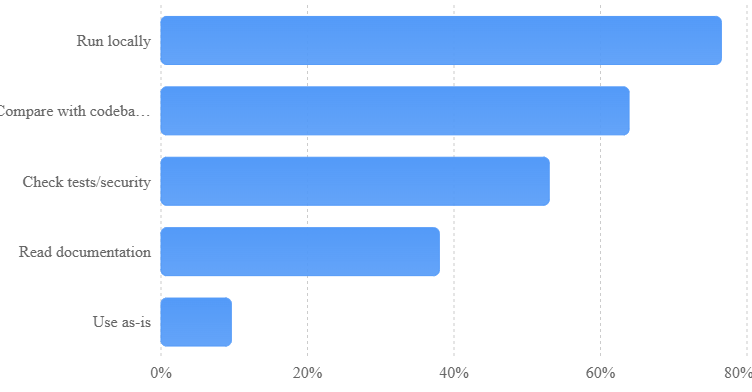
Source: Stack Overflow Developer Survey 2026. Multiple-response question.
Why this matters for testing agents
Testing gives AI agents something valuable: an outcome they can inspect.
An agent can run a test, compare the result with a requirement, and identify an error. This makes it easier to verify useful work than it would be in a task with no clear definition of success.
But test results are only as good as the tests themselves. A system can pass every existing check while still containing serious problems that nobody thought to test.
This creates an opportunity for startups that build better verification tools. The most useful products may not simply generate tests faster. They may help businesses identify missing checks, examine risky changes, and provide reliable evidence that software behaves as intended.
Original SFTechScene Research #3: When Do AI Testing and Debugging Agents Actually Save Money?
Research question: How much engineering time must AI save to justify its cost?
AI agents can make software work faster, but they also create new costs. Developers must set up tasks, review results, investigate bad suggestions, and sometimes repeat work when the agent makes mistakes.
SFTechScene created a scenario model to examine whether AI-assisted testing and debugging could save money for a small San Francisco startup.
This is an original financial model based on explicit assumptions, not a field experiment. The time estimates below are illustrative and should not be mistaken for measured averages from actual SF companies.
The baseline assumptions
We modeled a startup handling 40 recurring testing or debugging tasks each month. Without an AI agent, each task requires an average of 90 minutes of engineering time.
We assigned a hypothetical fully loaded engineering cost of $100 per hour, representing a planning assumption rather than a published local wage estimate. We also assumed $250 in additional monthly AI-related costs.
The baseline monthly workload is:
\[ 40 \times \frac{90}{60}=60\text{ hours} \]
At $100 per hour, those tasks represent $6,000 in monthly engineering time.
Three possible outcomes
We then modeled three different results from using an AI agent.
| Monthly model input | Conservative | Base case | Optimistic |
|---|---|---|---|
| Tasks completed | 40 | 40 | 40 |
| Human setup per task | 15 min | 10 min | 8 min |
| Other active human work | 25 min | 20 min | 12 min |
| Human review | 35 min | 25 min | 18 min |
| Chance of extra rework | 50% | 30% | 15% |
| Rework time if required | 60 min | 45 min | 30 min |
| Expected total human time per task | 105 min | 68.5 min | 42.5 min |
The expected time calculation includes the probability-weighted cost of extra rework. For example, in the base case, the rework allowance is 30% multiplied by 45 minutes, or 13.5 minutes per task.
The financial results
| Monthly outcome | Conservative | Base case | Optimistic |
|---|---|---|---|
| Human hours required | 70.0 | 45.7 | 28.3 |
| Hours saved vs. baseline | -10.0 | 14.3 | 31.7 |
| Value of time saved | -$1,000 | $1,433 | $3,167 |
| Extra AI costs | $250 | $250 | $250 |
| Net monthly value | -$1,250 | +$1,183 | +$2,917 |
Source: Original SFTechScene scenario calculations. Figures rounded. Negative savings mean the process takes more human time than the baseline.
Chart 3: Modeled monthly net value from AI-assisted testing
Scenario model using 40 monthly tasks, $100 per human engineering hour, and $250 monthly AI cost.
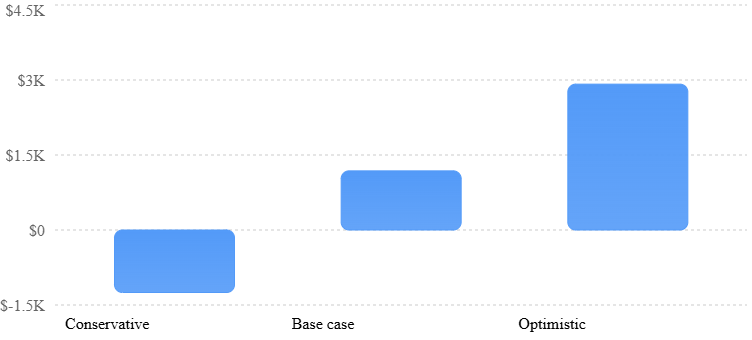
Illustrative model, not measured savings. Positive values represent the value of released engineering capacity less additional AI costs.
Original finding: AI can either save money or create more work
In our base scenario, AI assistance releases about 14.3 engineering hours per month and produces an estimated $1,183 in net monthly value.
In the conservative scenario, however, human time increases by ten hours. After including the added AI costs, the process creates an estimated $1,250 monthly loss.
The important lesson is that adoption alone does not determine financial success. A startup must measure whether AI reduces total human effort after setup, review, and rework.
There is also a difference between the value of freed-up time and actual cash savings. If engineers remain employed, the business may gain more development capacity without reducing its payroll expenses.
The break-even calculation
With 40 tasks each month, $250 in additional AI costs, and an assumed engineering value of $100 per hour, the agent must save at least 3.75 minutes of human time per task to cover those added costs.
That calculation is:
\[ \frac{\$250}{40\times \$100}\times60=3.75\text{ minutes} \]
This figure is useful for planning, but it is not a guarantee of profitability. It excludes any added costs from missed defects, delayed releases, system failures, or changes in infrastructure spending.
How SF founders should use this analysis
A startup should record the time spent completing a sample of testing tasks before bringing in an AI agent. It should then compare similar tasks completed with AI assistance, including every minute spent reviewing and correcting the output.
The strongest pilot will use tasks of similar difficulty and record unusual cases separately. Otherwise, a team could mistakenly credit AI for savings that came from easier work.
Teams should also track the number of problems that escape into production. Saving engineering time is not a good outcome if customers experience more software failures.
AI Coding Agents Are Making Software Quality Assurance More Continuous
From checking software before release to checking it throughout development
Quality assurance, often called QA, is the wider process of making sure software meets the needs of its users.
Testing is one part of QA. Other parts include reviewing requirements, checking security, confirming that changes meet business rules, and examining whether software is ready for customers.
AI coding agents can support more of this work throughout the development process.
A company might use one agent to help write tests while a feature is being developed. Another can review a proposed code change, while a third investigates failures reported by automated checks.
This allows quality checks to happen earlier and more often. Problems can be discovered while the relevant code is still fresh in the engineer’s mind.
AI-generated test plans
Before writing any tests, a team needs to decide what should be checked.
An AI agent can read a feature description and suggest a test plan covering common uses, unusual cases, possible failures, and changes that may affect existing customers.
For example, a new subscription billing feature should be checked for successful payments, failed payments, plan upgrades, downgrades, cancellations, refunds, and billing dates.
The agent may help identify cases the team initially overlooked. However, a product owner should confirm that the test plan matches the company’s actual business rules.
Continuous code review
Modern development teams commonly review code before adding it to the main application.
AI agents can help by reading proposed changes, pointing out possible errors, and suggesting questions for human reviewers.
GitHub Copilot, for instance, supports coding assistance, pull request reviews, and multi-step agent workflows. GitHub also documents workflows that investigate failed checks and attempt targeted fixes. GitHub Docs+1
This can reduce time spent identifying routine issues. But an AI review should not replace the engineer responsible for the final decision, especially when the change affects billing, authentication, customer data, or system security.
The importance of an independent quality gate
One of the most important rules is that an AI agent should not be the only system judging its own work.
An agent may produce a patch, write a new test, and report that everything passed. That still leaves open the possibility that the test contains the same mistake as the patch.
A stronger process uses existing regression tests, independently defined requirements, automated security checks, and human review.
For high-risk changes, teams should require evidence that the system behaves correctly under failure conditions, not just during normal use.
Original SFTechScene Research #4: The Hidden Problem With AI Coding Benchmarks
Research question: Can coding-agent benchmark scores predict software quality?
Many AI companies use benchmark results to demonstrate how well their coding agents perform. One of the best-known benchmarks has been SWE-bench, which evaluates whether AI systems can resolve software issues drawn from real code repositories.
These benchmarks provide useful information, but their results can be misunderstood.
Solving a benchmark problem does not necessarily mean an agent can safely maintain a large commercial application. Real software systems involve customer data, changing requirements, complex integrations, and business decisions that may not appear in benchmark tasks.
What the latest benchmark research reveals
In February 2026, OpenAI announced that it would stop relying on SWE-bench Verified as a measure of frontier coding capability. The company reported evidence that the benchmark had become affected by training-data exposure and problems with some test designs. OpenAI
A separate benchmark, SWE-bench Pro, was introduced to evaluate more difficult software engineering tasks. It contains 1,865 tasks drawn from 41 repositories.
However, an independent September 2026 review by Epoch AI raised concerns about the benchmark’s reliability. The review classified SWE-bench Pro as flawed, citing audits that found significant problems in parts of the dataset. Epoch AI+1
These developments matter because even a well-designed benchmark can become less useful when its tasks contain errors or when models have previously encountered its answers.
Original finding: Startups need their own private testing benchmarks
Our review suggests that SF startups should avoid choosing coding agents based only on public leaderboard rankings.
Instead, they should create small internal evaluations using real tasks from their own software.
A startup could select 30 historical bugs, remove the original fixes from a clean test environment, and ask competing agents to investigate the issues. The team could then check whether each agent identified the real cause and produced a correct fix.
To reduce bias, the same tasks, time limits, environments, and evaluation rules should apply to every agent.
| Evaluation measure | What it reveals |
|---|---|
| Correctly resolved bugs | Whether fixes address the actual problems |
| Regression test results | Whether changes break existing functions |
| Human review time | How much checking the agent requires |
| Rework rate | How often its proposed fixes need changes |
| Total cost | Engineering time plus agent and infrastructure spending |
| Repeatability | Whether results remain dependable across repeated runs |
| Security findings | Whether the proposed changes introduce new risks |
A company should also hold back some evaluation tasks from the agents during setup. Otherwise, repeated tuning can lead to results that look better than performance on unfamiliar problems.
The most meaningful benchmark is one that measures the work a startup actually needs to complete.
Why AI-Generated Tests Can Still Miss Serious Bugs
Tests can confirm the wrong behavior
An AI coding agent learns from the code and information available to it. If the application already contains incorrect business logic, an agent may treat that logic as the intended behavior.
Consider a subscription service that gives customers a refund only when a cancellation occurs within a certain period. If the refund rule is poorly documented, an agent could create tests that accept the wrong calculation.
Every generated test might pass, yet customers could still receive incorrect refunds.
The solution is to give agents clear product requirements and test expectations that come from an independent source.
Test coverage does not equal product quality
Test coverage measures how much code is exercised by tests. A high coverage percentage can be helpful, but it does not prove that the software works correctly.
An application could have tests covering nearly every function while failing to check important business situations.
For example, the tests might confirm that a payment function runs without errors but fail to verify that the correct customer is charged.
Startups should measure more than coverage. They should track important user journeys, escaped bugs, repeat failures, and how often tests catch real problems.
False confidence can become expensive
A weak AI testing process may be worse than no automation if it creates an inaccurate sense of safety.
Engineers might begin trusting green test results without inspecting whether the tests are meaningful. Over time, the application could become harder to maintain even while the number of automated checks increases.
The answer is not to avoid AI testing. It is to establish a quality standard that applies equally to AI-generated and human-written tests.
How San Francisco Startups Can Introduce AI Testing Agents in 30 Days
Week 1: Establish the current testing baseline
Begin by identifying where engineering time is going.
Review recent bugs, failed tests, delayed releases, and recurring problems. Separate issues into categories such as browser errors, database problems, payment failures, and test maintenance.
For each task, record how long it takes to investigate the issue, implement a fix, and confirm that the fix works.
The goal is to create a reliable starting point. Without baseline data, it becomes difficult to tell whether AI is actually improving the process.
Choose low-risk tasks first
The first AI testing project should involve work that is easy to repeat and verify.
Good starting points include generating unit tests for stable functions, explaining failed test logs, and identifying missing regression checks.
Avoid beginning with production database changes, security-sensitive authentication systems, or financial calculations where an incorrect fix could cause serious harm.
Week 2: Run a controlled pilot
Select a manageable group of real testing and debugging tasks. Use a clean development environment where AI agents cannot affect live customer data.
Give each agent clear instructions about its responsibilities. It should know which files it may change, which tests it must run, and when it must stop and request help.
Require the agent to provide evidence of its work, including the tests it ran, the changes it made, and any remaining uncertainty.
A useful pilot might include 20 to 30 tasks. This will not be enough to establish statistically reliable results for every type of bug, but it can reveal obvious workflow problems before a larger rollout.
Week 3: Measure quality and costs
Compare the AI-assisted results against the original baseline.
Do not measure only the time the agent spends running. Record the total human effort, including setup, review, investigation, and rework.
Evaluate each proposed fix using tests that the agent did not create or modify. This helps prevent the agent from passing an evaluation by weakening the tests.
Also record instances where the agent cannot complete a task. A system that fails clearly and hands over useful information may be safer than one that produces a confident but incorrect answer.
Week 4: Expand only where the results justify it
After the pilot, identify which tasks produced reliable benefits.
A startup might discover that AI agents are excellent at maintaining routine regression tests but less useful for investigating complex problems involving several services.
The company should expand automation in the first area while improving its processes in the second.
Create a written policy defining which tasks agents can complete independently, which changes require review, and which systems remain outside their access.
This allows AI use to increase without giving the technology more responsibility than it has demonstrated it can handle.
Choosing the Right AI Coding Agent for Testing and Debugging
Different tools support different parts of the software quality process. The best choice depends on the company’s existing development tools, testing environment, security needs, and engineering practices.
| Tool or platform | Relevant use | What to verify |
|---|---|---|
| OpenAI Codex | Running tests, investigating bugs, proposing code changes | Environment setup, permissions, review process |
| Claude Code | Codebase investigation, debugging, test maintenance | Tool access, reliability, cost controls |
| GitHub Copilot | Pull request reviews, coding assistance, failed-check investigation | GitHub integration, approval rules, test evidence |
| Sentry | Error monitoring, issue investigation, suggested fixes | Root-cause quality, monitoring coverage |
| Playwright | Repeatable browser testing | Test stability, realistic user journeys |
The products in this table have different roles. Playwright is primarily a testing framework, while Sentry focuses on monitoring and error investigation. They can complement a coding agent rather than directly replace one.
OpenAI’s published Codex documentation describes a process where agents inspect code, make changes, run tests, examine results, and repeat the process when necessary. It also emphasizes access controls and human review for higher-risk actions. OpenAI+1
Evaluate the entire workflow, not just the AI model
An advanced model may still produce disappointing results if it cannot run the project’s tests or access the information needed to understand the code.
A startup should therefore evaluate the full system: the agent, its tools, the testing environment, the permissions it receives, and the process used to approve changes.
This is particularly important for older applications. A tool that performs well on a small demonstration project might struggle with a complicated codebase containing years of technical decisions.
The Biggest Risks of Automating Software Quality Assurance
AI agents can introduce security problems
A coding agent may need access to source code, configuration files, logs, and testing systems.
That access creates security risks if permissions are too broad. Sensitive information might appear in logs, while unsafe commands could modify important files.
Companies should use isolated testing environments, limit access to necessary resources, and keep secrets out of information shared with agents whenever possible.
The same rules should apply to agent-generated code. Security checks should run before proposed changes are approved.
Agents can spend too much time trying to fix the wrong problem
AI agents sometimes repeat unsuccessful attempts. An agent might modify a function, run tests, receive another error, and continue making changes without finding the underlying cause.
This can waste computing resources and increase the amount of human review required.
Set limits on execution time, tool calls, and repeated attempts. When an agent reaches those limits, it should stop and provide a useful report for a developer.
Faster development can increase the review workload
An engineering team can generate more code than it can responsibly check.
This was an important concern even before the latest AI coding tools. A randomized study published by METR in 2025 found that experienced open-source developers working on familiar, mature projects took 19% longer to complete tasks when using the AI tools available in that study.
The experiment involved 16 developers and 246 tasks. Its results should not be generalized to every tool or workflow in 2026, but they show why perceived productivity and measured productivity can differ. metr.org
The lesson is especially relevant to testing automation. An agent that produces many proposed fixes can increase work if those fixes require extensive investigation.
Companies may lose important engineering knowledge
If an AI agent handles every routine problem, junior developers may have fewer opportunities to learn debugging skills.
Over time, this could make the team more dependent on tools it does not fully understand.
Startups should preserve learning opportunities by asking engineers to review why important bugs happened and how the fix was verified.
AI can handle repetitive work while people continue building the judgment needed to manage more complex systems.
What the Future of AI-Powered Software Testing Means for San Francisco
Smaller teams may be able to support more software
San Francisco startups face pressure to develop products quickly while controlling costs. AI coding agents could help small teams manage growing applications without expanding their testing workload at the same rate.
A team with three engineers might use AI agents to maintain regression tests, investigate common failures, and prepare fixes for review.
This does not mean the company will no longer need experienced engineers. It means those engineers may spend more time setting quality standards, designing reliable systems, and handling difficult problems.
The next opportunity is reliable verification infrastructure
As AI generates more code, businesses will need better ways to check whether that code is safe and correct.
This creates opportunities for startups building testing systems, code review platforms, security checks, bug investigation tools, and software monitoring products.
The most successful businesses may be those that connect these capabilities into clear workflows. Rather than producing another AI assistant, they could help engineering teams understand what changed, which tests were run, what failed, and whether the software is ready to release.
Better processes may matter more than better prompts
Google’s 2025 DORA research examined survey responses from nearly 5,000 technology professionals and more than 100 hours of qualitative research.
Its central finding was that AI tends to amplify a company’s existing strengths and weaknesses. Teams with clear processes are better placed to benefit, while weak processes can become more difficult to manage when AI increases the speed of work. Google Research
For SF startups, this suggests that improving the testing environment may deliver more lasting value than repeatedly switching between AI models.
Clear requirements, repeatable tests, reliable monitoring, and disciplined code reviews create the conditions under which agents can be useful.
Final Takeaway: AI Coding Agents Will Make Testing Faster, but Reliable Software Still Needs Human Judgment
AI coding agents are changing software testing, debugging, and quality assurance. They can help create tests, investigate failures, suggest fixes, and reduce the amount of repetitive engineering work required to maintain an application.
The latest developer survey data shows that these activities have become established uses of AI. Testing and debugging adoption is already much stronger than AI use in production operations.
However, the original SFTechScene analysis highlights an important business reality. AI automation creates value only when the time it saves exceeds the effort needed to supervise, review, and correct its work. Faster output is not the same as better software.
For San Francisco startups, the most effective strategy is to begin with tasks that are easy to verify. Build clear testing standards, measure real productivity, and expand automation only after it has demonstrated reliable results.
The companies that benefit most from AI coding agents may not be those that automate the largest number of engineering tasks. They may be the ones that build the strongest systems for proving that AI-generated software actually works.
SFTechScene Research Methodology and Reproducibility Notes
This article contains original secondary-data analysis and an independently constructed financial scenario model. It does not claim to present a new survey of San Francisco engineers, a new controlled experiment, or measured financial outcomes from local startups.
Research inputs: The main quantitative source is the 2026 Stack Overflow Developer Survey, published with 30,903 valid responses from 169 countries. The workflow analysis uses the question-specific base of 12,547 respondents. The survey was promoted through Stack Overflow and related channels, making it a voluntary rather than randomly selected population sample. Stack Overflow Developer Survey
Calculations: Adoption gaps are measured in percentage points. Adoption ratios are calculated by dividing one reported rate by another, rather than estimating individual-level behavior. The cost model uses the stated time, rework probability, labor-value, and software-cost assumptions. No location-specific pay rate is presented as a measured fact.
Limitations: The survey cannot establish that AI causes productivity gains, and the aggregate data cannot show how individual respondents combine tools. The financial scenarios are sensitivity illustrations, not forecasts or verified cost savings. The benchmark discussion is a review of published findings, not an independent re-execution of the benchmark suites.
Reproduction: The published percentages, formulas, and scenario inputs are provided in the article so readers can independently recompute the comparisons. A stronger follow-up study would require task-level records from participating SF engineering teams, randomized task assignment, independent quality checks, and tracking of production defects over time.
Original analysis by SFTechScene, November 2026.