
San Francisco startups are discovering something that could change how software companies are built. A founder can now describe an application in plain English, use AI to generate much of the code, and launch a working product without hiring a large engineering team.
Tools such as Cursor, Replit, Lovable, and Claude Code have made software development far more accessible. Tasks that once required hours of manual coding can sometimes be completed in minutes.
But there is a problem hiding behind this progress.
Building an application that looks finished is not the same as building software that can safely handle thousands of customers, protect private information, process payments, and operate without constant failures.
That difference is becoming one of the most important questions in San Francisco’s growing AI software industry.
Can founders use vibe coding to build serious software-as-a-service businesses? Or will the hidden costs of security, maintenance, and technical problems eventually cancel out the savings?
The answer is more interesting than a simple yes or no.
AI can dramatically reduce the effort needed to create software. However, the amount of work required to deliver a dependable product does not always fall at the same rate.
For founders, understanding that difference could determine whether their startup becomes a profitable business or an expensive technical problem.
This article examines what production-ready SaaS actually requires, where AI coding tools deliver the greatest value, and how founders can avoid the most common mistakes.
It also includes original SFTechScene analysis built from publicly available developer surveys, independent AI coding research, San Francisco wage data, security benchmarks, and published software infrastructure prices.
Rather than treating impressive AI demonstrations as proof of business readiness, we will examine the economics and engineering requirements behind running a real SaaS company.
The Short Version: Vibe Coding Can Build Real SaaS Products, but Production Readiness Requires More Than Working Code
The biggest change in software development is not that artificial intelligence can write code. AI has been helping programmers for years.
The more important development is that AI can now handle larger parts of the software-building process.
A founder can explain what a product should do, ask an AI coding agent to create the first version, test the result, and request changes through conversation. Some tools can also connect databases, create user accounts, build payment pages, and publish applications online.
This makes it possible for smaller teams to attempt projects that previously required several developers.
However, production-ready SaaS has a much higher standard than a working demonstration.
A real subscription software product must work correctly when customers behave in unexpected ways. It must protect private information, recover from failures, handle payments accurately, and remain dependable when usage increases.
These requirements are easy to overlook when an AI tool produces an attractive application in a few minutes.
The latest research shows why founders should be careful.
According to the Stack Overflow 2026 Developer Survey, 48% of respondents trust AI outputs when they can easily verify the results. Another 16.3% trust them for many tasks but not important work decisions. This suggests that verification has become a central part of serious AI-assisted development. Stack Overflow Developer Survey+1
Security research points to a similar issue.
Veracode’s Fall 2026 analysis found that the average security pass rate in its tested AI code-generation tasks improved from roughly 56% to 62%. That represents progress, but approximately 38% of the tested tasks still produced code with a detectable vulnerability. Veracode+1
These results do not mean that 38% of all AI-built SaaS applications are insecure. The research tested specific code-generation tasks, not complete applications.
They do show that generating working code and generating secure code remain different challenges.
For San Francisco founders, the practical lesson is clear.
Vibe coding can make a startup cheaper to build, but engineering discipline determines whether it becomes safe and reliable enough to operate.
The strongest approach is often a combination of AI-assisted development, managed cloud services, automated testing, security reviews, and human responsibility for important technical decisions.
What Does Production-Ready SaaS Actually Mean?
A Working Application Is Only the Beginning
Imagine a San Francisco founder wants to build subscription software for small marketing agencies.
The application needs to let agencies create accounts, manage clients, upload campaign reports, and generate monthly performance summaries.
Using an AI coding tool, the founder creates a working version in a weekend.
The application has an attractive dashboard. Customers can sign up, upload files, and view reports.
At first glance, it looks complete.
However, a production-ready SaaS product needs to answer several additional questions.
What happens if two customers upload files at the same time? Can one agency accidentally access another agency’s reports? What happens if a payment fails halfway through an account upgrade?
What if the database becomes unavailable during a customer request?
These situations are not rare technical exceptions. They are normal conditions that software businesses eventually face.
A product becomes production-ready when the company has tested these situations, placed reasonable safeguards around them, and created a dependable way to respond when something goes wrong.
The Seven Requirements of Production-Ready SaaS
| Requirement | What it means | What can go wrong |
|---|---|---|
| Reliability | The service performs its main tasks consistently | Errors, lost work, failed requests |
| Security | Customer accounts and information are protected | Data exposure, account abuse |
| Data protection | Information is stored and recovered safely | Permanent data loss |
| Performance | The product responds well under expected demand | Slow pages, timeouts |
| Payments | Subscription events are handled correctly | Wrong charges, incorrect access |
| Monitoring | The team can detect and investigate failures | Problems remain unnoticed |
| Maintainability | The product can be changed without breaking existing features | Rising repair costs |
An application does not need the same systems as a large public company on its first day.
A SaaS product serving 20 early customers will have different needs from a platform serving 100,000 businesses.
However, the basic principles are the same.
Customers should receive the service they purchased, their information should remain protected, and the business should have a reasonable way to recover from technical failures.
Production Readiness Is About Business Risk
One of the most useful ways to approach software quality is to connect technical requirements to customer harm.
Consider a task management application.
If a button briefly appears in the wrong color, the business impact is probably small. If the application deletes a customer’s project, the impact could be serious.
Now consider a healthcare application, payroll platform, or financial reporting tool.
Even a small technical mistake could create major consequences.
That means production readiness depends partly on the type of product being built.
A simple internal scheduling tool may require fewer safeguards than a SaaS platform handling sensitive financial records.
Founders should determine the acceptable risk before deciding how much development work can be automated.
Why San Francisco Founders Are Paying So Much Attention to Vibe Coding
Engineering Costs Create a Strong Economic Incentive
San Francisco remains one of the world’s most expensive markets for software talent.
The U.S. Bureau of Labor Statistics reported that computer and mathematical occupations in the San Francisco-Oakland-Fremont metropolitan area earned an average of $80.51 per hour in May 2025. The national average for the same broad occupational group was $57.73. Bureau of Labor Statistics+1
These are wages, not total employment costs. They also cover a wider group than software developers alone.
Nevertheless, they help explain why reducing development effort can matter so much to local startups.
A founder who needs hundreds of engineering hours to build a first product faces a substantial financial commitment.
If AI can reduce some of those hours, the company may be able to launch sooner without hiring as many people.
For venture-backed startups, this could extend the period before additional fundraising becomes necessary.
For bootstrapped founders, it could make a business idea financially possible in the first place.
AI Changes the Economics of Experimentation
Traditional software development often makes experimentation expensive.
A founder might spend months developing a product before discovering that customers are unwilling to pay for it.
Vibe coding changes that calculation.
Founders can build a narrower version, show it to potential customers, collect feedback, and improve the product without making a large initial investment.
This can be particularly useful in San Francisco, where startups often compete in fast-moving markets.
However, the economic advantage comes from learning earlier, not simply generating more applications.
A founder who creates five products nobody wants has not necessarily achieved more than a founder who carefully tests one useful idea.
The right question is not how quickly an AI tool can produce an application.
It is how quickly the startup can discover a real customer problem, deliver a reliable solution, and begin earning revenue.
Smaller Teams Can Attempt More Complex Projects
AI-assisted development can also change how engineering responsibilities are divided.
A small team might use AI to create dashboard components, prepare database queries, write documentation, or generate first versions of automated tests.
Experienced developers can then spend more time reviewing important decisions and solving difficult problems.
This does not mean every development task becomes easier.
In fact, an inexperienced founder may struggle to recognize when generated code is incorrect.
The practical opportunity is to combine faster code creation with better technical judgment.
That combination may allow smaller teams to deliver the same customer value without copying the staffing structure of older software companies.
Original SFTechScene Research #1: The AI Adoption Gap Is Becoming a Verification Problem
Research Question
Are developers becoming comfortable with AI-generated code, or are they learning to trust it only when the results can be checked?
To investigate this question, SFTechScene compared published findings from Stack Overflow’s 2025 and 2026 Developer Surveys.
Both surveys provide broad evidence about developer attitudes, but their questions and response categories are not identical. Therefore, the results should be treated as separate snapshots rather than a direct measure of how the same individuals changed their opinions.
The Data
The 2025 survey found that 84% of respondents were using or planning to use AI tools in their development process.
At the same time, 46% said they distrusted the accuracy of AI output, compared with 33% who expressed trust. Stack Overflow Developer Survey+1
The 2026 survey provides a more detailed picture of conditional trust.
When developers trust AI output
Share of Stack Overflow 2026 respondents, grouped by stated trust condition.
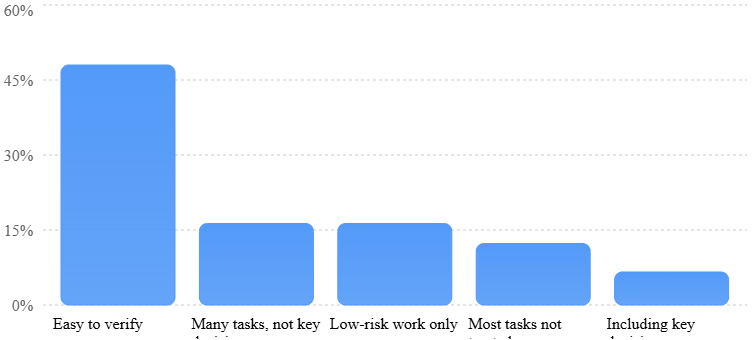
Source: Stack Overflow 2026 Developer Survey. The chart excludes the 0.5% who selected not sure or do not use AI tools. Percentages are rounded. Stack Overflow Developer Survey+1
Original Analysis: The Verification-Dependent Trust Share
SFTechScene combined the categories that explicitly place limits on AI trust.
Those categories are:
- Trust when the output is easy to verify: 48.0%.
- Trust for many tasks, but not important work decisions: 16.3%.
- Trust for low-risk work tasks only: 16.3%.
Together, these categories account for 80.6% of respondents.
This does not mean 80.6% distrust AI. It means they reported trust that depends on the type of task, its importance, or the ability to verify the result.
Only 6.6% said they trusted AI for many tasks, including important work decisions.
The distinction matters because most production SaaS applications involve decisions that cannot safely depend on unverified output.
What This Means for San Francisco Startups
The research suggests that founders should not measure AI coding success only by how much code an agent generates.
A more useful measurement is the amount of working, tested, maintainable software the team can deliver.
Consider two AI coding systems.
The first generates a feature in 20 minutes but requires four hours of debugging. The second takes 45 minutes and produces a feature that passes the team’s tests with little repair work.
The first system looks faster during a demonstration.
The second may be more productive for a real SaaS business.
Founders should measure total completion time, including review, testing, corrections, and deployment.
They should also track how frequently AI-generated changes cause problems after release.
These measurements help distinguish genuine productivity gains from work that has simply moved into later stages.
Research Limitations
This analysis uses reported survey results, not individual-level survey records or a controlled experiment. The 80.6% figure is a descriptive sum of three mutually exclusive answer categories.
It does not establish how much verification improves software security, nor does it prove anything specific about San Francisco developers. Its value is in showing the importance of conditional trust among the surveyed developer population.
How Vibe Coding Actually Changes SaaS Development
Traditional Development Begins With Engineering Decisions
In a traditional development process, a team usually starts by defining the product and selecting the technology needed to build it.
Developers design the database, choose how users will log in, plan the main application features, and decide how information will move between different systems.
They then write code, test features, fix mistakes, and prepare the application for deployment.
This process can be slow, especially when the product requires several connected features.
However, experienced developers make many important decisions while building the application.
They consider how information should be protected, how failures should be handled, and how future changes may affect the software.
Those decisions are not always visible in the finished interface.
Vibe Coding Starts With the Desired Result
Vibe coding approaches the process differently.
Instead of writing every component manually, a founder describes the desired application.
For example:
Build a subscription dashboard for marketing agencies. Each agency should have its own account, client records, monthly reports, and subscription plan. Agencies must not be able to access data belonging to other agencies.
An AI coding tool can interpret this request and begin generating the application.
The founder can then request new features, changes, or repairs through additional instructions.
This is useful because it makes development more conversational.
However, the AI may make technical choices that the founder does not fully understand.
It might use a database structure that becomes difficult to maintain, create overly broad access permissions, or fail to handle unusual customer behavior.
A feature that appears correct in the interface may contain problems that only become visible during testing.
The Most Important Change Is Where Human Work Happens
Traditional development places much of the effort in writing code.
AI-assisted development can move more of that effort into describing requirements, reviewing output, running tests, and managing the finished system.
This creates a new responsibility for founders.
They need to become better at explaining what software should do and recognizing whether it actually works.
For technical founders, this may be a manageable change.
For nontechnical founders, it creates a difficult question: who will verify the software when the AI produces something they cannot evaluate?
That is one reason human engineering knowledge remains valuable even when AI generates most of the initial code.
The AI Coding Tools San Francisco Founders Can Use in 2026
Different AI development platforms solve different problems. Choosing the right tool depends on the founder’s technical ability and the complexity of the application.
| Tool | Main advantage | Best suited for | Important consideration |
|---|---|---|---|
| Lovable | Fast application creation through prompts | Early prototypes and focused web apps | Review security, integrations, and code ownership |
| Replit | Development and deployment in one environment | Founders who want an integrated workflow | Check usage costs and deployment settings |
| Cursor | AI assistance inside a code editor | Technical founders and engineering teams | Requires understanding of the codebase |
| Claude Code | Working across files and development tasks | Developers managing larger projects | Generated changes still require review |
| OpenAI Codex | Delegating coding and related engineering work | Teams using agent-based development | Testing and permissions remain essential |
These tools should not be ranked by how quickly they can generate a landing page.
A better evaluation looks at how well each platform supports the complete life of a SaaS application.
Founders should examine code access, database controls, deployment options, debugging, automated testing, monitoring, and the ability to move their product elsewhere.
Why Code Ownership Matters
A SaaS company needs the ability to maintain its software over time.
If a founder cannot access the application’s underlying code, exporting or moving the product may become difficult.
That can create problems when the business grows beyond the original platform’s limits.
Before selecting a tool, founders should answer several questions.
Can the application code be stored in a repository controlled by the company? Can developers modify the software outside the original tool? Can the database be exported?
They should also check whether the platform supports backups, version history, and reliable deployment methods.
A tool that is excellent for prototyping may still be a poor choice for a long-term business if it creates unnecessary dependence on one provider.
Why Managed Services Can Be More Important Than the AI Model
Many founders focus on choosing the most powerful coding model.
However, the surrounding services can be equally important.
A managed database can reduce the effort required to operate storage systems. A trusted payment provider can simplify payment collection, while a managed login service can reduce the amount of custom authentication code.
For example, a founder might use an AI coding tool to build the interface, Supabase for database services, and Stripe for payments.
This does not automatically make the application secure.
The startup still needs to configure permissions correctly, protect secrets, and verify how the services interact.
Nevertheless, using established services can reduce the amount of critical infrastructure the team must build and maintain itself.
Original SFTechScene Research #2: How Much Engineering Time Can Vibe Coding Actually Save?
Research Question
How much faster must AI-assisted development become before it meaningfully reduces the cost of launching production-ready SaaS in San Francisco?
To explore this, SFTechScene constructed a scenario model using publicly reported local wage data and explicit assumptions about development work.

This is an original cost and sensitivity analysis, not an observational study of completed startups.
The purpose is to show how changes in coding speed, testing effort, and repair work affect the total economics of a software project.
Methodology: The Baseline Product
We modeled a small business SaaS application with the following features:
A customer login system, subscription billing, a dashboard, a database containing customer records, basic reports, account permissions, and an administrative interface.
The model assumes the same product requirements and quality standard across all development approaches.
It excludes customer acquisition, product design research, legal expenses, and ongoing support after the initial release.
The traditional development scenario assumes:
| Development stage | Assumed hours |
|---|---|
| Feature development | 300 |
| Testing and verification | 90 |
| Deployment and release preparation | 50 |
| Total | 440 |
These hours are illustrative planning assumptions. They are not measured industry averages.
We then modeled three AI-assisted scenarios.
The first assumes AI substantially reduces feature development time and moderately increases testing work.
The second assumes that AI saves coding time but creates more verification and deployment work.
The third represents a project where poorly understood generated code causes substantial repairs.
The San Francisco Cost Assumption
For the hourly cost baseline, we used the Bureau of Labor Statistics’ reported average of $80.51 per hour for computer and mathematical occupations in the San Francisco metropolitan area.
We applied a 30% modeling allowance for employer costs beyond wages.
That produces an estimated cost of:
\[ \$80.51 \times 1.30 = \$104.66 \]
The resulting figure is a planning proxy, not a verified average fully loaded software engineer rate.
Actual startup costs can differ substantially because of seniority, benefits, equity compensation, contractor rates, and utilization.
Original Results: Development Time Under Four Scenarios
Total effort to build and prepare a SaaS for launch
SFTechScene scenario model. Includes feature building, verification, and release preparation.
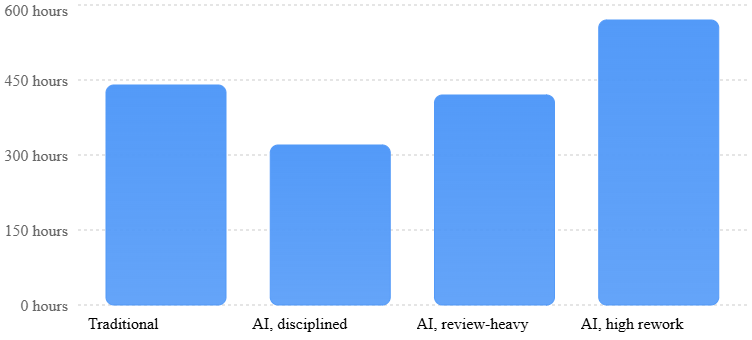
Source: SFTechScene original scenario analysis. All hours are explicit hypothetical assumptions, not observed results from actual companies.
| Scenario | Build hours | Verification hours | Release hours | Total hours | Modeled cost |
|---|---|---|---|---|---|
| Traditional | 300 | 90 | 50 | 440 | $46,052 |
| AI, disciplined | 120 | 135 | 65 | 320 | $33,492 |
| AI, review-heavy | 120 | 200 | 100 | 420 | $43,958 |
| AI, high rework | 120 | 300 | 150 | 570 | $59,658 |
Costs are rounded to the nearest dollar using $104.663 per hour. The scenarios assume all engineering time has the same hourly cost.
Finding #1: Faster Coding Does Not Mean Equally Large Total Savings
In the disciplined AI scenario, feature development falls from 300 hours to 120 hours.
That represents a 60% reduction in coding time.
However, total project effort falls from 440 hours to 320 hours.
The overall improvement is only 27.3%.
This is still a meaningful gain.
At the modeled hourly rate, the startup saves approximately $12,560 in development labor.
But the result shows why founders should avoid confusing coding speed with total delivery speed.
The remaining work includes testing, deployment, review, and other responsibilities that may not become easier simply because code was generated faster.
Finding #2: Verification Can Consume Most of the Initial Savings
The review-heavy scenario produces the same initial coding improvement.
Feature development still requires only 120 hours.
However, verification rises to 200 hours and release preparation to 100 hours.
The total becomes 420 hours, just 20 hours below the traditional baseline.
That translates into a reduction of approximately 4.5%.
The founder still benefits from faster code generation, but the overall financial advantage becomes small.
This could happen when a product has complicated account permissions, several external integrations, or generated code that is difficult to understand.
Finding #3: Poorly Managed AI Development Can Cost More
In the high-rework scenario, the team spends 300 hours testing and correcting the software, plus 150 hours preparing it for release.
The total reaches 570 hours.
That is approximately 29.5% more effort than the traditional baseline.
The modeled labor cost increases to nearly $59,700.
This does not prove that vibe coding normally costs more than traditional development.
It demonstrates the conditions under which an apparently faster development approach can become more expensive.
The risk is particularly important for nontechnical founders who may not recognize structural problems until the application becomes more complex.
The Break-Even Point for AI Verification
We can take the analysis further.
If AI reduces initial feature development to 120 hours and deployment preparation requires 65 hours, how much time can the team spend on verification before the AI approach loses its advantage?
The traditional baseline is 440 hours.
Therefore:
\[ 440 – 120 – 65 = 255 \]
The AI project can spend up to 255 hours on verification and still match the traditional project’s total effort.
Below that point, it saves labor time.
Above that point, the initial coding advantage is fully consumed.
For founders, this provides a practical method.
Estimate the hours AI saves during feature development, then compare those savings with the extra time spent reviewing and repairing its output.
What Independent Productivity Research Adds
This scenario analysis should also be viewed alongside independent experimental evidence.
A 2025 randomized study by METR involved 16 experienced open-source developers completing 246 tasks in familiar repositories. In that setting, developers using early-2025 AI tools took 19% longer on average than developers working without them. Metr+1
METR’s February 2026 update suggested that newer tools might produce better outcomes. Among returning developers in its later study, the estimated speedup was 18%, but the uncertainty interval included the possibility of a slowdown. The researchers also warned about selection effects and measurement problems. METR
These studies do not directly measure building a new SaaS product from scratch.
They demonstrate why AI productivity cannot be reduced to one universal percentage.
The effect depends on the task, the developer, the codebase, and the amount of verification required.
Practical Takeaway
San Francisco startups should measure AI productivity across the complete development process.
A useful internal metric is:
\[ \text{Delivery efficiency} = \frac{\text{Accepted, tested features}}{\text{Total engineering hours}} \]
A feature should count as accepted only when it meets defined requirements and passes the relevant tests.
This prevents teams from rewarding fast code generation that creates expensive problems later.
The Biggest Security Risks in AI-Built SaaS Applications
Risk #1: Customers Accessing Each Other’s Data
One of the most serious SaaS security failures occurs when users can access information that belongs to other customers.
Imagine a project management platform serving 100 companies.
Each company should be able to view only its own projects, files, and employee records.
A poorly protected application might allow a user to change a record identifier in a request and retrieve another company’s information.
The interface may appear secure because users only see their own projects.
However, the server may fail to enforce that restriction.
This is an access-control problem.
The OWASP Top 10:2025 places broken access control first among its major web application security risks. OWASP Top 10:2025+1
How Founders Can Reduce This Risk
Every customer-owned record should be associated with the correct organization or account.
The server should check whether the current user has permission to read or modify the requested record.
For applications using PostgreSQL through Supabase, row-level security can provide an important additional layer when configured correctly.
However, turning on a security feature is not enough.
Founders should test it using at least two separate customer accounts.
Create data under Account A, sign in as Account B, and attempt to access Account A’s records through the normal interface and direct API requests.
The expected result is that unauthorized access is denied.
These tests should be automated so future code changes do not accidentally weaken the protection.
Risk #2: Weak Authentication and Session Handling
Authentication determines who a user is.
Session handling determines whether that user remains authorized while using the application.
AI-generated applications may implement these features in ways that appear to work during normal testing but fail under unusual conditions.
For example, a deleted account might retain an active session.
A password reset link might remain usable for too long.
A logout button might hide the dashboard without properly invalidating access.
Founders should avoid creating their own password storage and session systems unless they have a strong reason and the necessary expertise.
Managed authentication can simplify the process, but its configuration and integration still need review.
Risk #3: Exposed API Keys and Secrets
Modern SaaS applications connect to many outside services.
These may include payment systems, email providers, AI models, databases, and analytics platforms.
Access to these services often depends on secret keys.
A common mistake is placing a private key directly inside browser code or committing it to a public repository.
The application may work perfectly during development while exposing the key to anyone who examines its files or requests.
Founders should keep sensitive credentials on the server and use appropriate secret-management tools.
They should also limit each credential to the permissions it actually needs.
If a key is accidentally exposed, removing it from the visible code is not sufficient. The company should revoke or rotate it.
Risk #4: Unsafe Database Changes
An AI coding agent may suggest changing the database when adding a feature.
Sometimes that change is harmless.
Other times, it can delete information, remove a required field, or break an existing customer workflow.
The danger increases as the database becomes more important to the business.
Founders should require reviewed database changes, backups, and a tested recovery process.
Production data should not be treated as a testing environment.
For important changes, the team should first test the update against a separate database containing representative data.
Risk #5: Vulnerable Third-Party Libraries
AI coding tools frequently rely on existing software packages.
This is normal. Modern applications depend on open-source libraries and commercial services.
However, software dependencies can contain security flaws.
Founders need a process for checking new packages, monitoring known vulnerabilities, and updating outdated components.
The OWASP Top 10:2025 explicitly includes software supply chain failures as one of its major risk categories. OWASP Top 10:2025
A founder does not need to understand every line inside a trusted open-source library.
But the team should know what dependencies the application uses and have a plan for responding when a serious problem is discovered.
Original SFTechScene Research #3: AI Code Security Is Improving, but the Production Safety Gap Remains
Research Question
How much has AI-generated code security improved, and what does that improvement mean for founders building SaaS applications?
For this analysis, SFTechScene compared Veracode’s published 2025 results with its Summer and Fall 2026 research updates.
Veracode evaluated AI-generated code across selected programming languages and tasks designed to expose known classes of security weaknesses.
Published Results
Security pass rates in Veracode’s AI coding tests
Published aggregate results across successive research snapshots; test populations and models may differ.
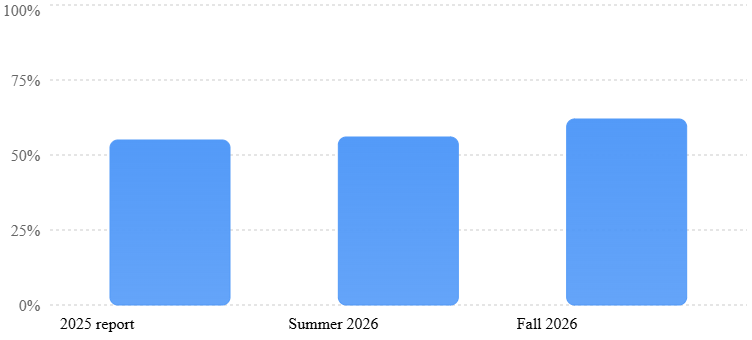
Source: Veracode’s 2025 report, 2026 report, and Fall 2026 update. These figures describe benchmark results, not the percentage of complete SaaS applications that are secure. view.ceros.com+2
The comparison shows an important improvement.
The reported average pass rate increased from approximately 55% in 2025 to 62% in Fall 2026.
That is a gain of seven percentage points, equivalent to a relative increase of about 12.7% in the pass rate.
But it is also important to examine what remains.
In the Fall 2026 tests, approximately 38% of tasks still produced code with a detectable security weakness.
Original Finding: The Gap Is Smaller, Not Closed
A developer who generates code with AI should assume that successful execution does not prove security.
The benchmark findings support that distinction.
AI systems may write code that runs, creates the expected output, and passes basic functional checks while still making unsafe decisions.
For SaaS businesses, this matters because security failures often affect the systems that are least visible during a product demonstration.
A dashboard might display the correct information while the underlying API has weak access controls.
A file upload feature might work while allowing unsafe file types.
A billing feature might display the correct subscription status while failing to verify the source of a payment event.
These problems require deliberate testing.
Why the Benchmark Cannot Predict Your Application’s Risk
The Veracode results should not be multiplied across the number of files or features in a SaaS application.
Individual security weaknesses are not independent events, and the test cases were selected to examine particular vulnerability classes.
The studies also do not directly measure complete coding agents operating within modern frameworks that may include security protections.
Furthermore, results from different research snapshots may reflect changes in the models tested, not just improvement in the same models.
The most defensible conclusion is narrower.
AI code generation has improved on the tested security tasks, but automatic code generation alone is not strong evidence that an application is safe.
A Practical Security Test Matrix for SaaS Founders
| Security area | Test to perform | Expected result |
|---|---|---|
| Account separation | User A requests User B’s records | Access denied |
| Authentication | Attempt access without logging in | Protected request denied |
| Authorization | Basic user calls an administrator action | Action denied |
| File upload | Submit an unsupported or unsafe file | File rejected safely |
| Secrets | Examine browser code and repository history | No exposed private keys |
| Billing | Send a duplicate payment event | No duplicate entitlement change |
| Rate limits | Send excessive requests | Requests controlled |
| Database backup | Restore representative data | Data can be recovered |
| Dependencies | Scan installed packages | Known serious issues reviewed |
| Logging | Trigger a controlled application failure | Useful event recorded without sensitive data |
This table is a starting point, not a complete security certification.
Products handling sensitive personal information, financial activity, or regulated data may require a broader threat assessment and specialist review.
How to Build a Production-Ready SaaS With Vibe Coding
Step 1: Choose a Product With Manageable Technical Risk
The first decision should be about the business, not the coding tool.
Some SaaS products are much easier to build safely than others.
A simple appointment scheduling platform has different requirements from a banking application or a medical records system.
Founders should begin by examining the consequences of a technical failure.
If an error causes a temporary inconvenience, the risk may be manageable.
If an error could expose sensitive information, cause financial harm, or disrupt essential services, the startup needs stronger engineering controls.
For a first AI-assisted SaaS business, a focused workflow product is often a sensible choice.
Examples include internal reporting tools, client approval systems, simple project dashboards, and business document management.
These applications still require security, but their initial scope can often be controlled.
Step 2: Define the Minimum Product Before Generating Code
One of the biggest mistakes founders make is asking AI to build too much at once.
A prompt such as “create a complete project management SaaS with every feature” gives the coding agent too many decisions to make.
The result may contain unnecessary features and inconsistent systems.
A better approach is to define one main customer problem.
For example, a marketing agency might need a simple way to collect client approvals.
The initial product could allow agencies to create accounts, upload campaign materials, invite clients, and record approval decisions.
It does not immediately need advanced analytics, team messaging, automated invoicing, and dozens of integrations.
This smaller scope reduces the number of systems that must be tested.
It also makes it easier to identify whether customers find the product valuable.
Step 3: Create a Product Requirements Document
Before writing the first prompt, founders should create a short document describing the product.
This document should explain who will use the software, which tasks they need to complete, and what should happen when something goes wrong.
For a client approval platform, the document might define three roles.
An agency administrator can create projects and invite users.
An agency employee can upload materials and request approval.
A client can view only the projects shared with them and record an approval decision.
The document should also state that clients cannot access other agencies’ information.
This gives the AI tool clearer instructions.
More importantly, it provides a reference that humans can use to verify the generated application.
Step 4: Design the Data Structure Before Building Every Screen
A SaaS application needs a clear way to organize information.
For a business product, this often means separating individual users from the organizations they belong to.
A simple data model might include organizations, users, organization memberships, projects, files, and approval records.
Each customer-owned record should have an appropriate relationship to its organization.
Permissions must then be enforced by the application and database, not only by hiding buttons in the interface.
Founders should ask the AI tool to explain the proposed database structure before generating the full application.
If the explanation is confusing, the team should resolve that confusion before adding more features.
Poor data design becomes harder to correct once customers begin using the product.
Step 5: Build Features in Small, Testable Units
Instead of asking AI to build the entire application at once, divide development into small tasks.
Start with user registration and login.
Test those features before moving to the organization system.
Then create a project record, test ownership rules, and add the client approval workflow.
This approach makes problems easier to identify.
If the application breaks immediately after adding a feature, the team has a smaller set of changes to examine.
It also encourages the founder to create tests as the product develops.
A working feature should not be considered complete until its expected behavior and important failure cases have been checked.
Step 6: Use Separate Development, Testing, and Production Environments
A production SaaS application should not be the place where developers experiment with untested changes.
Founders should maintain a development environment for building new features and a separate environment for testing them.
The production environment is where paying customers use the service.
These environments should not casually share sensitive customer data or unrestricted credentials.
An AI coding agent should have only the access required for its assigned work.
It should not be given direct control over a live database when the same task can be completed using a safe test environment.
This reduces the chance that a mistaken instruction or generated command damages customer information.
Step 7: Create Automated Tests Before Launch
Automated tests help confirm that important features continue working as the application changes.
For a SaaS product, founders should focus first on customer-critical workflows.
Can a new customer create an account? Can that customer complete payment? Does the application correctly activate the subscription?
Can users access only the records they are authorized to view?
What happens if payment fails or an outside service becomes temporarily unavailable?
A strong test suite covers successful actions and expected failures.
AI tools can help write these tests, but the team must verify that the tests are checking the intended behavior.
A test that confirms the wrong result can create false confidence.
Step 8: Review the Security of Important Features
Not every part of the application requires the same depth of review.
A small visual change is usually less risky than changing login logic or customer permissions.
Founders should prioritize human review of authentication, authorization, payments, file access, database changes, and external integrations.
Automated security scans can help identify known problems.
However, they do not replace thoughtful review of how the product handles customer information.
For example, a scanner may detect an outdated library while missing a business rule that lets one customer change another customer’s subscription.
A combination of automated checks and focused human testing is more useful than relying on either alone.
Step 9: Add Monitoring Before Customers Arrive
A production application needs a way to show when something is wrong.
Basic monitoring should track application errors, failed requests, slow responses, and important background jobs.
A founder should know when subscription activation fails or when users suddenly cannot log in.
Alerts should focus on events that require action.
A dashboard filled with hundreds of harmless warnings is not necessarily useful.
For early-stage SaaS, a small number of well-chosen alerts can provide more value than a complicated monitoring system nobody understands.
Step 10: Test Recovery, Not Just Normal Operation
Backups are valuable only when the company knows how to restore them.
A startup should periodically test whether it can recover important records after a simulated failure.
The team should also understand how to return the application to a previous working version.
For example, imagine an AI-generated update introduces a serious billing problem.
Can the company quickly stop the change? Can it identify which customers were affected? Can it restore the previous behavior without losing valid customer transactions?
These questions belong in the launch process, not only in an emergency response plan.
Original SFTechScene Research #4: What Does It Really Cost to Operate a Vibe-Coded SaaS?
Research Question
Can a founder build a financially attractive SaaS business using low-cost AI tools and managed cloud infrastructure?
To explore this, SFTechScene created a transparent monthly operating model using publicly available pricing from software infrastructure providers.
The analysis separates published prices from additional budget assumptions.
It does not claim that the modeled figures represent actual expenses reported by San Francisco startups.
Published Infrastructure Price Inputs
| Service | Example published starting price | Role |
|---|---|---|
| Vercel Pro | $20/month | Web hosting |
| Supabase Pro | $25/month | Database and related services |
| Replit Core | $20/month, annual billing | AI-assisted development |
| Stripe Payments | 2.9% + $0.30 per domestic card transaction | Payment processing |
Published plan information: Vercel+3 These are illustrative choices, not a required architecture. Usage charges, billing fees, taxes, and other services can increase actual costs.
The first lesson is that the basic monthly price of the development and hosting tools can be relatively small.
That does not mean the total operating cost of a SaaS business is equally small.
A company also needs monitoring, email delivery, customer support, security work, and continuing maintenance.
Our Operating Cost Model
We modeled a small SaaS application charging $29 per customer per month.
The application uses a simple subscription model with one successful domestic card charge per customer each month.
For the fixed monthly budget, we used the following assumptions.
| Cost category | Monthly assumption | Basis |
|---|---|---|
| Web hosting | $20 | Published Vercel Pro starting price |
| Database | $25 | Published Supabase Pro starting price |
| AI development subscription | $20 | Published Replit Core annual-billing rate |
| Monitoring and error tracking | $80 | SFTechScene planning allowance |
| Transactional email | $50 | SFTechScene planning allowance |
| Other software and operating tools | $100 | SFTechScene planning allowance |
| Total fixed monthly budget | $295 | Mixed published prices and assumptions |
This budget intentionally excludes engineering labor, founder compensation, customer support labor, marketing, legal work, and income taxes.
It also excludes any usage-based infrastructure overages, extra AI credits, additional billing-product fees, and refunds or chargebacks.
Therefore, the model describes an illustrative contribution after selected software expenses, not company profit.
What Happens as the Customer Base Grows?
At $29 per month, Stripe’s listed domestic card payment fee produces a modeled processing charge of $1.141 per successful monthly payment.
The formula is:
\[ \$29 \times 2.9\% + \$0.30 = \$1.141 \]
We then calculate the amount remaining after payment processing and the fixed $295 monthly software budget.
Illustrative monthly contribution as SaaS customers grow
At $29 per customer. After modeled card fees and $295 fixed software expenses; before labor and other business costs.
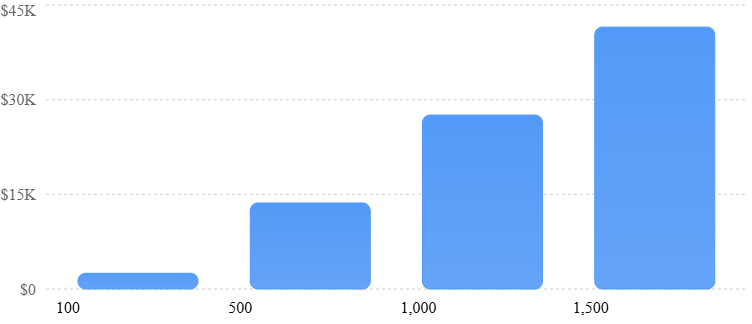
Source: SFTechScene original financial model. Assumes every subscriber pays successfully once per month, with no refunds, churn, taxes, or additional variable expenses.
| Paying customers | Monthly revenue | Card processing | Fixed software budget | Amount remaining |
|---|---|---|---|---|
| 100 | $2,900 | $114 | $295 | $2,491 |
| 500 | $14,500 | $571 | $295 | $13,635 |
| 1,000 | $29,000 | $1,141 | $295 | $27,564 |
| 1,500 | $43,500 | $1,712 | $295 | $41,494 |
Finding #1: Low Software Subscription Costs Can Create an Attractive Starting Point
At 100 paying customers, the model generates $2,900 in monthly revenue.
After the selected card processing and software expenses, approximately $2,491 remains.
That is enough to show why small SaaS businesses can be financially interesting.
However, it is not enough to prove that the business is profitable.
The founder still needs to account for the time spent maintaining the product, answering support requests, finding customers, and improving the software.
A business that generates $2,491 before these expenses may still operate at a loss.
Finding #2: Engineering Labor Can Matter More Than Hosting Costs
Consider the model with 1,000 customers.
It leaves approximately $27,564 per month before labor and other omitted expenses.
Now suppose the startup requires 160 hours of engineering work in that month.
At the research model’s San Francisco hourly cost proxy of $104.66, that represents approximately $16,746 in labor expense.
The amount remaining falls to roughly $10,818 before the other omitted business costs.
If the startup also spends heavily on marketing or customer support, the financial picture changes further.
This reveals an important issue.
Cheap hosting does not automatically create a cheap software company.
The amount of human work needed to keep the application dependable can be one of its largest operating costs.
Finding #3: A SaaS Product Must Be Economically Sustainable After Launch
The most useful SaaS cost question is not simply how much it costs to build the first version.
Founders should ask how expenses change when customers increase.
Do infrastructure costs rise smoothly? Does each new customer require manual setup? Does the application create more support tickets as usage grows?
A good SaaS product should generate enough additional revenue to cover the added cost of serving customers while leaving room for maintenance and growth.
If every customer needs extensive manual attention, the business may have weak economics even if its software was inexpensive to build.
The Hidden Cost of AI Usage
Some AI-powered SaaS products include AI features inside the application itself.
For example, a marketing reporting tool might generate campaign summaries using an AI model.
That creates a second category of AI spending.
The founder pays for AI tools used during development and may also pay for AI requests made by customers.
Those production inference costs depend on the model, amount of text processed, frequency of requests, retries, and usage limits.
A customer paying $29 per month could become unprofitable if they generate unusually high AI processing costs.
Founders should therefore measure the cost of each customer-facing AI feature.
They can use reasonable request limits, caching, smaller models when appropriate, and usage-based pricing for expensive tasks.
The Break-Even Customer Calculator
Estimate how many paying customers cover your monthly costs
Interactive SFTechScene scenario model. Uses the same illustrative domestic card fee and assumes one payment per customer per month.Subscription price ($)Fixed software costs ($/mo)Monthly labor budget ($)Other variable cost ($/customer)
Contribution per customer
$25.86
Customers to cover these costs
205
Excludes taxes, refunds, unpaid invoices, churn, customer acquisition, and any expenses not entered. Positive operating contribution is not the same as net profit.
Research Limitations
The original financial analysis is deterministic: its results follow directly from published price inputs and stated assumptions.
It does not represent a random sample of SaaS companies or an estimate of the average startup’s actual profit margin.
Vendor prices can change, and published starting prices do not guarantee that a particular application will remain within included usage limits.
A founder should replace the example assumptions with real usage measurements before making hiring, pricing, or fundraising decisions.
Which SaaS Business Models Work Best With Vibe Coding?
Internal Workflow SaaS
Internal workflow tools can be strong candidates for AI-assisted development.
These applications help teams manage routine business activities, such as approvals, task assignments, document reviews, or reporting.
The main advantage is that the product can begin with a narrow set of features.
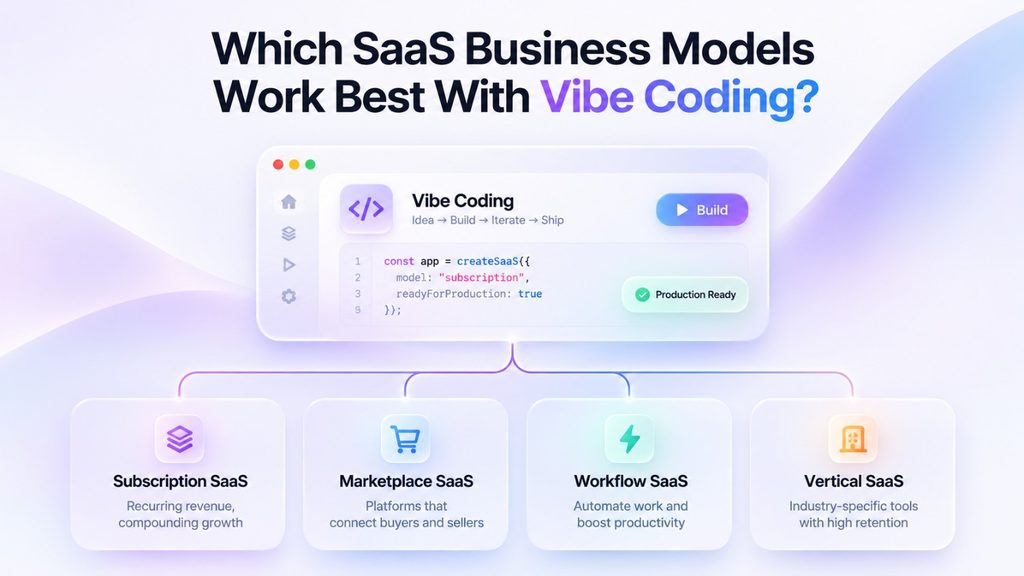
A founder might build a tool for tracking construction project approvals or collecting client feedback.
The application still requires proper account permissions, reliable data storage, and backups.
However, the scope may be easier to control than a broad enterprise software platform.
Niche Business SaaS
Another opportunity is software designed for a very specific industry.
Consider a reporting platform for independent property managers.
Instead of competing with large general-purpose business software companies, the founder could focus on a few tasks that property managers repeatedly struggle with.
The product might collect maintenance records, prepare monthly owner reports, and track simple operating metrics.
AI-assisted development can make it cheaper to test these focused ideas.
The business advantage comes from understanding the customer better than larger competitors, not merely from building the application quickly.
AI-Enhanced SaaS
Some startups use AI coding to build the application and then include AI inside the product.
Examples include software that summarizes documents, helps prepare sales responses, or organizes customer feedback.
These products can deliver useful results, especially when they reduce repetitive work.
However, founders need to evaluate two types of reliability.
The application itself must function correctly, and the AI-generated output must be accurate enough for its intended use.
A document summarizer that occasionally produces a misleading summary may create serious problems if customers depend on it for important decisions.
Founders should include user review, clear limitations, and appropriate checks for high-impact outputs.
SaaS Products That Need More Caution
Some categories require significantly stronger safeguards.
Financial technology, healthcare systems, identity verification platforms, and products handling highly sensitive records may face additional legal and technical requirements.
AI can still help developers working on these products.
However, the founder should not assume that a generated application is suitable for production simply because it passes a few basic tests.
Specialist security review, legal advice, privacy controls, and stronger operational processes may be necessary.
The correct level of review depends on the actual product, customers, data, and markets served.
The Biggest Mistakes Founders Make When Building SaaS With Vibe Coding
Mistake #1: Building Too Many Features Before Finding Customers
AI makes it easy to keep adding new features.
A founder can request dashboards, analytics, notifications, reports, and integrations with very little effort.
This creates the impression that a larger product is automatically better.
However, every feature adds something that must be tested, maintained, and explained to customers.
A small product that solves one painful problem may have a better chance of success than a complicated application with no clear purpose.
Founders should ask customers which tasks create the greatest frustration before adding new capabilities.
Mistake #2: Treating a Successful Demonstration as Proof of Reliability
A product demonstration usually follows a carefully chosen path.
The founder logs in, clicks a few buttons, and shows the expected result.
Real customers do not behave so predictably.
They upload unexpected files, lose internet connections, enter unusual information, and try workflows the developer never considered.
A production-ready application needs testing beyond its ideal customer journey.
Founders should test incorrect inputs, failed services, expired sessions, duplicate requests, and unauthorized access attempts.
Mistake #3: Allowing AI to Make Unreviewed Architecture Decisions
An AI coding agent may choose a database design, authentication method, or dependency based on the immediate request.
That choice may work for the current feature while creating problems for future development.
The risk becomes greater when several AI-generated features depend on inconsistent technical decisions.
Founders should document important architecture choices.
A short explanation of the database, account permissions, external services, and deployment process can make future changes much easier.
An experienced engineer should review high-impact decisions before the product becomes dependent on them.
Mistake #4: Giving Coding Agents Too Much Access
Some AI development tools can run commands, modify files, and interact with external services.
These capabilities can be useful, but they also create risks.
An agent with unrestricted access might delete important data, expose credentials, or make changes that are difficult to reverse.
Founders should apply the principle of least privilege.
Give the agent only the permissions required for the current task.
Require human approval for destructive database actions, production deployments, and changes involving sensitive customer information.
Mistake #5: Ignoring Maintenance Until Something Breaks
The launch of a SaaS application is the beginning of its operating life.
Libraries need updates. Cloud providers change their services. Customer requirements evolve.
A product that works today may require changes next month.
Founders should reserve time and money for maintenance from the beginning.
They should keep a record of technical problems, review important dependencies, and monitor recurring failures.
A company that spends all its resources on new features may eventually find that its existing product has become difficult to maintain.
A Practical 30-Day Plan for Building a More Reliable AI-Coded SaaS
A founder does not need to solve every future engineering problem before launching.
However, the first month should establish the basic practices needed to build a dependable product.
The following plan is designed for a focused, relatively low-risk SaaS application. More sensitive products may require significantly more time and specialist involvement.
Week 1: Validate the Problem and Design the Product
During the first week, the founder should focus on understanding the customer problem.
Interview potential users and identify the one workflow they most want to improve.
Create a short requirements document explaining the product, user roles, important records, and expected behavior.
Choose the main development platform and supporting services.
Before generating large amounts of code, decide how the company will store its source code and maintain control over its data.
The goal for the first week is a clear product scope and a workable technical plan.
Week 2: Build the Core Application
The second week focuses on creating the essential product.
Start with account creation, login, customer organization records, and the main workflow.
Use AI to generate features in small sections.
After each feature, test the expected behavior before moving forward.
Create separate development and testing environments.
Begin automated tests for important actions such as account creation, permission checks, and record updates.
Avoid adding attractive but unnecessary features.
The goal is a functional application with a narrow and understandable set of capabilities.
Week 3: Test Security, Billing, and Recovery
The third week should focus on work that is easy to overlook during rapid AI development.
Test whether users can access information belonging to other accounts.
Check the handling of authentication sessions, passwords, files, and private credentials.
Connect the payment system and verify successful payments, failed payments, cancellations, and duplicate payment notifications.
Create backups and test data restoration.
Add error tracking and basic performance monitoring.
Review the application’s dependencies and address serious security findings.
For important features, obtain review from an engineer with the required experience.
Week 4: Run a Controlled Customer Pilot
The fourth week is about testing the product with real users under controlled conditions.
Invite a small number of customers who understand that the application is in an early stage.
Observe how they use the product.
Record confusing workflows, technical failures, and repeated support questions.
Monitor important application events and investigate unexpected behavior.
Do not automatically add every requested feature.
Focus on problems that prevent customers from completing the product’s main task.
Before opening access more widely, review the remaining risks and confirm that the team can respond if something fails.
The 30-Day Launch Scorecard
Pre-launch readiness checklist
0/12 completed
Product scopeOne clear customer problem is definedMain user roles and permissions are documentedCore workflow works end to end
Security and dataCross-account access tests passPrivate keys are not exposedDatabase backups and restoration are tested
Payments and reliabilityPayment, cancellation and failure cases are testedCritical application errors are monitoredA rollback procedure is tested
OperationsSource code is version-controlledA technical owner is responsible for critical issuesPilot customer feedback has been reviewed
Reset checklist
This checklist is not a security certification.
Its purpose is to help founders avoid launching a customer-facing application without basic operating controls.
How San Francisco Startups Should Measure AI Coding Success After Launch
Measure Time to a Verified Feature
The first useful metric is the time needed to deliver a feature that works correctly.
Do not stop the measurement when AI finishes generating code.
Include review, tests, bug fixes, and deployment.
This gives founders a more accurate picture of engineering productivity.
Track Production Failures
A second metric is the number of problems that reach customers.
Founders should record serious failures, the number of customers affected, and how long recovery takes.
An increase in feature output is not necessarily positive if it causes more production incidents.
The team should investigate recurring problems and improve the processes that allowed them to occur.
Track Maintenance Hours
Maintenance work can reveal whether the product is becoming harder to manage.
If an AI-generated application requires increasing amounts of repair work, its original development savings may disappear.
Track the time spent on bug fixes, dependency updates, infrastructure changes, and operational support.
A useful measure is maintenance hours per 100 active customers.
That number should be evaluated alongside the complexity and usage of the product.
Measure Customer Outcomes
Ultimately, SaaS performance is a business question.
Founders should measure whether customers use the product, complete important workflows, and continue paying.
For example, a client reporting platform might track how many customers create their first report and how frequently they return.
A scheduling application might track completed bookings and the time saved compared with the customer’s previous process.
These measurements reveal whether the software provides meaningful value.
A technically impressive product that customers do not need is still an unsuccessful business.
What the Future of Production-Ready Vibe Coding Could Look Like
AI Coding Tools Will Likely Handle More of the Development Process
AI development platforms are moving beyond basic code suggestions.
Modern tools increasingly combine planning, code generation, testing, debugging, and deployment-related work.
This creates opportunities to automate larger parts of software development.
For example, a future coding workflow might begin with a product requirement and produce a proposed implementation, tests, and a summary of the changes.
The system could identify failed tests and suggest repairs before asking a developer to review the result.
However, greater automation does not eliminate responsibility for the finished software.
A startup still needs someone who can decide whether the application meets customer needs and whether the remaining risks are acceptable.
The Most Valuable Engineers May Spend Less Time Writing Routine Code
If AI handles more repetitive coding work, engineering responsibilities may shift toward system design, security, testing, and difficult problem-solving.
Developers may spend more time deciding how systems should behave and reviewing whether generated changes are safe.
This could be especially useful for smaller San Francisco startups.
A small team with strong technical judgment may be able to deliver more features without hiring a separate developer for every area of the product.
However, the benefit depends on the team maintaining enough knowledge to understand and repair its software.
Founders May Need Technical Judgment Even When They Do Not Write Code
Vibe coding creates new opportunities for nontechnical entrepreneurs.
A founder with industry knowledge can now build a working prototype without first learning every detail of a programming language.
That is a meaningful change.
But operating a SaaS business requires more than producing code.
Founders need to understand which failures matter, how customer information should be protected, and when specialist engineering help is necessary.
They do not need to become experts in every technical field.
They do need a dependable way to obtain expert review and make informed decisions.
Reliable AI-Built Software Could Become a Competitive Advantage
As it becomes easier to create applications, the ability to produce software may become less distinctive.
More founders will be able to build dashboards, reporting tools, and workflow applications.
That could increase competition in many SaaS markets.
However, customers still care about whether a product solves their problem reliably.
A startup that provides dependable performance, strong support, thoughtful design, and clear customer value may stand out from companies focused primarily on shipping more features.
For San Francisco founders, the opportunity is not simply to use AI to produce software faster.
It is to combine lower development costs with the judgment needed to operate a trustworthy business.
Final Takeaway: Vibe Coding Can Build Production-Ready SaaS, but Reliability Will Decide Which Startups Succeed
The most important lesson from the rise of vibe coding is that software creation and software operation are becoming increasingly different challenges.
AI can make it much easier to create the first version of an application.
A founder can move from an idea to a working product with fewer resources than many traditional development projects would require.
That advantage is real, even though the size of the savings varies by project.
The original SFTechScene cost analysis shows how important the difference can be.
In the disciplined AI development scenario, a 60% reduction in feature development hours produces a 27.3% reduction in total engineering effort.
But when testing and repair work increase, most of those savings can disappear.
The financial model tells a similar story.
Basic SaaS infrastructure can be relatively affordable, but engineering labor, customer support, security, and ongoing maintenance remain major business considerations.
External evidence reinforces these findings.
The 2026 Stack Overflow survey shows that many developers place conditions on how much they trust AI output. Veracode’s latest research shows improving code security, while also demonstrating that important weaknesses remain.
Together, these findings point toward a practical strategy for San Francisco startups.
Use AI to reduce repetitive development work. Keep the product focused. Build on trusted services where appropriate. Test important customer workflows and review the systems that protect customer information.
Most importantly, measure success by the reliability and business value of the finished product.
A startup does not win because its founder generated 50,000 lines of code in a weekend.
It wins because customers have a problem, the software solves it, and the company can continue delivering that solution safely and profitably.
Vibe coding may change who can build software. Production readiness will determine who can build a lasting software business.
SFTechScene Research Methodology and Sources
The original analysis in this article was prepared using publicly accessible research and pricing information available as of November 1, 2026.
The research includes three distinct methods: descriptive analysis of published survey percentages, comparison of published security benchmark results, and deterministic financial scenarios built from stated inputs.
It does not include proprietary startup operating data, newly conducted founder interviews, or independent testing of live AI-generated applications.
| Research section | Input evidence | Original contribution | Important limitation |
|---|---|---|---|
| #1: Developer trust | Stack Overflow 2025 and 2026 surveys | Calculation of the 80.6% conditional-trust grouping | Survey categories differ between years |
| #2: Engineering economics | BLS wages and published METR research | Four development scenarios, cost comparison, break-even hours | Hours and employer cost allowance are assumed |
| #3: Security | Veracode 2025–2026 results | Cross-period comparison and SaaS risk interpretation | Benchmark tasks are not whole applications |
| #4: Operating costs | Published vendor prices and Stripe fees | Revenue scenarios and customer break-even model | Excludes many real operating expenses |
Primary Research Sources
The principal external sources used for this article are:
- Stack Overflow Developer Survey 2026 — AI adoption, trust conditions, and development practices.
- Stack Overflow Developer Survey 2025 — prior-year AI adoption and accuracy concerns.
- METR Developer Productivity Update, February 2026 — experimental findings and uncertainty concerning AI-assisted productivity.
- Veracode Fall 2026 AI Code Security Research — updated AI-generated code security benchmark results.
- U.S. Bureau of Labor Statistics, San Francisco Metropolitan Wages — regional compensation baseline.
- OWASP Top 10:2025 — major web application security risks.
- Vercel Pricing, Supabase Pricing, Replit Pricing, and Stripe Pricing — public inputs for the software cost model.
All SFTechScene financial and engineering scenario outputs are derived from the assumptions shown in the article. They should be described as original modeled analysis, rather than as measured findings about actual San Francisco startups.
This distinction is important for editorial accuracy. The calculations are reproducible, but validating the predictions would require additional real-world project data, such as tracked engineering hours, production incidents, and actual cloud invoices.